
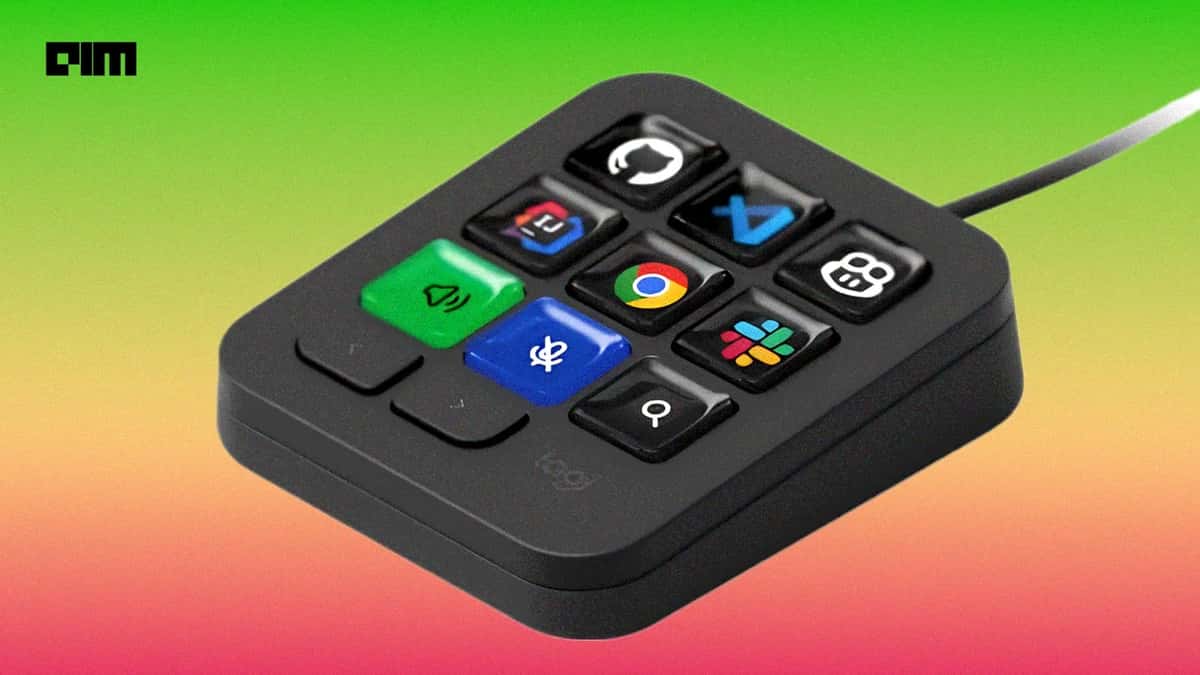

With AI integrated into software development, the role of developers has shifted from typing code to supervising and managing multiple agents. This requires specialised hardware to eliminate context-switching and accelerate developer workflows.
Logitech has launched the MX Keypad, a nine-button programmable keypad to give developers faster access to AI coding agents and applications and streamline workflows.
Priced at ₹15,999, the MX Keypad enters a market that already includes programmable control surfaces such as Elgato’s Stream Deck and OpenAI’s Codex Micro.
Stream Deck offers customisable keys and plugins that work across multiple AI tools, while Codex Micro is built around OpenAI’s Codex coding agent.
Valeriya Kostyukovskaya, Global Business and Marketing Manager for MX at Logitech, says the company saw a growing need for a dedicated hardware interface as AI becomes fundamental to software development.
“84% of developers use AI,” she tells AIM, citing data from the Stack Overflow Developer Survey.
Kostyukovskaya says developers are increasingly dealing with navigation, context switching, and waiting for AI agents to complete tasks. Logitech believes the MX Keypad can address some of that friction by moving controls from the screen to a physical device.
The keypad supports workflows across GitHub Copilot, Claude Code, VS Code, and IntelliJ IDEA.
Designed for AI-Powered Developer Workflow
The MX Keypad builds on Logitech’s MX Creative Console, which was launched two years ago for creative professionals. The company found that developers were also looking for equipment to streamline their workflows.
“With AI, with all the tools evolving, we’ve been trying to keep up with the evolving landscape of different tools, applications, and everything out there,” Kostyukovskaya says.
The MX Keypad’s programmable keys come with dynamic displays. These can show different controls depending on the application or workflow and can also reflect the status of an AI agent.
The device lets developers configure individual keys to perform actions across one or multiple applications and AI agents. These include running prompt macros, refactoring code, and launching commands, allowing developers to access coding tools without switching between applications.
“It can also show you the status of your agent and react to whatever is happening in the background,” she says.
This allows developers to start an agent, monitor its progress, and return to a running session without continuously watching the screen.
GitHub is among Logitech’s key partners for the MX Keypad, with the two companies working together from the beginning on integrations and use cases. Kostyukovskaya says that GitHub has helped with integration, use cases, and APIs, while continuing to update the plugin for the Copilot application.
The partnership also comes with a commercial offer. Every MX Keypad includes three months of GitHub Copilot Pro+ for both new and existing users, redeemable through Logitech’s Logi Options+ software.
Logitech’s SDK
A major part of the MX Keypad strategy is its software development kit (SDK). Logitech describes it as its first product that is SDK-led, with the company encouraging developers to build and share their own plugins.
Developers can experiment with the SDK, create plugins, and publish them on Logitech’s marketplace. The company also provides developer support through the MX community.
Kostyukovskaya says Logitech provides AI-friendly documentation that developers can use with AI agents to build plugins.
Plugins built using the SDK are not limited to the MX Keypad. They can be used across Logitech devices that support the company’s Actions Ring—a customisable, on-screen menu—while the SDK also supports haptic events.
Kostyukovskaya says this could eventually allow developers to create physical feedback for events such as an AI agent completing a task or encountering an error. “We can have a buzz when the agent has finished its work, or if there is an error, we can have a different pattern of a buzz.”
She expects such capabilities to arrive through future updates.
From AI Agents to Everyday Automation
The MX Keypad is not limited to AI coding tools. Logitech also sees it as a way to automate repetitive tasks across a developer’s broader workflow.
Users can assign macros to launch multiple applications, save frequently used text or code snippets, and automate repetitive tasks. Developers can use these shortcuts for coding tasks, email templates, pull-request descriptions, and other snippets.
Logitech also sees the keypad as an alternative to relying entirely on keyboard shortcuts.
The device offers native integrations with developer environments including VS Code and IntelliJ, allowing users to access functions without remembering complex shortcut combinations. The keypad can also trigger voice functions.
Beyond coding and AI, Logitech is positioning the MX Keypad as a broader productivity device. The company currently has more than 70 app plugins available on its marketplace, supporting applications including Zoom, Microsoft Office, Notion, and Figma.
The approach reflects Logitech’s broader strategy of starting with core integrations and letting developers add new capabilities. Logitech positions the keypad as a physical interface for the changing AI developer stack rather than another computer accessory.
- The AI Slowdown Narrative Doesn’t Reflect Enterprise Reality
- India’s Enterprises are Scaling AI. Is the Infrastructure Ready?
- Industry Wants Faster Approvals and Cheaper Power in India’s Data Centre Policy
- Inside Jio Platforms: Its Tech Bets, Loss-Making Subsidiaries and Hidden Risks
- India’s GCCs to Add 1.4 Million Jobs, Drive 170 Million Sq. Ft. Office Demand by 2031
- AI Can Be Cyborg or Centaur. But Can Enterprises Monetise It?