

5 min
Recently, a PhD researcher, Daniele Grattarola built a framework known as Spektral for mapping relational representation learning which is built in Python and is based on the Keras API. Spektral contains a comprehensive set of tools to build graph neural networks as well as implement some of the popular layers for graph Deep Learning.
 The core GNN modules of Spektral are mainly based on Keras and it works with all the different backends offered by Keras in order to promptly start experimenting with the Relational Representation Learning (RRL) which consists of developing models that are able to deal with graphs natively without having to deal with the distracting low-level details. The accessory modules of Spectral are built in Numpy/Scipy and for which everything should work at the speed of almost-C-like and without compatibility issues.
How It Works
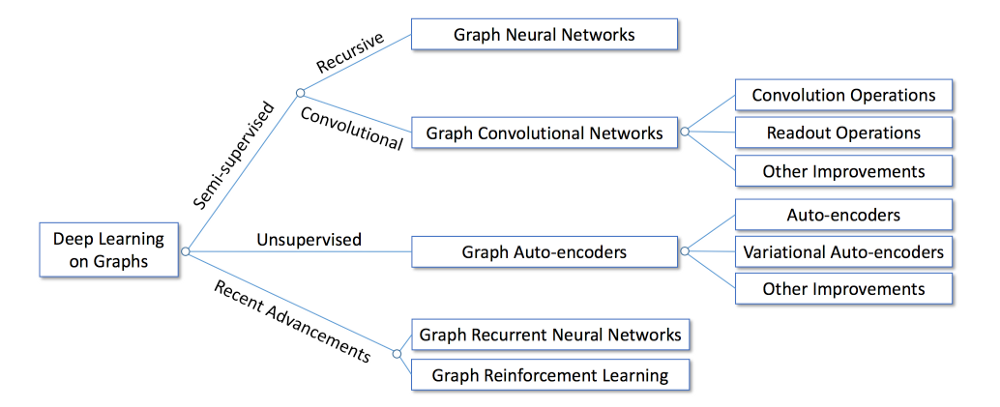
Spektral is built with semi-supervised deep learning methods for graph data, Graph Neural Network (GNN). According to this paper, the idea of GNN is simple: to encode structural information of the graph, each node v_i can be represented by a low-dimensional state vector s_i , 1 ≤ i ≤ N. The categorisation of deep learning methods on the graph is shown below
The core GNN modules of Spektral are mainly based on Keras and it works with all the different backends offered by Keras in order to promptly start experimenting with the Relational Representation Learning (RRL) which consists of developing models that are able to deal with graphs natively without having to deal with the distracting low-level details. The accessory modules of Spectral are built in Numpy/Scipy and for which everything should work at the speed of almost-C-like and without compatibility issues.
Data Representation
Spektral uses a matrix-based representation of manipulating graphs and feeding them to neural networks. This is one of the most commonly used approaches in the theory of GNN and it is also perfect to perform effective computations on GPU. In this framework, some layers and functions are implemented to work on a single graph and while the others are considered as a set of graphs. The framework also distinguishes between three main modes of operations mentioned below
- Single, where a single graph is considered with its topology and attributes
- Batch, where a collection of graphs are considered, each with its own topology and attributes
- Mixed, where a graph with a fixed topology is considered but a collection of different attributes. This can be considered as a particular case of the batch mode (i.e. the case where all adjacency matrices are the same) but is treated separately for computational reasons.
Installation
Spektral is developed by keeping Python in mind so Python versions 2 and 3 are recommended. Python 3 is heavily recommended and for those who are using Python 2 version are suggested to switch into Python 3 for a smooth workflow. There are some features of Spectral which require the following optional dependencies- RDKit, a library for cheminformatics and molecule manipulation (available through Anaconda);
- Dyfunconn, a library to build functional connectivity networks (available through PyPi);
- CDG, a library implementing several change detection algorithms, as well as an engine for Riemannian geometry (available on Github);
Bottom Line
However, this project comes with a little warning for the work which is still in progress and may change before the proper release. Also, if you are interested in contributing your ideas for further development, you can easily do it just by dropping an email.- AMD’s Server CPU Business Faces a New AI Boom
- How an Engineer Is Using AI to Bridge the Accessible Education Gap
- AI Agents are Making Human Customer Service a Specialist Job
- Why Nandan Nilekani-Backed F2A Believes India's Investment Opportunity Lies in Edge AI
- India Needs to Build the AI 'Brain' for Robotics, Not Just Import Hardware
- Why Enterprise AI Prototypes Break in Production