Key takeaways
- Microsoft open-sources Magentic-UI to automate web tasks with human oversight.
- Utilize a multi-agent system for deep website navigation and code execution.
- Collaborate with agents using a co-planning interface for efficient task management.
- Magentic-UI includes five specialized agents for varying web automation tasks.
- Enhance productivity by creating and approving step-by-step plans interactively.
Microsoft has open-sourced Magentic-UI, a research prototype that allows users to automate web-based tasks while retaining control through a transparent, interactive interface. The tool uses a multi-agent system capable of browsing websites, executing code, and analysing files.
The company said Magentic-UI is “especially useful for web tasks that require actions on the web, deep navigation through websites not indexed by search engines or tasks that need web navigation and code execution.”
Magentic-UI is powered by AutoGen’s Magentic-One system and includes five specialised agents, namely, Orchestrator, WebSurfer, Coder, FileSurfer, and UserProxy.
The Orchestrator acts as the lead agent and coordinates the workflow, while WebSurfer can interact with live websites and perform actions like clicking, typing, and uploading files. Coder and FileSurfer handle the execution of Python or shell commands and file conversion tasks, respectively. The UserProxy enables collaboration with the human operator.
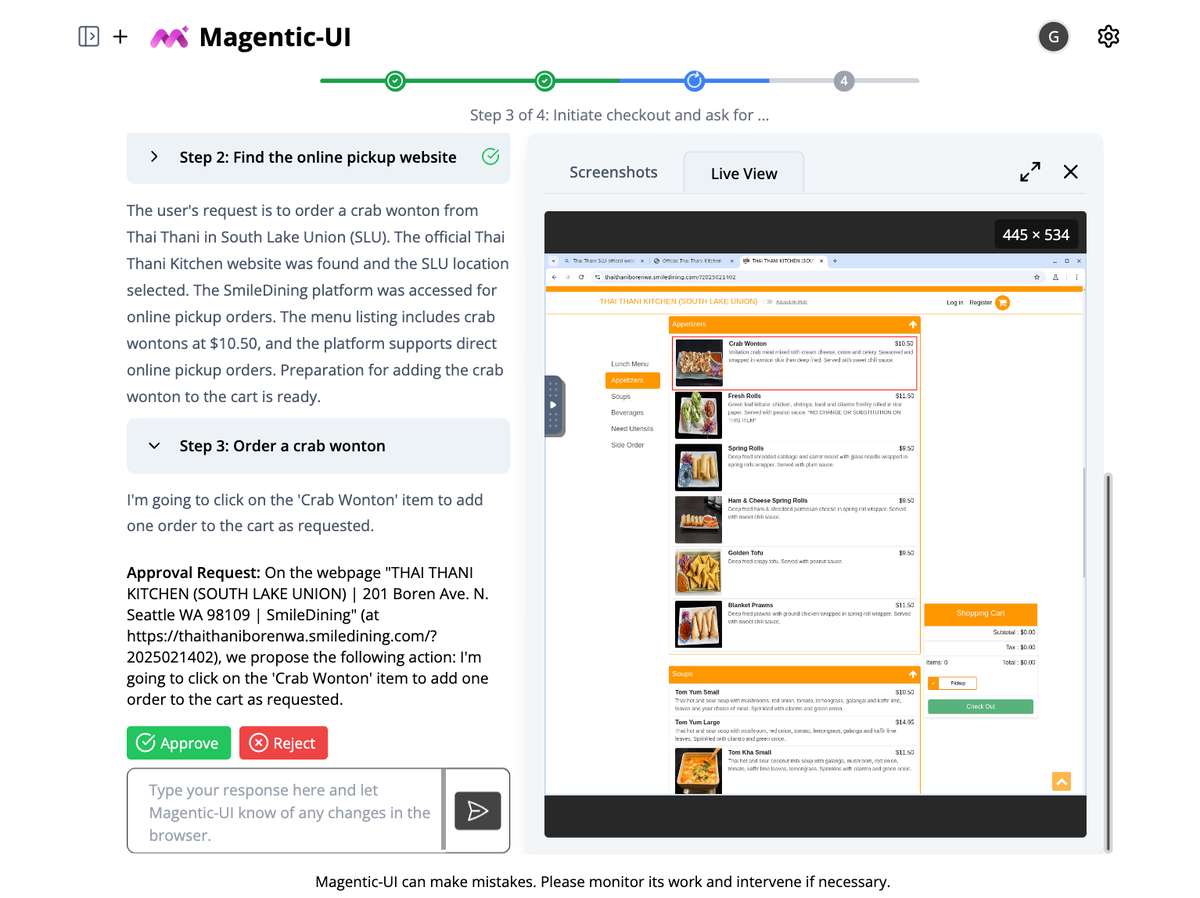
One of the system’s key features is its co-planning interface, where users and agents collaborate to define a step-by-step plan before execution. “Collaboratively create and approve step-by-step plans using chat and the plan editor,” the company said.
Users can also edit the plan, “add, delete, edit, regenerate steps, and write follow-up messages to iterate.”
Magentic-UI introduces additional controls, including “Action Guards,” where “sensitive actions are only executed with explicit user approvals,” and session indicators that signal when input is needed or a task is complete. The platform also supports “parallel task execution,” letting users run multiple workflows simultaneously.
Another significant feature is plan learning and retrieval. The system can learn from previous runs to improve future task automation and automatically or manually retrieve saved plans in future tasks.
Magentic-UI is built with Docker and can be installed on macOS, Linux, or Windows (with WSL2). Users can install it using pip and access the interface via a local port. Additional dependencies support integration with Azure and Ollama models.
The interface has dual panels with a session navigator and a session workspace. The session workspace displays both the task plan and a live browser view. The system updates progress in real time and lets users pause or intervene during task execution.
Microsoft describes Magentic-UI as “a platform to study human-agent interaction and experiment with web agents.” The system is intended not just for automation but also for research into how users interact with intelligent agents while maintaining oversight.