

URL shortening is the process of reducing the length of the URL. There are many messaging platforms where the length of the message is limited. Here, anyone can face the issue in sharing the long URLs. For example, twitter also limits the length of the tweets. To share long URLs in these platforms, either it is automatically shortened by the feature of the platform, or we need to write the shortened URL. To get a URL shortened, there are various services available on the internet that shorten URLs as a black-box approach.
In this article, we will discuss how to create a library in python to shorten a URL and then we will check this library to shorten multiple URLs in a text file. The shortened URLs will further be written in an output text file. It can work for thousands of URLs in a text file and convert them into their corresponding shortened form without any crash.
Creating the URL Shortening Library
Here, we are defining the library for URL shortening. Save the below code snippet in the ‘url_shortener.py’ file.
#Importing the required libraries
import contextlib
from __future__ import with_statement
try:
    from urllib.parse import urlencode
except ImportError:
    from urllib import urlencode
try:
    from urllib.request import urlopen
except ImportError:
    from urllib2 import urlopen
import sys


#Defining the function to shorten a URL
def make_shorten(url):
    request_url = ('http://tinyurl.com/api-create.php?' +
    urlencode({'url':url}))
    with contextlib.closing(urlopen(request_url)) as response:
        return response.read().decode('utf-8')


#The main function to receive user inputs
def main():
    for shortyurl in map(make_shorten, sys.argv[1:]):
        print(shortyurl)


if __name__ == '__main__':
    main()
The above library has a function make_shorten() that takes a URL as an argument and returns its corresponding encoded shortened form.
Shortening the URLs in a Text File
Let we have the following text file comprising multiple URLs. You can put as many URLs as you want to shorten. Just for the demo purpose, only a few URLs are kept here.
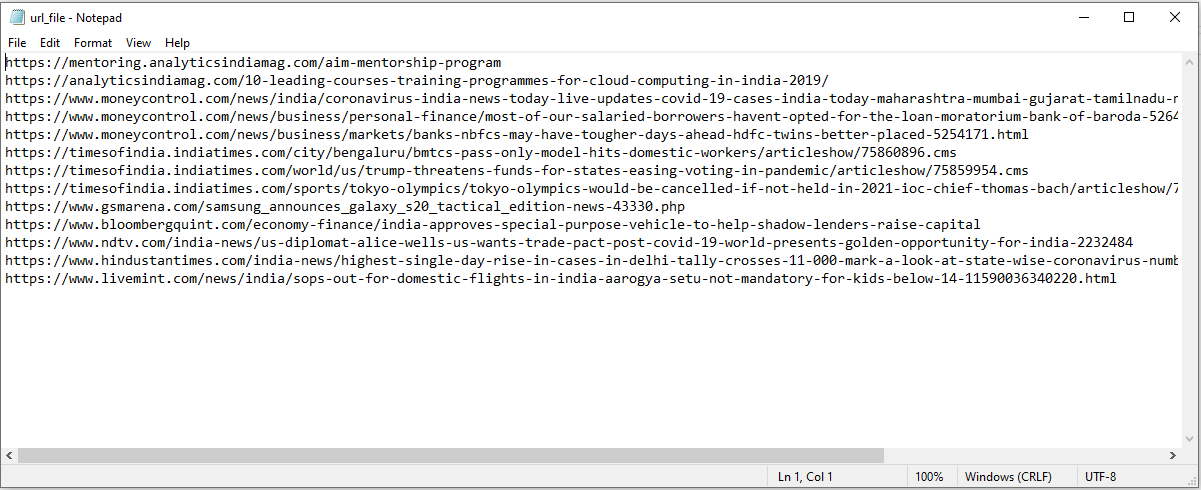
Here first, we will import the library that we have defined. Make sure that the ‘url_shortener.py’ file is available in the current working directory.
Here first, we will import the library that we have defined. Make sure that the ‘url_shortener.py’ file is available in the current working directory.#Importing the library that we defined import url_shortenerAfter successfully importing our defined library, we will first check the working of the library by shortening two sample URLs.
#Testing the program for the first URL urll = "https://www.moneycontrol.com/news/india/coronavirus-india-news-today-live-updates-covid-19-cases-india-today-maharashtra-mumbai-gujarat-tamilnadu-nirmala-sitharaman-press-conference-5269421.html" url_short = url_shortener.make_shorten(urll) print(url_short)#Testing the program for the second URL url2 = "https://analyticsindiamag.com/10-leading-courses-training-programmes-for-cloud-computing-in-india-2019/" url_short2 = url_shortener.make_shorten(url2) print(url_short2)

As we can see that our library is working correctly and ha converted long URLs into shortened URLs ‘http://tinyurl.com/yc9wcvam’ and ‘http://tinyurl.com/ybl3sdso’. Now, we will read the text file that is having many URLs.
#Opening the file that contains URLs
file = open('url_file.txt', 'r')

#Reading all the URLs line-by-line
lines = file.readlines()

#Opening the file in which we will write the shortened URLS
file2 = open(r"url_file_shortened.txt","w+")
Here, we will call the function of our defined library to convert a URL into its short form.
#Shortening each URL, printing n console and writing them in a text file
for url in lines:
    url_short = url_shortener.make_shorten(url.strip('\n'))
    print(url_short)
    file2.write(url_short)
    file2.write("\n")

#Closing bothe the files
file.close()
file2.close()
After executing the above code, the following text file comprising the corresponding shortened URLs is generated.

So, this is the way through which we can shorten URLs by using our own defined library. You can create this application for 1000s of URL and shorten them automatically and very quickly. You need not shorten every URL one-by-one.
- Meet Bython, the Python With Braces
- From Humanoid Robots to Telecom Trials, 12 Major Announcements at NVIDIA GTC Berlin 2026
- Anyone Can Make a Robot Move, Few Can Make It Stop
- After ISRO’s PSLV Failure, TakeMe2Space Looks to SpaceX for Reliable Launch
- Why AI Agents are the Next Frontier in Quantum Security
- Physical AI Squeezes Labour Market, And Low-Skilled Immigrant Jobs May Be First to Fall