
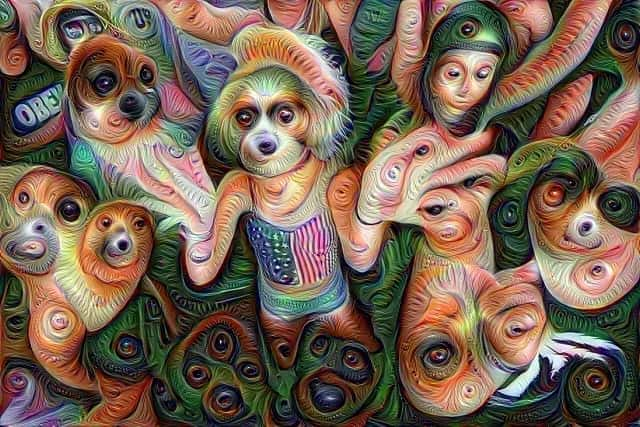
DeepDream is one of the interesting applications of deep learning in computer vision. It is actually a computer program that was developed by Google engineer Alexender Mordvintsev. This program uses a convolutional neural network to find and enhance image patterns using algorithmic pareidolia. It creates dream-like hallucinogenic visualizations in the processed images. This model has been applied in the field of art history. Also, it has been used by researchers to allow users to explore virtual reality environments to mimic the experience of psychoactive substances.
In this article, we will demonstrate the implementation of DeepDream program to dreamify images. The pre-trained deep convolutional neural network used in the program will learn the patterns of an image that will be visualized in the processed image. First, the input image will be passed to the InceptionNet after that the gradient of the image will be calculated with respect to the activations of a particular layer of the network. Finally, the image is modified to increase the activations, and the patterns seen by the network are enhanced. In this way, a dream-like image is created.
Implementation
First of all, it needs a TensorFlow backend.
import tensorflow as tfNow, import other required libraries.
import numpy as np
import matplotlib as mpl
import IPython.display as display
import PIL.Image
from tensorflow.keras.preprocessing import image
Specify the URL of the image to be processed.
url = 'https://wallpaperaccess.com/full/1267119.jpg'The below function will download the image and read it into a NumPy array.
# Download an image and read it into a NumPy array.
def get_image(url, max_dim=None):
  name = url.split('/')[-1]
  image_path = tf.keras.utils.get_file(name, origin=url)
  img = PIL.Image.open(image_path)
  if max_dim:
    img.thumbnail((max_dim, max_dim))
  return np.array(img)

# Normalize an image
def deprocess(img):
  img = 255*(img + 1.0)/2.0
  return tf.cast(img, tf.uint8)
Now, we will visualize the image.
# Display an image
def show_img(img):
  display.display(PIL.Image.fromarray(np.array(img)))

# Downsizing the image makes it easier to work with.
original_img = get_image(url, max_dim=500)
show_img(original_img)
In the next step, the InceptionV3 model will be loaded with pre-trained ImageNet weights.
base_model = tf.keras.applications.InceptionV3(include_top=False, weights='imagenet')To use the InceptionV3 as a feature extractor, its layers need to be added to our model that actually perform feature extraction. In InceptionV3, there are 11 such layers out of which two are used below.
# Maximize the activations of these layers
names = ['mixed3', 'mixed5']
layers = [base_model.get_layer(name).output for name in names]

# Create the feature extraction model
dream_model = tf.keras.Model(inputs=base_model.input, outputs=layers)
The below function will be used to calculate the loss of activations in the chosen layers.
def get_loss(img, model):
  # Pass forward the image through the model to retrieve the activations.
  # Converts the image into a batch of size 1.
  img_batch = tf.expand_dims(img, axis=0)
  layer_activations = model(img_batch)
  if len(layer_activations) == 1:
    layer_activations = [layer_activations]

  losses = []
  for act in layer_activations:
    loss = tf.math.reduce_mean(act)
    losses.append(loss)

  return  tf.reduce_sum(losses)
In the DeepDream, the loss is maximized (generally, it is minimized) using the gradient descent. Once the loss is obtained for the chosen layers, the gradient is calculated with respect to the images and added to the original image. Adding the gradients to the image enhances the patterns seen by the network.
In the next step, the DeepDream is defined via a class that will be instantiated to create the model.
class DeepDream(tf.Module):
  def __init__(self, model):
    self.model = model

  @tf.function(
      input_signature=(
        tf.TensorSpec(shape=[None,None,3], dtype=tf.float32),
        tf.TensorSpec(shape=[], dtype=tf.int32),
        tf.TensorSpec(shape=[], dtype=tf.float32),)
  )
  def __call__(self, img, steps, step_size):
      print("Tracing")
      loss = tf.constant(0.0)
      for n in tf.range(steps):
        with tf.GradientTape() as tape:
          # This needs gradients relative to `img`
          # `GradientTape` only watches `tf.Variable`s by default
          tape.watch(img)
          loss = get_loss(img, self.model)

        # Calculate the gradient of the loss with respect to the pixels of the input image.
        gradients = tape.gradient(loss, img)

        # Normalize the gradients.
        gradients /= tf.math.reduce_std(gradients) + 1e-8
In gradient ascent, the "loss" is maximized so that the input image increasingly "excites" the layers. You can update the image by directly adding the gradients (because they're the same shape!)
        img = img + gradients*step_size
        img = tf.clip_by_value(img, -1, 1)

      return loss, img
Now, the DeepDrem model is instantiated.
deepdream = DeepDream(dream_model)
The below function is used to run the DeepDream model.
def run_deep_dream(img, steps=100, step_size=0.01):
  # Convert from uint8 to the range expected by the model.
  img = tf.keras.applications.inception_v3.preprocess_input(img)
  img = tf.convert_to_tensor(img)
  step_size = tf.convert_to_tensor(step_size)
  steps_remaining = steps
  step = 0
  while steps_remaining:
    if steps_remaining>100:
      run_steps = tf.constant(100)
    else:
      run_steps = tf.constant(steps_remaining)
    steps_remaining -= run_steps
    step += run_steps

    loss, img = deepdream(img, run_steps, tf.constant(step_size))

     display.clear_output(wait=True)
    show(deprocess(img))
    print ("Step {}, loss {}".format(step, loss))

  result = deprocess(img)
  display.clear_output(wait=True)
  show(result)

  return result
Now, we will run the DeepDream model on the image.
dream_img = run_deep_dream(img=original_img, steps=100, step_size=0.01)
As the resulting image is not much good and having a low resolution and noise, it will be fine-tuned using the octave that means an approach to perform the previous gradient ascent approach, then increase the size of the image and repeat this process for multiple octaves.
OCTAVE_SCALE = 1.30

img = tf.constant(np.array(original_img))
base_shape = tf.shape(img)[:-1]
float_base_shape = tf.cast(base_shape, tf.float32)

for n in range(-2, 3):
  new_shape = tf.cast(float_base_shape*(OCTAVE_SCALE**n), tf.int32)
  img = tf.image.resize(img, new_shape).numpy()
  img = run_deep_dream_simple(img=img, steps=50, step_size=0.01)

display.clear_output(wait=True)
img = tf.image.resize(img, base_shape)
img = tf.image.convert_image_dtype(img/255.0, dtype=tf.uint8)
show(img)
As we can see above, the dream-like image has been generated by the DeepDream program. For more clarity in the patterns, you can take other pictures with much better quality, and by tuning the parameters like octave scales, activations, etc.
References:-- From Humanoid Robots to Telecom Trials, 12 Major Announcements at NVIDIA GTC Berlin 2026
- Anyone Can Make a Robot Move, Few Can Make It Stop
- After ISRO’s PSLV Failure, TakeMe2Space Looks to SpaceX for Reliable Launch
- Why AI Agents are the Next Frontier in Quantum Security
- Physical AI Squeezes Labour Market, And Low-Skilled Immigrant Jobs May Be First to Fall
- Rocket Math Isn’t Mathing: Why India’s Space Launches are Expensive