Key takeaways
- PyTorch and Keras are both influential tools in the deep learning landscape, each offering unique strengths.
- PyTorch supports a wider range of operating systems compared to Keras, which only functions on Linux and OSX.
- Debugging is generally more straightforward in PyTorch, making it a preferred choice for some developers.
- Keras has emerged as a popular tool alongside Python, especially among data science practitioners.
- Choosing between PyTorch and Keras often depends on specific project needs and user proficiency.
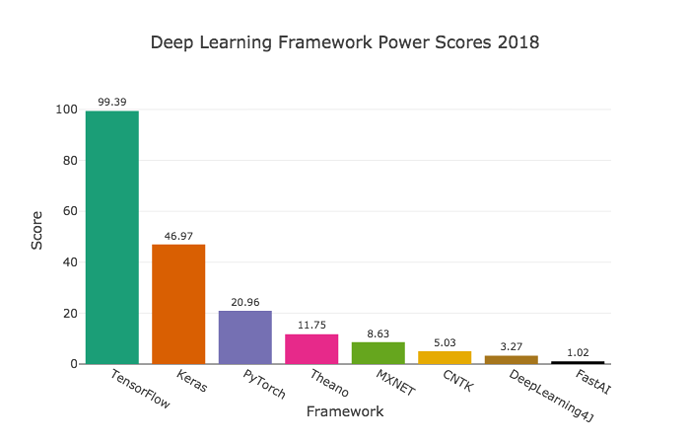
 PyTorch and Keras are both very powerful open-source tools in Deep Learning framework. Usually, beginners struggle to decide which framework to work with when it comes to starting a new project. According to a recent survey by KDnuggets, Keras and Python emerged as the two fastest growing tools in data science. Here is a step-by-step comparison of both the tools with respect to various aspects, to help to decide what framework to use for your next deep learning project.
1.Supporting system and language:
PyTorch, developed by Facebook, supports Windows, Linux and OSX operating systems. Meanwhile, Keras, developed by Google engineer Francois Chollet, works only on Linux and OSX. Although it does not make much of a difference, since most deep learning enthusiasts do not prefer Windows, but in case it matters to you, Keras would lose the competition here. Both tools support Python versions of 2.7, 3.5 and 3.6. Some users of PyTorch are Twitter, Salsesforce and the University of Oxford and that of Keras are Home61, Suggestic and Stylight.
PyTorch wins.
2.Debugging:
It is easier and faster to debug in PyTorch than in Keras. Keras has a lot of computational junk in its abstractions and so it becomes difficult to debug. PyTorch allows an easy access to the code and it is easier to focus on the execution of the script of each line. Debugging can be done using the standard way, by printing after any line of the code. In Keras, the possibility of the code going wrong is less than PyTorch, but it is not completely impossible. So once the code goes wrong in Keras, it is very difficult to note where the actual flaw was.
Despite model complexity, PyTorch allows for an easy and direct error identification. Moreover, PyTorch repo can also be used to check whether it is readable code. With static graph libraries like Theano and Tensorflow in Keras, it is very difficult to find the cause of the error, while in dynamic libraries like PyTorch with dynamic computational graph, it is easier to track which line is responsible for which error. You can even stop the interpreter in the debugger to see what layer produces the error. In cases where one cannot debug with the debugger, there is a high probability of there being either too much of abstraction or the code being of low value. PyTorch: Common debugging tools in PyTorch are pdb, ipdb or PyCharm.
PyTorch wins.
3.Portability:
It is very important to have control over your models in terms of RAM, CPU and file loading, while deploying them. PyTorch saves its models in Python-based Pickles, which is not portable. Exporting models of PyTorch is more difficult because of its Python code and for this issue the widely recommended solution is to convert the PyTorch model to Caffe2 using ONNX. Keras has a wider set of options for deployment of its models to mobile platforms, when operating on TensorFlow, like Flask, GitLab, Docker.
Keras wins.