 MachineHack one of the leading hackathon platforms dedicated to the Data Science community, is back again with an exciting hackathon for all data science enthusiasts. This new hackathon, in partnership with Imarticus Learning, challenges the data science community to predict the resale value of a car from various features. Predicting The Costs Of Used Cars Hackathon consists of data collected from various sources across India.
In this article, we will continue from where we stopped, to preprocess and build a simple regression model for the hackathon. So without further ado let's begin with a basic solution.
Data Preprocessing
By the end of the first part, we had already performed Exploratory Data Analysis and also cleaned the data to some extent making it ready for the next stage which is Data Preprocessing.
We now have a clean dataset that we believe consists of only the values or numbers that are required to train a model and make some predictions. However, that data is still not ready to be trained. The data still consists of empty cells or nans that needs to be filled and also we need to encode and scale the data. We will also split the training set to a training set and a validation set so that we can evaluate the model for prediction accuracy.
Encoding Categorical Variables
We will start by encoding the categorical features in the cleaned dataset.To encode we must know all the unique values or categories in each of the columns(‘Brand', 'Model', 'Location','Fuel_Type', 'Transmission', 'Owner_Type'). Follow the below steps.
Finding all unique categories
#'Brand', 'Model', 'Location','Fuel_Type', 'Transmission', 'Owner_Type'
all_brands = list(set(list(training_set.Brand) + list(test_set.Brand)))
all_models = list(set(list(training_set.Model) + list(test_set.Model)))
all_locations = list(set(list(training_set.Location) + list(test_set.Location)))
all_fuel_types = list(set(list(training_set.Fuel_Type) + list(test_set.Fuel_Type)))
all_transmissions = list(set(list(training_set.Transmission) + list(test_set.Transmission)))
all_owner_types = list(set(list(training_set.Owner_Type) + list(test_set.Owner_Type)))
Initializing label encoders and fitting the categories
#Initializing label encoders
from sklearn.preprocessing import LabelEncoder
le_brands = LabelEncoder()
le_models = LabelEncoder()
le_locations = LabelEncoder()
le_fuel_types = LabelEncoder()
le_transmissions = LabelEncoder()
le_owner_types = LabelEncoder()
#Fitting the categories
le_brands.fit(all_brands)
le_models.fit(all_models)
le_locations.fit(all_locations)
le_fuel_types.fit(all_fuel_types)
le_transmissions.fit(all_transmissions)
le_owner_types.fit(all_owner_types)
Transforming the data in training set and test_set
#Applying encoding to Training_set data
training_set['Brand'] = le_brands.transform(training_set['Brand'])
training_set['Model'] = le_models.transform(training_set['Model'])
training_set['Location'] = le_locations.transform(training_set['Location'])
training_set['Fuel_Type'] = le_fuel_types.transform(training_set['Fuel_Type'])
training_set['Transmission'] = le_transmissions.transform(training_set['Transmission'])
training_set['Owner_Type'] = le_owner_types.transform(training_set['Owner_Type'])
#Applying encoding to Test_set data
test_set['Brand'] = le_brands.transform(test_set['Brand'])
test_set['Model'] = le_models.transform(test_set['Model'])
test_set['Location'] = le_locations.transform(test_set['Location'])
test_set['Fuel_Type'] = le_fuel_types.transform(test_set['Fuel_Type'])
test_set['Transmission'] = le_transmissions.transform(test_set['Transmission'])
test_set['Owner_Type'] = le_owner_types.transform(test_set['Owner_Type'])
On executing the above code blocks, the training_set and test_set will be converted to completely numerical datasets as shown below.

Imputing Missing Values
Now we can impute or fill up the missing values. Just before imputing we will classify the predictors and target.
Classifying predictors and target
# Dependent Variable
Y_train_data = training_set.iloc[:, -1].values
# Independent Variables
X_train_data = training_set.iloc[:,0 : -1].values
# Independent Variables for test Set
X_test = test_set.iloc[:,:].values
Initializing and fitting the imputer
from sklearn.impute import SimpleImputer
#Training Set Imputation
imputer = SimpleImputer(missing_values = np.nan, strategy = 'most_frequent')
imputer = imputer.fit(X_train_data[:,8:12])
X_train_data[:,8:12] = imputer.transform(X_train_data[:,8:12])
#Test_set Imputation
imputer = SimpleImputer(missing_values = np.nan, strategy = 'most_frequent')
imputer = imputer.fit(X_test[:,8:12])
X_test[:,8:12] = imputer.transform(X_test[:,8:12])
The above code block will replace all missing values or ‘Nan’ with the most frequently occurring element in each respective column.
Splitting The Training Data Into Training And Validation Sets
from sklearn.model_selection import train_test_split
#Splitting the training set into Training and validation sets
X_train, X_val, Y_train, Y_val = train_test_split(X_train_data, Y_train_data, test_size = 0.2, random_state = 1)
Scaling The Data
#Feature Scaling
from sklearn.preprocessing import StandardScaler
sc = StandardScaler()
#Scaling Original Training Data
X_train_data = sc.fit_transform(X_train_data)
#Reshaping vector to array for transforming
Y_train_data = Y_train_data.reshape((len(Y_train_data), 1))
Y_train_data = sc.fit_transform(Y_train_data)
#converting back to vector
Y_train_data = Y_train_data.ravel()
X_test = sc.transform(X_test)
# Scaling Splitted training and val sets
X_train = sc.fit_transform(X_train)
X_val = sc.fit_transform(X_val)
#Reshaping vector to array for transforming
Y_train = Y_train.reshape((len(Y_train), 1))
Y_train = sc.fit_transform(Y_train)
#converting back to vector
Y_train = Y_train.ravel()
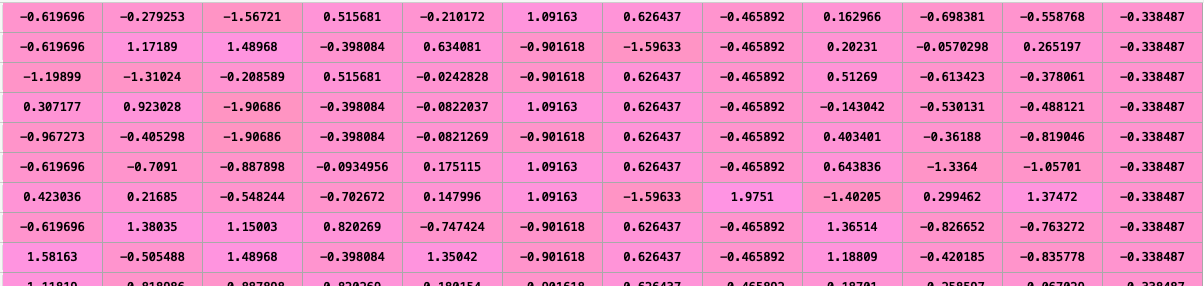
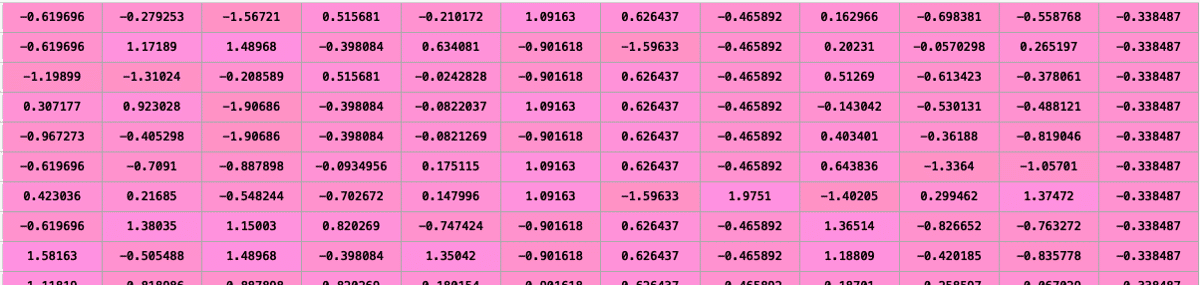
The above code blocks on execution will transform the datasets into scaled or normalised datasets. As shown below for example data in X_train has been reduced to a smaller range.
Modelling And Predicting
We are down to the final stage of modelling the data. We will create a simple linear regression model to predict the Price for the given test data. But before we do that we need to check how efficient our model is for which we have created a validation set. We will use the Root Mean Log Squared Error (RMLSE) on the validation set for calculating the accuracy as mentioned in the hackathons evaluation page.
Calculating Accuracy With RMLSE
# Score Calculation
def score(y_pred, y_true):
error = np.square(np.log10(y_pred +1) - np.log10(y_true +1)).mean() ** 0.5
score = 1 - error
return score
#The actual recordings to be tested against
y_true = Y_val
Testing The Model On Validation Sets
#Initializing Linear regressor
from sklearn.linear_model import LinearRegression
lr = LinearRegression()
#Fitting the regressor with training data
lr.fit(X_train,Y_train)
#Predicting the target(Price) for predictors in validation set X_val
Y_pred = sc.inverse_transform(lr.predict(X_val))
#Eliminating negative values in prediction for score calculation
for i in range(len(Y_pred)):
if Y_pred[i] < 0:
Y_pred[i] = 0
#Printing the score for validation sets
print("\n\n Linear Regression SCORE : ", score(Y_pred, y_true))
Output:
Linear Regression SCORE : 0.763433258668093
Predicting The Price For Test Set
#Initializing a new regressor
lr2 = LinearRegression()
#Fitting the regressor with complete training data(X_train_data,Y_train_data)
lr2.fit(X_train_data,Y_train_data)
#Predicting the target(Price) for predictors in the test data
Y_pred2 = sc.inverse_transform(lr2.predict(X_test))
#Eliminating negative values in prediction for score calculation
for i in range(len(Y_pred2)):
if Y_pred2[i] < 0:
Y_pred2[i] = 0
Saving the predictions to an excel sheet
pd.DataFrame(Y_pred2, columns = ['Price']).to_excel("predictions.xlsx")
Finally, you can submit the excel in the assignment page of the hackathon and see your score on the leaderboard. The above solution has attained a leaderboard score of 0.76959 at MachineHack. Use the above code as a starter pack, use your own ideas and submit the solutions to learn and win prizes.
Good luck and happy modelling!