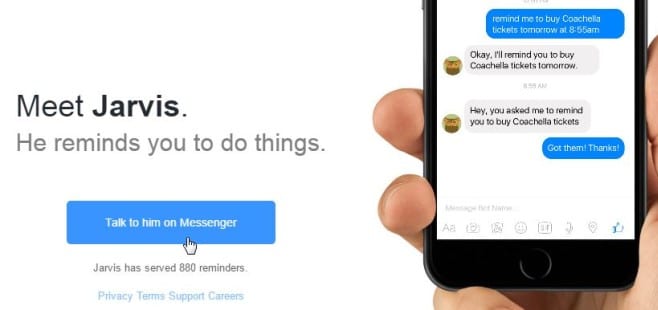
Have you met Jarvis? Well,
Jarvis is Facebook’s messenger chatbot which you can use to set your reminders. Last month,
Facebook’s CEO Mark Zuckerberg announced its new chatbot platform at its F8 conference. Jarvis is one of the early entrants, allowing you to set reminders with a chat conversation directly inside Facebook Messenger.
Starting with Jarvis
To get started you can visit
hellojarvis.io and press the tab ‘Talk to him on messenger’ to get started. Alternatively you can just search “Hello Jarvis” in the web-based Messenger or the Messenger app on Android.or iOS to get started.
As soon as you start with Jarvis, on the very first contact Jarvis will ask you to state the city which you are living in. This is all part of the linear conversation flow, as it allows Jarvis to understand and get an instant idea of your location and timezone. This information allows him to set reminders which are worthwhile to the user. Once you enter the city name, Jarvis will confirm the timezone by messaging you the current time at your location. The chatbot is then all set to take orders and set reminders on your behalf.
Setting Reminders
You can set simple reminders with Jarvis, say for instance “remind me to pick up milk tomorrow at 17.00” or “remind me to go to the doctor first thing in the morning”. Upon setting these reminders, Jarvis will reply with confirmation that he has understood the command and provide a recap of what he will be actually doing and what time the reminder will come. And all this takes place quite instantly and inline in a standard messenger conversation.
Jarvis sends reminders to you on the Messenger and you will get them on your desktop as well as your phone. These reminders can be set either for a particular day when you wish to be reminded or for a relative time such as thirty minutes from now. Your timezone is considered by Jarvis while sending you reminders.
In case you wish to change your timezone or see all your reminders which you have set, you just need to type Help and sent it to Jarvis. Jarvis will reply with buttons specific for changing the timezone and for viewing reminders. But the problem happens when you want to delete one specific reminder as you cannot delete one reminder. Jarvis only gives the option to delete all the reminders as of now.
The bot is in its initial phase right now and doesn’t seem to be powerful like
Google Now or Siri. Nevertheless, Facebook’s Jarvis is a neat way to present what facebook chatbots can do.


Your reaction
Discussion
What's your take on this story?
No comments yet — be the first to share your view.