
With covid everyone is locked in their homes at this time I thought of learning new skills and making some fun projects. I worked on a concept I called “Reality Gaming” .
It is simply controlling games with our movements. I used object tracking using OpenCV for this Project and PyAutoGUI for the keypress.
This can be used to control any game with a set of keys we want to use for control.
First, we mark the object we want to track then in code we divide our screen area into left, right, up, down and neutral for the specific keypress we want. Now whenever our tracking object moves to the left with the help of PyAutoGUI, the left key is pressed. Similarly for other keys.
In the later session I will explain everything with code.
There are various trackers available in opencv to track the movement .
- BOOSTING Tracker
- KCF Tracker
- MIL Tracker
- TLD Tracker
- MEDIANFLOW Tracker
- GOTURN tracker
- MOSSE tracker
- CSRT tracker
The main tradeoff between all these trackers is speed and accuracy, i.e. the frame rate it can provide and accuracy it can track objects with.
The one I used was MOSSE which provided a very high frame rate it can support upto 450fps and the second one is CSRT which has comparatively lower fps (25 fps) but gives higher accuracy for object tracking.
What libraries did I use?
- OpenCV
- PyAutoGUI
- Time
import cv2
import time
import pyautogui
How to run Reality Gaming?
- Run the python script
- A photo will be clicked from your webcam
- Select the area in the image clicked that you wish to track
- Click enter now and open the Subway surfer or any game with up down left right controls.
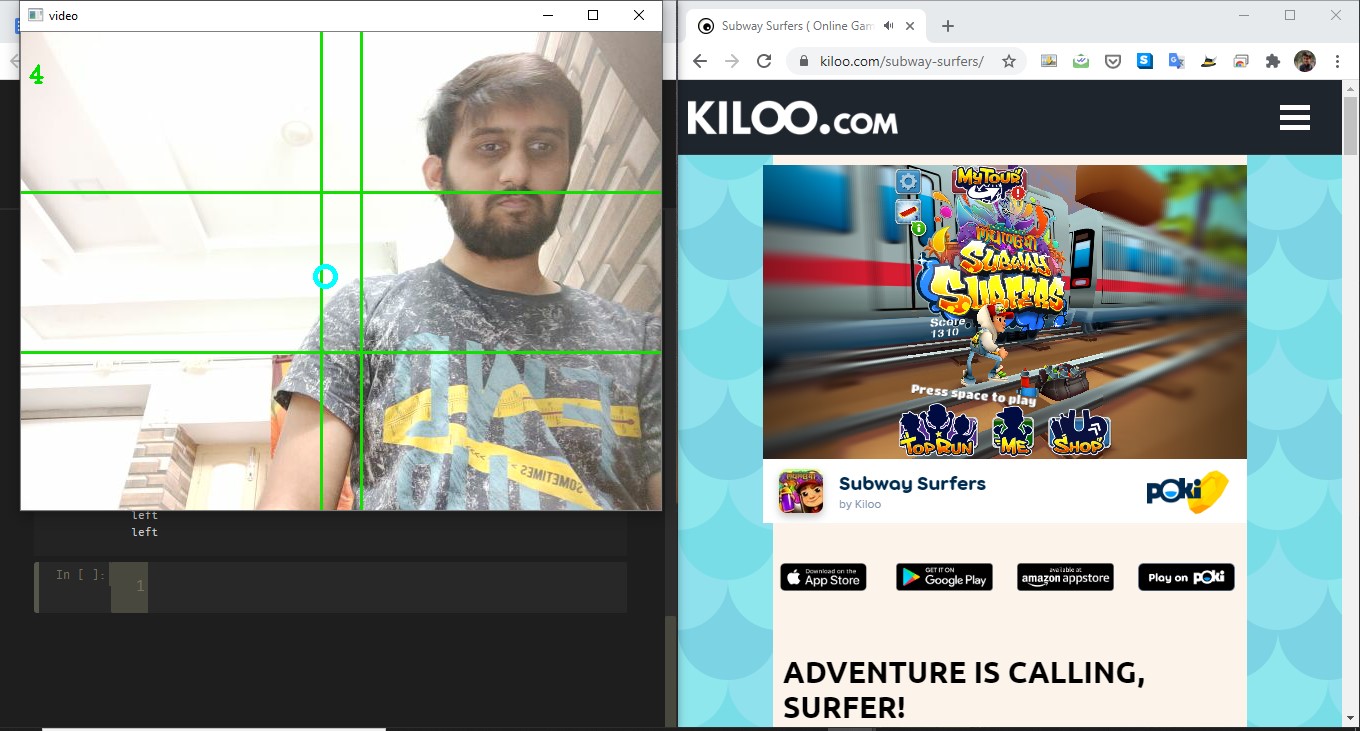
- You can watch the screen portion of left right up down in the video shown on the screen.
- Start the game and Play!
Do you want to implement the same? Follow these steps below!
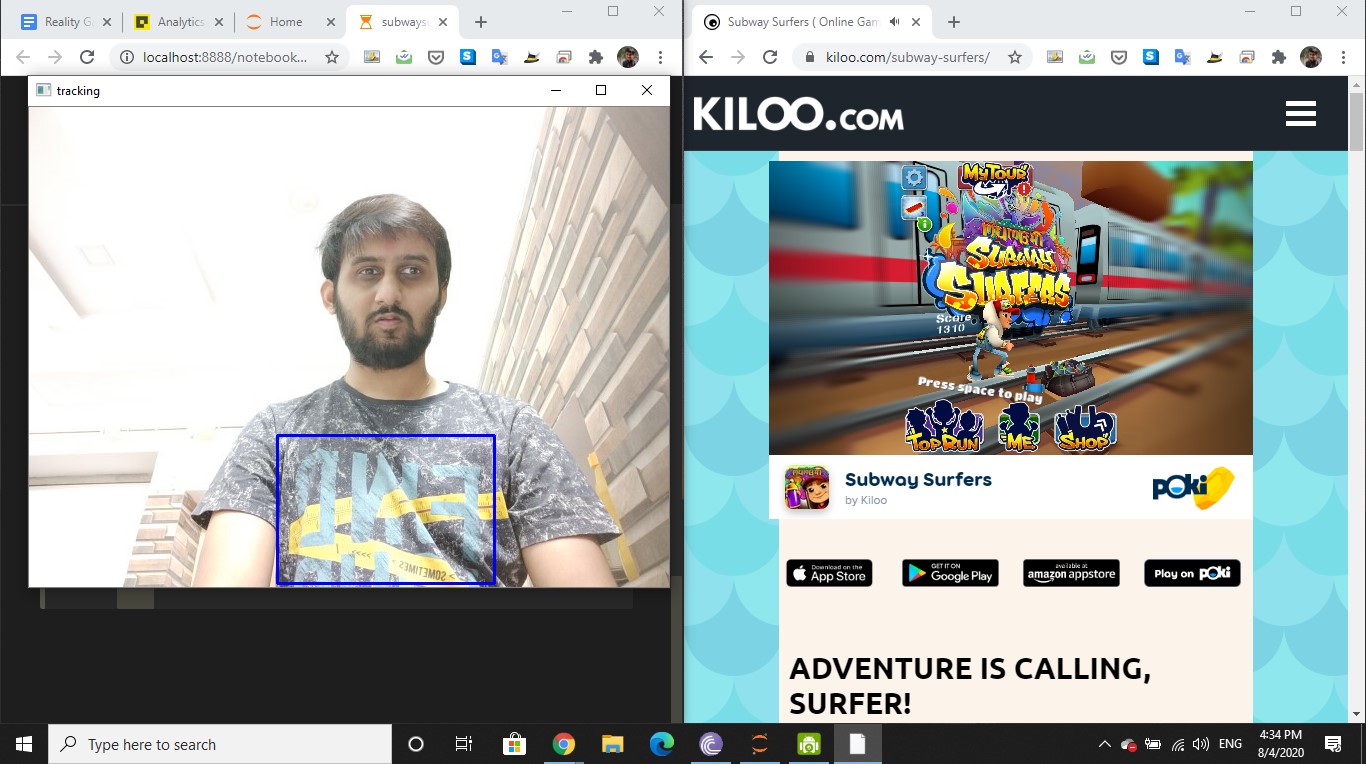
Step-1: Choose the area of image to be tracked from the image captured by webcam and initialize the tracker.
cap=cv2.VideoCapture(0)
tracker= cv2.TrackerCSRT_create()
success,img= cap.read()
img = cv2.flip(img, 1)
bbox= cv2.selectROI("tracking",img,False)
tracker.init(img,bbox)
Step-2: Set the rules for the game that is the coordinate and area selection for different controls in the game.
count =0
def drawbox(img,bbox):
    x,y,w,h= int(bbox[0]),int(bbox[1]),int(bbox[2]),int(bbox[3])
    global count
    if(x>300 and y>160 and x<340 and y <320):
        count=0
    if(x>0 and y<160):
            print("up")
            pyautogui.keyDown('up')
            pyautogui.keyUp('up')
    elif(x>0 and y>320):
            print("down")
            pyautogui.keyDown('down')
            pyautogui.keyUp('down')
    if(count<1):
        if(x>340 and y>160):
            print("right")
            pyautogui.keyDown('right')
            pyautogui.keyUp('right')
            count+=1
        elif(x<300 and y>160):
            print("left")
            pyautogui.keyDown('left')
            pyautogui.keyUp('left')
            count+=1
            time.sleep(0.001)
 cv2.circle(img,(x,y), 10,(255, 255, 0),3
Step-3: Draw boundary lines over the video to partition the area of controls.
while True:
    timer= cv2.getTickCount()
    success,img= cap.read()
    img = cv2.flip(img, 1)
    cv2.line(img,(0,160),(640,160),(0,224,19),2)
    cv2.line(img,(0,320),(640,320),(0,224,19),2)
    cv2.line(img,(300,0),(300,480),(0,224,19),2)
    cv2.line(img,(340,0),(340,480),(0,224,19),2)
    success,bbox= tracker.update(img)
Step-4: Updation of the tracker by calling the drawbox function as the object moves in video and print the frame rate and tracking details.
if success:
drawbox(img,bbox)
    else:
 cv2.putText(img,"lost",(75,50),cv2.FONT_HERSHEY_COMPLEX,0.8,(0,223,0),2)
    fps=cv2.getTickFrequency()/(cv2.getTickCount()-timer)
    cv2.putText(img,str(int(fps)),(7,50),cv2.FONT_HERSHEY_COMPLEX,0.8,(0,223,0),2)
Step-5: Exit the program by pressing ‘q’.
cv2.imshow("video",img)
 if cv2.waitKey(1) == ord('q'):
 break
cap.release()
cv2.destroyAllWindows()
Step-6: Wohla! Now Run the program and enjoy your games with reality gaming experience.
For improving the program you can change the tracker and even switch to haar cascade that would provide a more better experience.
Game is available at :
- Subway surfer https://www.kiloo.com/subway-surfers/
- Temple run https://m.plonga.com/adventure/Temple-Run-2-Online-Tablet

For checking out the game in action do visit:
For code checkout this GitHub link
- The AI Slowdown Narrative Doesn’t Reflect Enterprise Reality
- India’s Enterprises are Scaling AI. Is the Infrastructure Ready?
- Industry Wants Faster Approvals and Cheaper Power in India’s Data Centre Policy
- Inside Jio Platforms: Its Tech Bets, Loss-Making Subsidiaries and Hidden Risks
- India’s GCCs to Add 1.4 Million Jobs, Drive 170 Million Sq. Ft. Office Demand by 2031
- AI Can Be Cyborg or Centaur. But Can Enterprises Monetise It?