Key takeaways
- Intel's OpenVINO toolkit streamlines computer vision tasks by offering a unified software layer across various hardware.
- It supports not only Intel's hardware but also GPUs, enhancing performance for deep learning solutions.
- The toolkit simplifies the deployment of computer vision applications, requiring minimal knowledge of neural networks.
This toolkit allows developers to deploy pre-trained Deep Learning models through a high-level C++ or Python* inference engine API integrated with application logic. It supports multiple Intel® platforms and is included in the Intel® Distribution of OpenVINO™ toolkit. Short for Open Visual Inference & Neural Network Optimization, the Intel® Distribution of OpenVINO™ toolkit (formerly Intel® CV SDK) contains optimised OpenCV™ and OpenVX™ libraries, Deep Learning code samples, and pre-trained models to enhance computer vision development. It’s validated on 100+ open source and custom models, and is absolutely free.The Intel Distribution of #OpenVINO Toolkit was awarded the @EmbVisionSummit Vision Product of the Year Award for Developer Tool of Year. Discover the #computervision capabilities here: https://t.co/EnNamVY9uk #intelAI pic.twitter.com/autYwT9bxa
— Intel AI (@IntelAI) May 21, 2019
Under The Hood Of OpenVINO™
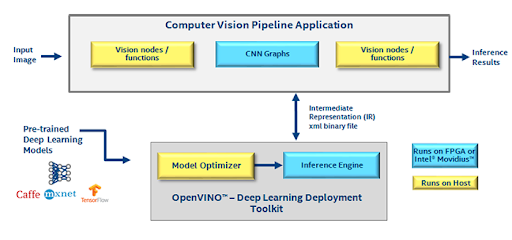
- Deep Learning Model Optimizer which supports converting Caffe*, TensorFlow*, MXNet*, Kaldi*, ONNX* models
- Deep Learning Inference Engine — a unified API to allow high-performance inference on many hardware types including Intel® CPU, Intel® Processor Graphics, Intel® FPGA, Intel® Movidius™ Neural Compute Stick, and Intel® Neural Compute Stick 2
- OpenCV™ library
Running OpenVINO™
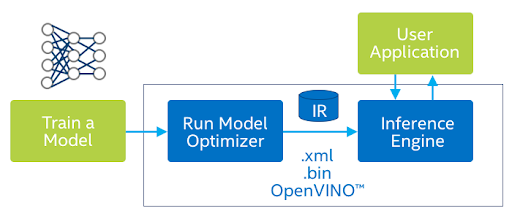
Can a trained model be used without deploying the entire framework? Or use a small part of the framework just for inferencing? These are two common challenges faced by software developers and data scientist when deploying models. Addressing these challenges was the primary objective behind developing OpenVINO™ toolkit. Accelerate computer vision tasks with OpenVINO™ toolkit in 3 steps:- Convert the model from original framework format using the Model Optimizer tool. This will output the model in Intermediate Representation (IR) format
- Perform model calibration using the calibration tool within the Intel® Distribution of OpenVINO™ toolkit. It accepts the model in IR format and is framework-agnostic
- Use the updated model in IR format to perform inference
python3 classification_sample.py -h
To run the sample, the user can use AlexNet and GoogLeNet or other image classification models. And, users can download the pre-trained models with the OpenVINO™ Model Downloader.
Here is an example of pretrained model in OpenVINO™ for Human Pose estimation:
This is a multi-person 2D pose estimation network (based on the OpenPose approach) with tuned MobileNet v1 as a feature extractor. It finds a human pose: body skeleton, which consists of keypoints and connections between them, for every person inside image. The pose may contain up to 18 keypoints — ears, eyes, nose, neck, shoulders, elbows, wrists, hips, knees and ankles.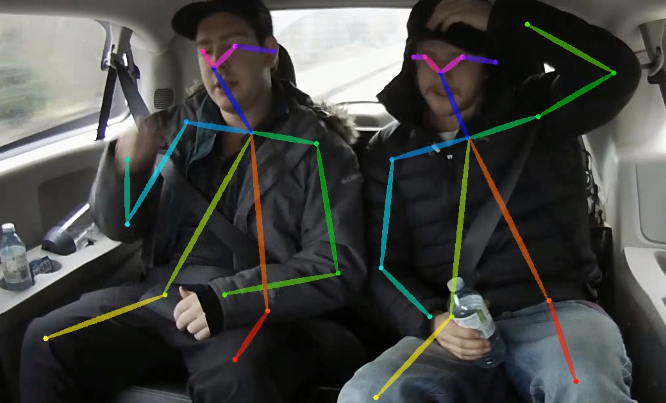
- 6th-8th Generation Intel® Core™
- Intel® Xeon® v5 family
- Intel® Xeon® v6 family
- Microsoft Windows* 10 64-bit