

Building a machine learning or deep learning model for accurate predictions is important but adding interpretability along with these models can make the process more useful and interesting. There are a few methods to visualize the defined predictive models but visualizing a deep learning model with its complex structure is a challenge. In this article, we will learn to visualize the deep learning models in order to achieve interpretability. We will go through different steps to see how to customize these visualizations of the deep learning models to make them more understandable. The major points to be covered in this article are listed below.
Table of Contents
- Need of Interpretability
- About ViusualKeras
- Visualization of neural networks
Need of Interpretability
Most of the machine learning models are considered black-box models, especially the neural networks. It is not easy to understand how a defined model is functioning with the data. The approach to making the models understandable and interpretable by everyone is very important. Considering this scope, interpretability or explainability is trending nowadays. In the context of deep learning, there are different approaches used for explainable deep learning. Here we are going to discuss how can we visualize a defined deep learning model so that any person can understand that a model which is giving so accurate results, how does it look.
About VisualKeras
For the visualization of deep learning models, we will use a python package named visualkeras. Let us understand about this package before going forward. Visualkeras is a python package with the facility of visualization of deep learning models architecture build using the Keras API also we can visualize the networks built using Keras included in TensorFlow. This library supports the layered and graph style architecture of neural networks.
Visualization of Deep Learning Models
In this section, we will see how we can define and visualize deep learning models using visualkeras. Let us go through the elbow steps.
1. Installing Dependency
Let's start with the installation of the library.
Using the following code we can install the visualkeras package.
pip install visualkerasOutput:

2. Defining the Model
As a next step, we are making a simple model for this we are required to import some libraries.
from tensorflow import keras
from tensorflow.keras import layers, models
For a small example, we can make a sequential model with convolutional layer and pooling layers.
model = models.Sequential()
model.add(layers.Conv2D(32, (3, 3), activation='relu', input_shape=(32, 32, 3)))
model.add(layers.MaxPooling2D((2, 2)))
model.add(layers.Conv2D(64, (3, 3), activation='relu'))
model.add(layers.MaxPooling2D((2, 2)))
model.add(layers.Conv2D(64, (3, 3), activation='relu'))
Let's check for the summary of the defined model.
model.summary()
Output:

Here we can see that the model we have defined a model with 3 convolutional layers and 2 pooling layers in the network. Now the question which comes to mind is how we can visualize it?
3. Visualizing the Model
Let's import the visualkeras package
import visualkeras
Now we are ready to visualize the defined network. This can be done by simply using the following code.
visualkeras.layered_view(model)
Output:

Here we can see that convolutional layers are in yellow and pooling layers are in pink colour as we have seen in the summary there are three convolutional and 2 pooling layers.
4. Adding Dense Layer
Let's add a dense layer to the network.
model.add(layers.Dense(64, activation='relu'))
Visualizing the model added with a dense layer

Here we can see that now we have different colours for dense layers.
5. Labelling the Layers
Since we are talking about interpretability it will be more interpretable visualization if the name of the layers is assigned with layers themselves. Using this package we can also assign the name of the layer in the visualization.
For this, we need to import the image font for the PIL library.
from PIL import ImageFontImage font can be used in with the visualkeras
from PIL import ImageFont
visualkeras.layered_view(model, legend=True, font=font)
Output:

6. Adding Flatten Layer
Adding a flatten layer in the model.
model.add(layers.Flatten())
visualkeras.layered_view(model, legend=True, font=font)
Output:

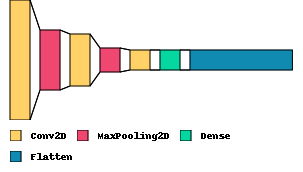
7. Visualising in 2-D Space
We can also visualize the network in 2D space or we can say in flat style using the following codes.
visualkeras.layered_view(model, legend=True, font=font, draw_volume=False)
8. Customizing the Space between Layers
We can manage to space between the layers.
visualkeras.layered_view(model, legend=True, font=font, draw_volume=False,spacing=50)
Output:

9. Customizing the Layers Colours
We can also customize the colours of the layers.
from collections import defaultdict

color_map = defaultdict(dict)
color_map[layers.Conv2D]['fill'] = 'orange'
color_map[layers.MaxPooling2D]['fill'] = 'red'
color_map[layers.Dense]['fill'] = 'black'
color_map[layers.Flatten]['fill'] = 'teal'
visualkeras.layered_view(model, legend=True, font=font,color_map=color_map)
Output:

Here we can see how we can visualize a deep learning model built using Keras. The layers I have used in the model are some of the most used layers in the field of modelling neural networks.
Final Words
In the article, we learnt how to visualize a deep learning model using a python package named visualkeras. We saw how to plot the models with so many customizations to make them understandable and interpretable. This visualization is not much difficult and can be done very quickly. Adding such visualizations in the deep learning-based reports can make the report more attractive and interpretable.
Reference:

Your reaction
Discussion
What's your take on this story?
No comments yet — be the first to share your view.