
There has been a continuing debate for a long time whether Artificial Intelligence, also known as AI for short, will boost the economy or kill the industries. Rumours and talks of how many new innovative businesses will emerge, how many people might become unemployed, how secure AI-based solutions might be, and so on. I am sure this could be a great topic for a live and ever-continuing debate. But leaving aside all these philosophical aspects and focusing more on AI’s potential and capabilities, particularly the use of AI in the Media & Entertainment Industry. Most media industry players already boast of AI-based solutions and implementation within their business workflows. Netflix can be easily called a pioneer because of its intelligent cast compilation and viewer data analytics combined with a sophisticated deep learning and computer vision algorithm applied to its recommendation engine. The software combined with AI makes it far ahead of time and the industry standard. Video encoding methods have also evolved. They can now analyze each shot in a video and compress it without affecting the image quality, thus reducing the amount of data used to render.
Disney has been working recently on mixed reality and augmented reality projects that consist of robotics and human-computer interaction, computer vision, etc. Disney and the University of California have collaborated on the AI front to create a deep learning approach to denoise the Monte Carlo-rendered images, which produced high-quality results suitable for production. Media companies have just started to harness the power of more sophisticated tools such as deep learning algorithms.
Recently, for the film “Finding Dory,” a special convolutional neural network was trained to learn the complex relationship between noisy and reference data across a large set of frames with varying distributed high-end effects to produce noise-free image quality. Now it can be applied to other films, as well. Deep learning algorithms produce the most accurate results but only on the condition of them being fed with millions of observations. Therefore, media companies need to manage different types of data in a unified manner to power effective AI-driven decision-making. This might include several types of audience data, operational data and content data, also called metadata.
There are many further areas in which AI and machine learning could benefit in the domain of the art of production. Location scouting, as an example - helping directors to find the right venues for their shoots. Artificial intelligence can also help in creating AR/VR interactive content. By using artificial intelligence techniques, media companies can do miracles and produce breathtaking scenes with just a pair of 3-D goggles. By introducing more & more innovations, it can enhance the user experience. The recent development of virtual reality content for reality shows, food shows, and live events based on Artificial Intelligence grabs user’s attention. With advancements like these, watching movies and sports with real effects will not just be a dream anymore but will happen in future for sure! In the future, AI will grab most of the tasks in animation. That day might not be so far when we go to the theatre and watch a film that AI completely conceptualized. With the help of big data, AI has become a prominent tool in the media and entertainment industry.
What Is GANsNRoses?
GANsNRoses is an open-source library that creates new Images by building a mapping that takes face images and produces them to anime drawings of faces. With the contents of the image being preserved, the same face could be represented in many different ways in the anime. GANsNRoses consists of a function that takes a content code recovered from the face image and a style code, a latent variable that produces an anime face. GNR uses the same image with different augmentations to form a batch, constraining the spatial invariance in style codes, all style codes being the same across the batch. The Diversity Discriminator present looks at batch-wise statistics by explicitly computing the minibatch standard deviation across the batch. This ensures diversity within each batch of images, in turn producing unique animated images.
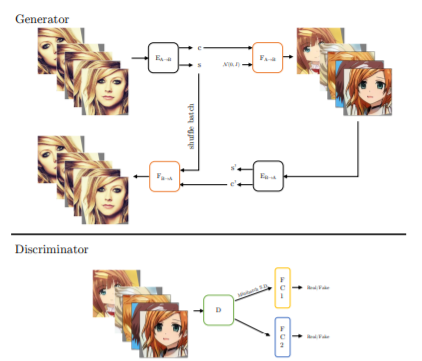
The generated anime images can easily be interpolated and adjusted for styles as the face moves across time. The style outputs are also not diverse, and the interpolation offers only little changes in the output except for color. GNR performs significantly better due to its sensible definition of style and content, and therefore can also be used to create animated real-time videos.
Getting Started With The Code
Through this article, I will show how I performed different types of augmentations on Images and Videos to demonstrate what functionalities the GANsNRoses library can present us with. Here, I will generate different animated faces using the library and also implement the same on a video where the animated images will adjust themselves according to the movement of the original video, therefore creating a Deepfake. The following implementation is inspired by the creators of GANsNRoses, whose GitHub repository can be accessed using the link here.
Installing The Library
The first step will be to import the GANsNRoses Library, it can be done using the following lines of code,
!git clone https://github.com/mchong6/GANsNRoses.git
%cd GANsNRoses
!pip install tqdm gdown kornia scipy opencv-python dlib moviepy lpips aubio ninja
Importing Dependencies
Next up, we will be importing the required dependencies, which will be essential for our image model to work.
#Importing Dependencies
import os
import numpy as np
import torch
from torch import nn
from torch.nn import functional as F
from torch.utils import data
from torchvision import transforms, utils
from tqdm import tqdm
torch.backends.cudnn.benchmark = True
import copy
from util import *
from PIL import Image

from model import *
import moviepy.video.io.ImageSequenceClip
import scipy
import cv2
import dlib
import kornia.augmentation as K
from aubio import tempo, source

from IPython.display import HTML
from base64 import b64encode
from google.colab import files
Let us now set the required checkpoints for image generation from the library and set up our model,
#Creating Checkpoint And Setting The Model
device = 'cuda'
latent_dim = 8
n_mlp = 5
num_down = 3

G_A2B = Generator(256, 4, latent_dim, n_mlp, channel_multiplier=1, lr_mlp=.01,n_res=1).to(device).eval()

ensure_checkpoint_exists('GNR_checkpoint.pt')
ckpt = torch.load('GNR_checkpoint.pt', map_location=device)

G_A2B.load_state_dict(ckpt['G_A2B_ema'])

# mean latent
truncation = 1
with torch.no_grad():
    mean_style = G_A2B.mapping(torch.randn([1000, latent_dim]).to(device)).mean(0, keepdim=True)


test_transform = transforms.Compose([
    transforms.Resize((256, 256)),
    transforms.ToTensor(),
    transforms.Normalize(mean=(0.5, 0.5, 0.5), std=(0.5, 0.5, 0.5), inplace=True)
])
Generating Animated Images
With our model checkpoint all set up, we can now start generating animated images. To do this, we can use two methods, either by uploading the image or setting up a path to it; we’ll be trying both.
# upload your own image
uploaded = files.upload()
filepath = list(uploaded.keys())[0]

image = cv2.imread(filepath)
height, width = image.shape[:2]

# Detect with dlib
face_detector = dlib.get_frontal_face_detector()
gray = cv2.cvtColor(image, cv2.COLOR_BGR2GRAY)
# grab first face
face = face_detector(gray, 1)[0]

# Face crop with dlib and bounding box scale enlargement
x, y, size = get_boundingbox(face, width, height)
cropped_face = image[y:y+size, x:x+size]
cropped_face = cv2.cvtColor(cropped_face, cv2.COLOR_BGR2RGB)
cropped_face = Image.fromarray(cropped_face)
cropped_face

Generating animated images from the input image,
%matplotlib inline
plt.rcParams['figure.dpi'] = 200

torch.manual_seed(84986)

num_styles = 5
style = torch.randn([num_styles, latent_dim]).to(device)

real_A = cropped_face
real_A = test_transform(real_A).unsqueeze(0).to(device)

with torch.no_grad():
    A2B_content, _ = G_A2B.encode(real_A)
    fake_A2B = G_A2B.decode(A2B_content.repeat(num_styles,1,1,1), style)
    A2B = torch.cat([real_A, fake_A2B], 0)

display_image(utils.make_grid(A2B.cpu(), normalize=True, range=(-1, 1), nrow=10))
Output :

Let us now try again by setting a path to it manually,
torch.manual_seed(13421)

#path of image
real_A = Image.open('/content/margot_robbie.jpg')
real_A = test_transform(real_A).unsqueeze(0).to(device)

style1 = G_A2B.mapping(torch.randn([1, latent_dim]).to(device))
style2 = G_A2B.mapping(torch.randn([1, latent_dim]).to(device))

with torch.no_grad():
    A2B = []
    A2B_content, _ = G_A2B.encode(real_A)
    for i in np.linspace(0,1,5):
        new_style = i*style1 + (1-i)*style2
        fake_A2B = G_A2B.decode(A2B_content, new_style, use_mapping=False)
        A2B.append(torch.cat([fake_A2B], 0))
    A2B = torch.cat([real_A] + A2B, 0)

display_image(utils.make_grid(A2B.cpu(), normalize=True, range=(-1, 1), nrow=10))

Style Interpolation
Using GANsNRoses, we can also perform Style Interpolation, where given a style image and a content image, extract the style from the style image and apply it to the content image. The goal is to adjust the content image to show the same content but is now in the new style.
#Performing Style Interpolation
modulate = {
    k: v
    for k, v in ckpt["G_A2B_ema"].items()
    if "modulation" in k and "to_rgbs" not in k and "weight" in k
}

weight_mat = []
for k, v in modulate.items():
    weight_mat.append(v)

W = torch.cat(weight_mat, 0)
eigvec = torch.svd(W).V.to("cpu")

#setting image features
plt.rcParams['figure.dpi'] = 200

#path to original image
real_A = Image.open('/content/IMG_4552.JPG')
real_A = test_transform(real_A).unsqueeze(0).to(device)


eig_idx = 2 # which eigenvec to choose
eig_scale = 4 # how much to scale the eigvec

style = G_A2B.mapping(torch.randn([1, latent_dim]).to(device))
direction = eig_scale * eigvec[:, eig_idx].unsqueeze(0).to(device)

#generating interpolated image
with torch.no_grad():
    A2B_content, _ = G_A2B.encode(real_A)
    fake_A2B = G_A2B.decode(A2B_content, style, use_mapping=False)
    fake_A2B2 = G_A2B.decode(A2B_content, style+direction, use_mapping=False)

display_image(utils.make_grid(torch.cat([real_A, fake_A2B, fake_A2B2], 0).cpu(), normalize=True, range=(-1, 1)))

As we can see, the model has rendered several images, keeping intact the angle and most expressions from the original image being processed!
Video Translation Using GANsNRoses
We can perform the same on videos as well and create a real-time moving animation from an input video. There we are using an input video where the face is constantly moving and changing expressions, demonstrating the power of video rendering through GANsNRoses.
# input video
inpath = '/content/tiktok.mp4'

#output path
outpath = '/content/output.mp4'

mode = 'beat'
assert mode in ('normal', 'blend', 'beat', 'eig')

# Frame numbers and length of output video
start_frame=0
end_frame=None
frame_num = 0
mp4_fps= 30
faces = None
smoothing_sec=.7
eig_dir_idx = 1

frames = []
reader = cv2.VideoCapture(inpath)
num_frames = int(reader.get(cv2.CAP_PROP_FRAME_COUNT))

# get beats from audio
win_s = 512
hop_s = win_s // 2

s = source(inpath, 0, hop_s)
samplerate = s.samplerate
o = tempo("default", win_s, hop_s, samplerate)
delay = 4. * hop_s
# list of beats, in samples
beats = []

# total number of frames read
total_frames = 0
while True:
    samples, read = s()
    is_beat = o(samples)
    if is_beat:
        this_beat = int(total_frames - delay + is_beat[0] * hop_s)
        beats.append(this_beat/ float(samplerate))
    total_frames += read
    if read < hop_s: break
#print len(beats)
beats = [math.ceil(i*mp4_fps) for i in beats]


if mode == 'blend':
    shape = [num_frames, 8, latent_dim] # [frame, image, channel, component]
    all_latents = random_state.randn(*shape).astype(np.float32)
    all_latents = scipy.ndimage.gaussian_filter(all_latents, [smoothing_sec * mp4_fps, 0, 0], mode='wrap')
    all_latents /= np.sqrt(np.mean(np.square(all_latents)))
    all_latents = torch.from_numpy(all_latents).to(device)
else:
    all_latents = torch.randn([8, latent_dim]).to(device)

if mode == 'eig':
    all_latents = G_A2B.mapping(all_latents)

in_latent = all_latents

# Face detector
face_detector = dlib.get_frontal_face_detector()

assert start_frame < num_frames - 1
end_frame = end_frame if end_frame else num_frames

while reader.isOpened():
    _, image = reader.read()
    if image is None:
        break

    if frame_num < start_frame:
        continue
    # Image size
    height, width = image.shape[:2]

    # 2. Detect with dlib
    if faces is None:
        gray = cv2.cvtColor(image, cv2.COLOR_BGR2GRAY)
        faces = face_detector(gray, 1)
    if len(faces):
        # For now only take biggest face
        face = faces[0]


    # Face crop with dlib and bounding box scale enlargement
    x, y, size = get_boundingbox(face, width, height)
    cropped_face = image[y:y+size, x:x+size]
    cropped_face = cv2.cvtColor(cropped_face, cv2.COLOR_BGR2RGB)
    cropped_face = Image.fromarray(cropped_face)
    frame = test_transform(cropped_face).unsqueeze(0).to(device)

    with torch.no_grad():
        A2B_content, A2B_style = G_A2B.encode(frame)
        if mode == 'blend':
            in_latent = all_latents[frame_num]
        elif mode == 'normal':
            in_latent = all_latents
        elif mode == 'beat':
            if frame_num in beats:
                in_latent = torch.randn([8, latent_dim]).to(device)

        if mode == 'eig':
            if frame_num in beats:
                direction = 3 * eigvec[:, eig_dir_idx].unsqueeze(0).expand_as(all_latents).to(device)
                in_latent = all_latents + direction
                eig_dir_idx += 1

            fake_A2B = G_A2B.decode(A2B_content.repeat(8,1,1,1), in_latent, use_mapping=False)
        else:
            fake_A2B = G_A2B.decode(A2B_content.repeat(8,1,1,1), in_latent)


        fake_A2B = torch.cat([fake_A2B[:4], frame, fake_A2B[4:]], 0)

        fake_A2B = utils.make_grid(fake_A2B.cpu(), normalize=True, range=(-1, 1), nrow=3)


    #concatenate original image top
    fake_A2B = fake_A2B.permute(1,2,0).cpu().numpy()
    frames.append(fake_A2B*255)

    frame_num += 1

clip = moviepy.video.io.ImageSequenceClip.ImageSequenceClip(frames, fps=mp4_fps)

# save to a temporary file.
clip.write_videofile('./temp.mp4')

# use ffmpeg to add audio to video
!ffmpeg -i ./temp.mp4 -i $inpath -c copy -map 0:v:0 -map 1:a:0 $outpath -y
!rm ./temp.mp4

#rendering output video
mp4 = open(outpath,'rb').read()
data_url = "data:video/mp4;base64," + b64encode(mp4).decode()
HTML("""


""" % data_url)
Output :
End Notes
In this article, we have explored and understood how Artificial Intelligence is being used in the Media & Entertainment Industry to explore new ventures. We also created a model which generates animated images using the GANsNRoses Library, where we performed several operations and explored its functionalities with images and videos. The above code can be found in a Colab notebook, which can be accessed using the link here.
Happy Learning!

Your reaction
Discussion
What's your take on this story?
No comments yet — be the first to share your view.