

In time series modelling, the ARIMA models are one of the greatest choices. Performing optimal time series modelling using the ARIMA models requires various efforts and one of the major efforts is finding the value of its parameters. This model includes three-parameter p, d and q. In this article, we are going to discuss how we can choose optimal values for these parameters. The major points to be discussed in the article are listed below.
Table of content
- About ARIMA models
- About p, d, q, values in ARIMA
- How to choose values of p, d and q?
- Implementation
- Augmented Dickey-Fuller test
- Finding the value of the d parameter
- Finding the value of the p parameter
- Finding the value of the q parameter
Let's start by introducing the ARIMA model.
About ARIMA model
In one of our articles, we have already discussed that the ARIMA models combine two models and 1 method. Two models are Auto Regression(AR) and Moving Average(MA). One method is differencing(I). These three works together when the time series we use is non-stationary. In simple words, we can call a model ARIMA model if we apply differencing (I) at least once to make the data stationary and combine autoregressive and moving averages to make some forecasting based on old time-series data. The equation of this model can be explained by the following expressions:

In words, we can explain this expression as,
Prediction = constant + linear combination lags of Y + linear combination of lagged forecast errors
Here we came to a point where we are required to understand what p, q, and d mean. Let's take a look at the below section.
Are you looking for a complete repository of Python libraries used in data science, check out here.
About p, d, q, values in ARIMA
To make a better explanation of ARIMA we can also write it as (AR, I, MA) and by this, we can assume that in the ARIMA, p is AR, d is I and q is MA. here our assumption is right. These parameters can be explained as follows
- p is the number of autoregressive terms,
- d is the number of nonseasonal differences,
- q is the number of lagged forecast errors in the prediction equation.
For an example, ARIMA(1, 1, 2) can also be called a damped-trend linear exponential smoothing where we are applying one time differencing on the time series if it is non-stationary and after that, we are performing autoregression on the series with one lag when the series is stationary by differencing and 2 average moving average order is applied.
Since this article is focusing on finding the values of p, d, and q in the ARIMA model for time series analysis in the next section we will look at how we can do this. For a much better explanation of ARIMA and parameters, we can refer to this article. Also, before applying ARIMA for time series forecasting some of the conditions are required to be known. This information can be obtained using this article.
How to Choose Values of p, d and q?
There are various ways to choose the values of parameters of the ARIMA model. Without being confused we can do this using the following steps:
- Test for stationarity using the augmented dickey fuller test.
- If the time series is stationary try to fit the ARMA model, and if the time series is non-stationary then seek the value of d.
- If the data is getting stationary then draw the autocorrelation and partial autocorrelation graph of the data.
- Draw a partial autocorrelation graph(ACF) of the data. This will help us in finding the value of p because the cut-off point to the PACF is p.
- Draw an autocorrelation graph(ACF) of the data. This will help us in finding the value of q because the cut-off point to the ACF is q.
Implementation of ARIMA
Let's take a look at how we can perform these steps one by one.
import pandas as pd
path = '/content/drive/MyDrive/Yugesh/deseasonalizing time series/AirPassengers.csv'
data = pd.read_csv(path, index_col='Month')
data.head(20)
Output:
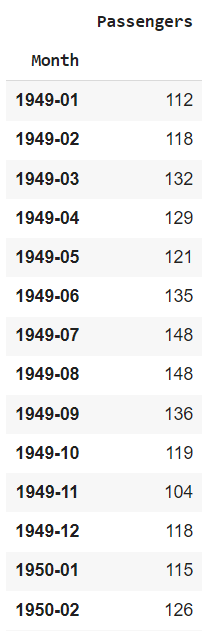
Augmented Dickey-Fuller test
from statsmodels.tsa.stattools import adfuller
result = adfuller(data['Passengers'])
print('ADF Statistic: %f' % result[0])
print('p-value: %f' % result[1])
print('Critical Values:')
for key, value in result[4].items():
  print('\t%s: %.3f' % (key, value))
Output:
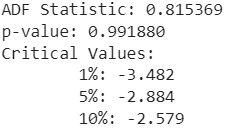
Here we can see that the p-value is more than 0.05 this means our null hypothesis will be rejected and we will take this series as non-stationary. Let's make a plot of this data
data.plot()
Output:
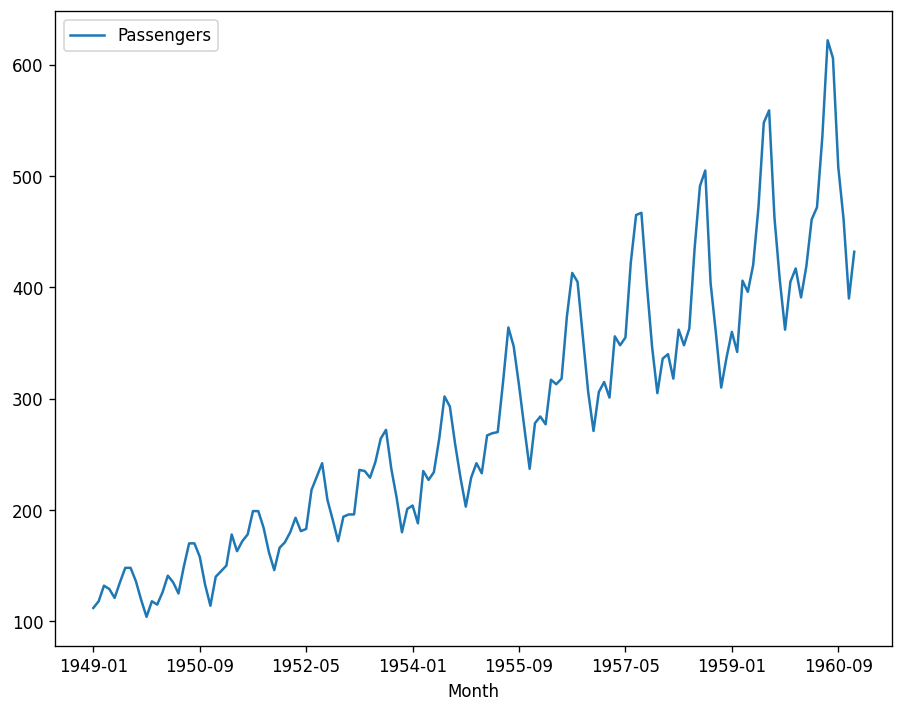
Here it is visible that the data is not stationary and requires differentiation.
Finding the value of the d parameter
There is no such method that can tell us how much value of d will be optimal. However, the value of differencing can be optimal till 2 so we will try our time series in both. Pandas provide this option of differencing. Let's utilize this.
import numpy as np, pandas as pd
import matplotlib.pyplot as plt
plt.rcParams.update({'figure.figsize':(9,7), 'figure.dpi':120})

# Original Series
fig, (ax1, ax2, ax3) = plt.subplots(3)
ax1.plot(data.Passengers); ax1.set_title('Original Series'); ax1.axes.xaxis.set_visible(False)
# 1st Differencing
ax2.plot(data.Passengers.diff()); ax2.set_title('1st Order Differencing'); ax2.axes.xaxis.set_visible(False)
# 2nd Differencing
ax3.plot(data.Passengers.diff().diff()); ax3.set_title('2nd Order Differencing')
plt.show()
Output:
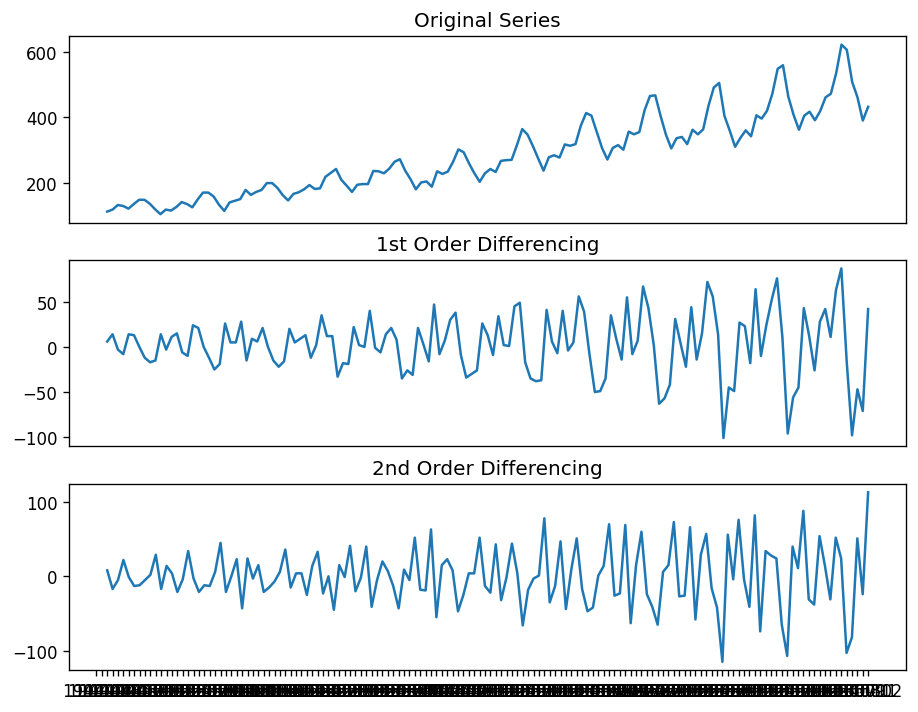
Here we can see how the time series has become stationary. One thing which is noticeable here is in first-order differencing we have fewer noises in the data while after 1st order there is an increase in the noise. So we can select 1st order differencing for our model. We can also verify this using an autocorrelation plot.
from statsmodels.graphics.tsaplots import plot_acf
fig, (ax1, ax2, ax3) = plt.subplots(3)
plot_acf(data.Passengers, ax=ax1)
plot_acf(data.Passengers.diff().dropna(), ax=ax2)
plot_acf(data.Passengers.diff().diff().dropna(), ax=ax3)
output:
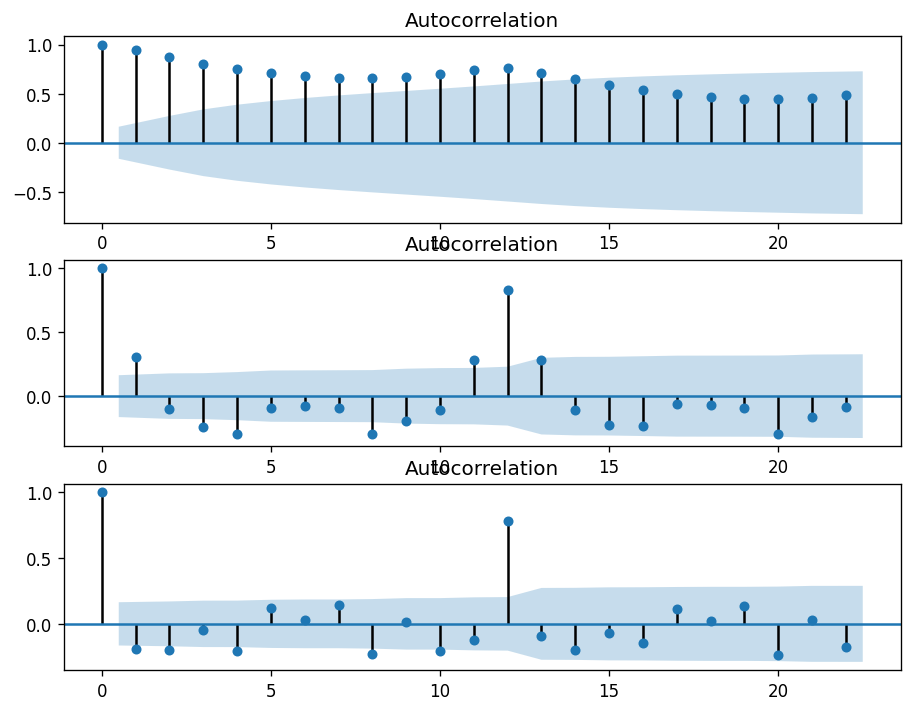
Here we can see that in second-order differencing the immediate lag has gone on the negative side, representing that in the second-order the series has become over the difference.
Finding the value of the p parameter
In the above section, we have identified the optimal value of d. Now in this section, we are going to find the optimal value of p which is our number of autoregressive terms. We can find this value by inspecting the PACF plot. In one of our articles, we have explained the pacf and acf plots.
The partial autocorrelation function plot can be used to draw a correlation between the time series and its lag while the contribution from intermediate lags can be ignored. This plotting will let us know about the lags that are not required in the autoregression part.
Significant correlation in a stationary time series can be represented by adding auto regression terms. Using the PACF plot we can take the order of AR terms to be equal to the lags that can cross a significance limit.
from statsmodels.graphics.tsaplots import plot_pacf
plot_pacf(data.Passengers.diff().dropna())
Output:
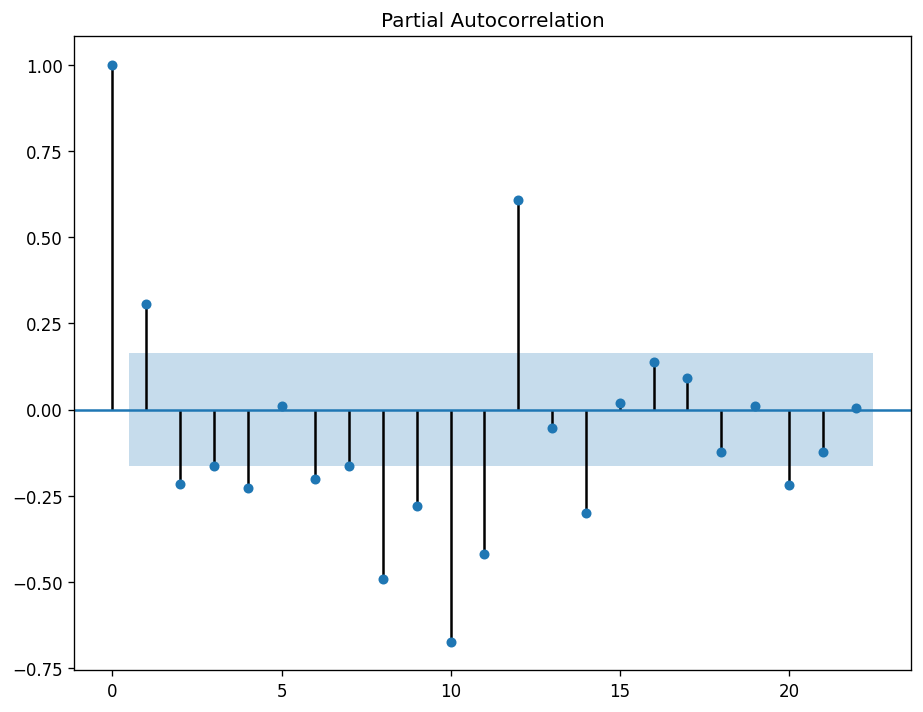
Here we can see that the first lag is significantly out of the limit and the second one is also out of the significant limit but it is not that far so we can select the order of the p as 1.
Finding the value of the q parameter
To find out the value of q we can use the ACF plot. Which will tell us how much moving average is required to remove the autocorrelation from the stationary time series.
plot_acf(data.Passengers.diff().dropna())
Output:
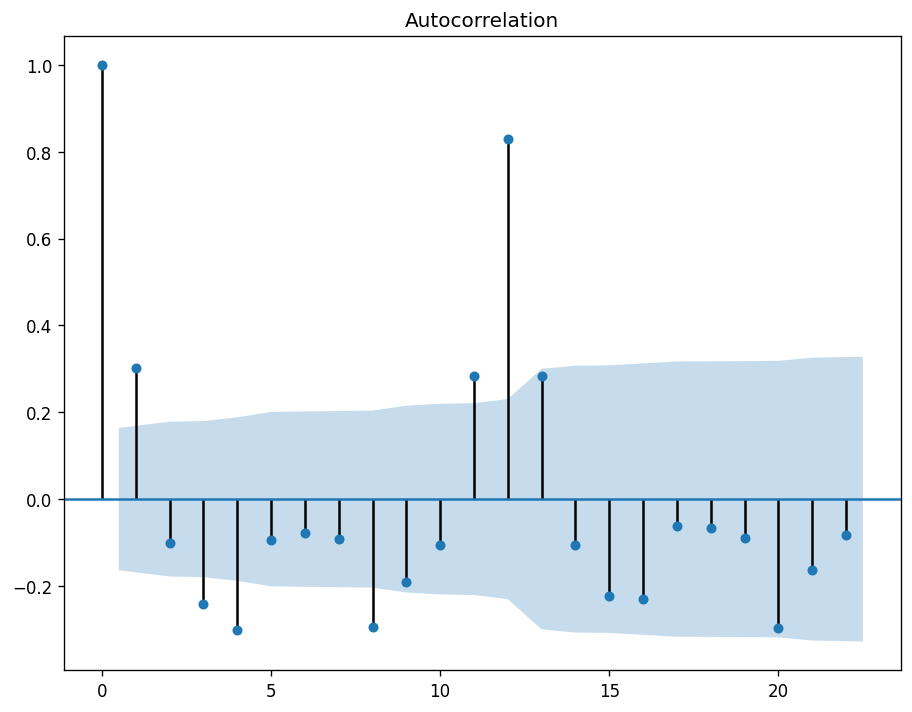
Here we can see that 2 of the lags are out of the significance limit so we can say that the optimal value of our q (MA) is 2.
Building ARIMA model
In the above sections, we have seen how we can find the value of p, d, and q. After finding them we are ready to use them in the ARIMA model. Here we can use the statsmodel library where under the tsa package we have a function for the ARIMA model.
from statsmodels.tsa.arima_model import ARIMA
model = ARIMA(data.Passengers, order = (1,1,2))
model_fit = model.fit(disp=0)
model_fit.summary()
Output:
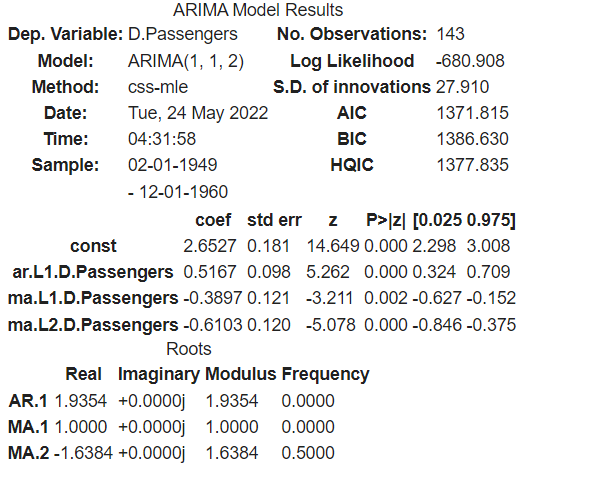
Here we can see the summary of the model. Let's predict from the model.
model_fit.plot_predict(dynamic=False)
plt.show()
Output:
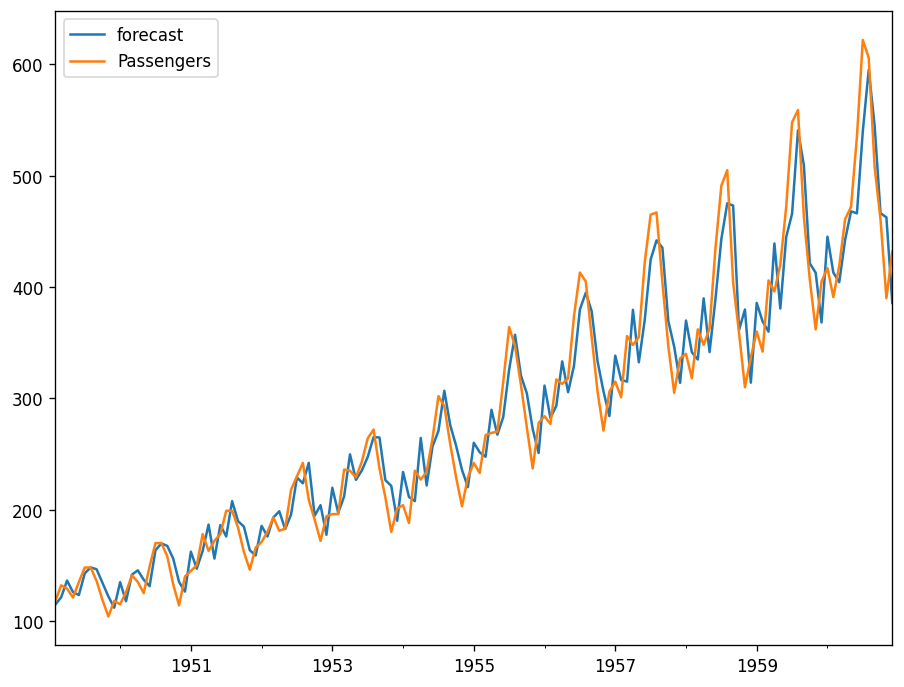
Here we can see that the values are pretty close to the real values.
Final words
In this article, we have discussed the process of finding the values of parameters in the ARIMA modelling. One thing that is also noticeable here is the AIC value that needs to be lower while performing the ARIMA modelling. We can reduce this term by changing the values of the q parameter.

Your reaction
Discussion
What's your take on this story?
No comments yet — be the first to share your view.