

5 min
Jupyter Notebook, popularly known as Jupyter among data science aficionados, is an open-source interactive coding application which allows the user/programmer a plethora of options such as testing code, equations, data visualisations, text and many more, using the Python programming language. Primarily used for data visualisation, Jupyter is flexible and supports most of the popular programming languages such as R, JavaScript, HTML/CSS, Node.js among others. Jupyter is the offshoot project of IPython Notebook.
Though it is one of the most commonly used notebook in the data science fraternity, Jupyter has a few setbacks such as fragmented output code, version overlapping and so on. In this article, we explore the top five alternative notebooks for Jupyter that offers better features and flexibility along with having a different take when it comes to coding and its implementation.
 Ardent users of Jupyter might try this similar notebook interface which offers better features. PyCharm not only supports Python programming language, but also handles code written in SQL and similar database languages along the line. Jupyter users will definitely agree with the packages Pycharm integrates with libraries such as Numpy and Matplotlib for numerical computing and data visualisation in Python. Apart from computation, it also supports Web Development languages such as HTML/CSS, Javascript, Angular.js among many other languages. One interesting feature of PyCharm is the presence of a sharp debugger with a graphical interface along with offering customisations.
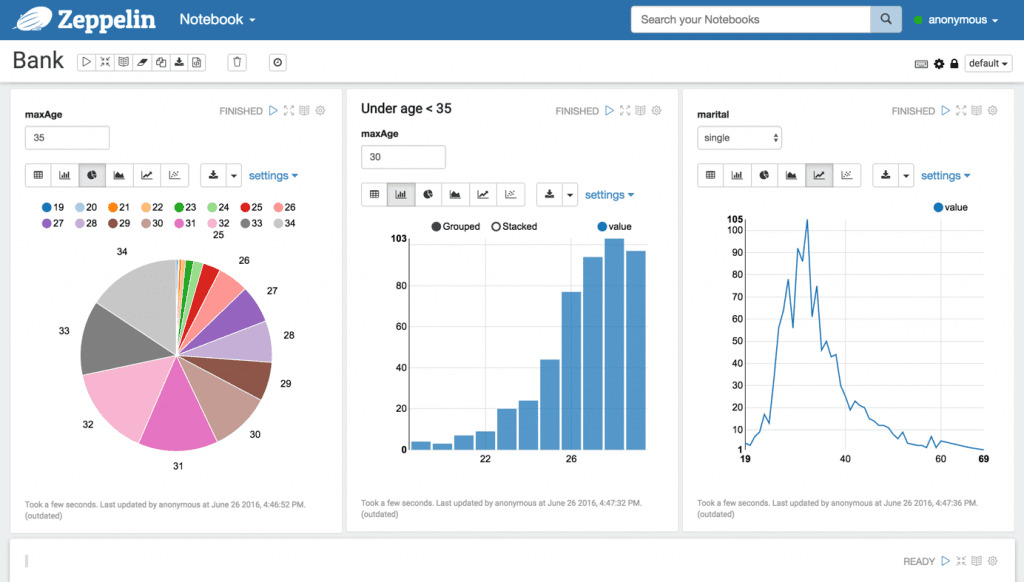 Apache’s standalone data analysis product, Zeppelin is making news and is competing with the likes of Jupyter. Apache has a host of advantages over Jupyter such as multi-user support and richer inbuilt data visualisation tools. It also allows the user to combine multiple paragraphs of code written in Python in one single line, which is helpful when there are a lot of iterations in the code. However, Zeppelin has a few pitfalls such as no extension support to bring in a new functionality, unlike Jupyter which provides more than 80 extensions brought out by the Jupyter development community. Nevertheless, the Zeppelin community is growing and picking up pace in its development.
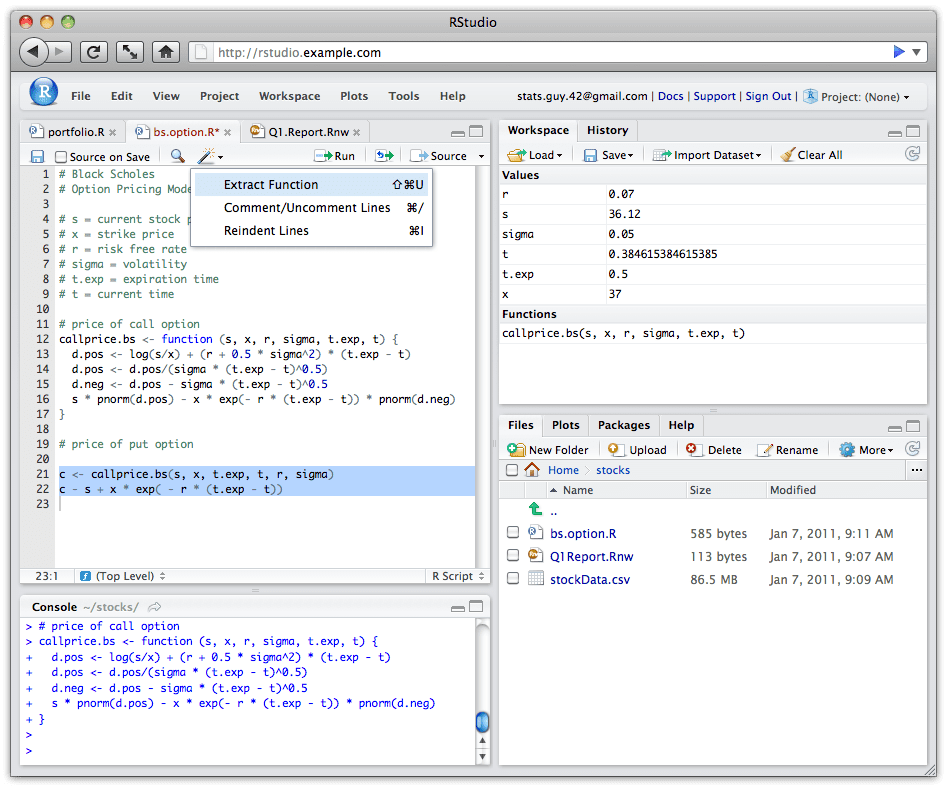 With R becoming the norm in the statistical programming language domain, RStudio is a notebook made specifically for R. It has a console with a error-highlighting editor for syntax and supports code execution directly. RStudio has numerous data visualisation tools to assist the user with plotting. It comes with a variety of interesting features such as a customisable console, searchable history for previous code, keyboard shortcuts, cross-platform compatibility (RStudio can be accessed using a web browser), help section and many more. It also supports the functionality of running on a server. Furthermore, the RStudio community plans to provide support to other languages such as Julia and Haskell. Rstudio also has RMarkdown under the umbrella, with the latter offering data analysis reports and customising them into visually appealing documents and presentations.
 A data science and machine learning integrated development environment (IDE) built solely for Python programming, Rodeo has auto-compete and syntax-highlighting functions for users to help with their Python code. The support for Vim and Emacs text editors is where Rodeo stands apart from the other Python IDEs. Rodeo uses block code execution, which means that error-correcting codes are executed in blocks. Its Integrated Tutorials is a great help for anyone starting with Python programming. There are quick-reference materials which assist users to refer them and code better. Again, Rodeo has cross-platform support which means it can be run on Windows, Mac or Linux operating systems (OS).
 Apache’s Spark software, which was solely used for big data processing has also ventured into data sciences with its notebook software called Spark Notebook. The notebook uses Scala as its primary programming language for data analysis. The latest versions extends support to Spark technology as well as SQL and JavaScript. The interesting feature of Spark Notebook is that it offers dynamic and interactive components making the data analysis visually richer and better to understand. It can also visualise the output from SQL queries. One contrasting aspect is that the Spark environment rigorously sticks to immutability, a programming concept which means that the code cannot be changed except for the logic or operations involved in the code.
1 . PyCharm
Ardent users of Jupyter might try this similar notebook interface which offers better features. PyCharm not only supports Python programming language, but also handles code written in SQL and similar database languages along the line. Jupyter users will definitely agree with the packages Pycharm integrates with libraries such as Numpy and Matplotlib for numerical computing and data visualisation in Python. Apart from computation, it also supports Web Development languages such as HTML/CSS, Javascript, Angular.js among many other languages. One interesting feature of PyCharm is the presence of a sharp debugger with a graphical interface along with offering customisations.
2 . Apache Zeppelin
 Apache’s standalone data analysis product, Zeppelin is making news and is competing with the likes of Jupyter. Apache has a host of advantages over Jupyter such as multi-user support and richer inbuilt data visualisation tools. It also allows the user to combine multiple paragraphs of code written in Python in one single line, which is helpful when there are a lot of iterations in the code. However, Zeppelin has a few pitfalls such as no extension support to bring in a new functionality, unlike Jupyter which provides more than 80 extensions brought out by the Jupyter development community. Nevertheless, the Zeppelin community is growing and picking up pace in its development.
3. RStudio
With R becoming the norm in the statistical programming language domain, RStudio is a notebook made specifically for R. It has a console with a error-highlighting editor for syntax and supports code execution directly. RStudio has numerous data visualisation tools to assist the user with plotting. It comes with a variety of interesting features such as a customisable console, searchable history for previous code, keyboard shortcuts, cross-platform compatibility (RStudio can be accessed using a web browser), help section and many more. It also supports the functionality of running on a server. Furthermore, the RStudio community plans to provide support to other languages such as Julia and Haskell. Rstudio also has RMarkdown under the umbrella, with the latter offering data analysis reports and customising them into visually appealing documents and presentations.
4. Rodeo IDE (Python only)
 A data science and machine learning integrated development environment (IDE) built solely for Python programming, Rodeo has auto-compete and syntax-highlighting functions for users to help with their Python code. The support for Vim and Emacs text editors is where Rodeo stands apart from the other Python IDEs. Rodeo uses block code execution, which means that error-correcting codes are executed in blocks. Its Integrated Tutorials is a great help for anyone starting with Python programming. There are quick-reference materials which assist users to refer them and code better. Again, Rodeo has cross-platform support which means it can be run on Windows, Mac or Linux operating systems (OS).
5. Spark Notebook
Apache’s Spark software, which was solely used for big data processing has also ventured into data sciences with its notebook software called Spark Notebook. The notebook uses Scala as its primary programming language for data analysis. The latest versions extends support to Spark technology as well as SQL and JavaScript. The interesting feature of Spark Notebook is that it offers dynamic and interactive components making the data analysis visually richer and better to understand. It can also visualise the output from SQL queries. One contrasting aspect is that the Spark environment rigorously sticks to immutability, a programming concept which means that the code cannot be changed except for the logic or operations involved in the code.

Your reaction
Discussion
What's your take on this story?
No comments yet — be the first to share your view.