
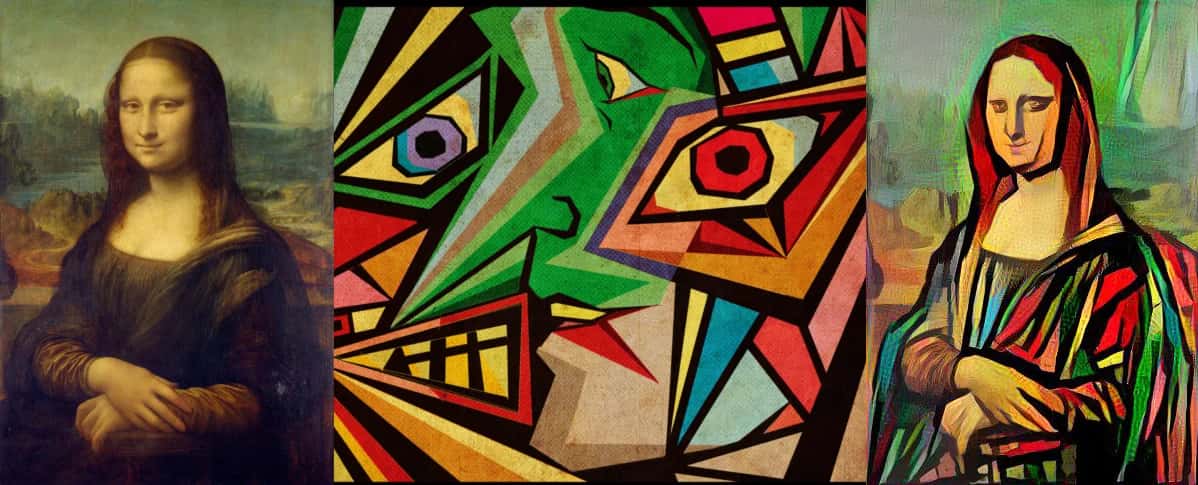
Neural Style Transfer is one of the interesting applications of computer vision using deep learning. In this method, two images named as original content images and the style reference images are blended together by the algorithms. This blending is done in such a way that the resulting image looks like the original content image but painted in the style of the style reference image. This style transfer task is performed by optimizing the output image to match the content statistics of the content image and the style statistics of the style reference image. These statistics are extracted from the images using the feature extraction capabilities of the convolutional neural network.
There are several deep learning methods for the neural style transfer in images. But they require a heavy execution environment and consume much computational resources and time. The TensorFlow Hub module provides a class of pre-trained machine learning modules in order to save computational resources and time. It also provides the pre-trained deep convolutional neural network for style transfer in images.
In this article, we present a very fast and effective way to neural style transfer in images using the TensorFlow Hub module. The TF-Hub module provides the pre-trained VGG Deep Convolutional Neural Network for style transfer. This approach takes less than four seconds to transfer style to a content image.
Implementation
This code was implemented in Google Colab and the .py file was downloaded.# -*- coding: utf-8 -*- """style_transfer_hub_module.ipynb Automatically generated by Colaboratory. Original file is located at https://colab.research.google.com/drive/1foyup5-Ma-JXES4DLsAVXXXXXXXXXXXX """
First of all, we will import the required libraries. To use the TensorFlow hub, we will import it as hub from tensorflow_hub. The functool library is used for higher-order functions that act on or return other functions. Make sure to install the if you are working on the local system.
import functools
import os
from matplotlib import gridspec
import matplotlib.pylab as plt
import numpy as np
import tensorflow as tf
import tensorflow_hub as hub
After importing, we will check the versions. tf.executing_eagerly() checks whether the current thread has eager execution enabled.
print("TF Version: ", tf.__version__)
print("TF-Hub version: ", hub.__version__)
print("Eager mode enabled: ", tf.executing_eagerly())
print("GPU available: ", tf.test.is_gpu_available())
Using the below lines of codes the functions to load, format, preprocess and visualize images are defined. content_image, style_image, and stylized_image are expected to be 4-D Tensors with shapes [batch_size, image_height, image_width, 3]
def crop_center(image):
  """Returns a cropped square image."""
  shape = image.shape
  new_shape = min(shape[1], shape[2])
  offset_y = max(shape[1] - shape[2], 0) // 2
  offset_x = max(shape[2] - shape[1], 0) // 2
  image = tf.image.crop_to_bounding_box(
      image, offset_y, offset_x, new_shape, new_shape)
  return image


@functools.lru_cache(maxsize=None)
def load_image(image_url, image_size=(256, 256), preserve_aspect_ratio=True):
  """Loads and preprocesses images."""
  # Cache image file locally.
  image_path = tf.keras.utils.get_file(os.path.basename(image_url)[-128:], image_url)
  # Load and convert to float32 numpy array, add batch dimension, and normalize to range [0, 1].
  img = plt.imread(image_path).astype(np.float32)[np.newaxis, ...]
  if img.max() > 1.0:
    img = img / 255.
  if len(img.shape) == 3:
    img = tf.stack([img, img, img], axis=-1)
  img = crop_center(img)
  img = tf.image.resize(img, image_size, preserve_aspect_ratio=True)
  return img


def show_n(images, titles=('',)):
  n = len(images)
  image_sizes = [image.shape[1] for image in images]
  w = (image_sizes[0] * 6) // 320
  plt.figure(figsize=(w  * n, w))
  gs = gridspec.GridSpec(1, n, width_ratios=image_sizes)
  for i in range(n):
    plt.subplot(gs[i])
    plt.imshow(images[i][0], aspect='equal')
    plt.axis('off')
    plt.title(titles[i] if len(titles) > i else '')
  plt.show()
Now, we will define the required sizes for the content images and style images.
output_image_size = 384
content_img_size = (output_image_size, output_image_size)
style_img_size = (256, 256)
In the next step, we will load the content and the style images and visualize them.
content_image_url = 'https://d16yj43vx3i1f6.cloudfront.net/uploads/2019/10/GettyImages-803849852.jpg' style_image_url = 'https://vertexpages.com/wp-content/uploads/2019/10/farm.jpg' content_image = load_image(content_image_url, content_img_size) style_image = load_image(style_image_url, style_img_size)The below lines of codes will load the TF-HUB module.style_image = tf.nn.avg_pool(style_image, ksize=[3,3], strides=[1,1], padding='SAME') show_n([content_image, style_image], ['Content image', 'Style image'])

import time
start_time = time.time()

hub_handle = 'https://tfhub.dev/google/magenta/arbitrary-image-stylization-v1-256/2'
hub_module = hub.load(hub_handle)
Neural Style Transfer
Using the blow lines of codes, the style is transferred using the HUB module and the output image is generated.outputs = hub_module(content_image, style_image) stylized_image = outputs[0] # Stylize content image with a given style image. # This is pretty fast within a few milliseconds on a GPU. outputs = hub_module(tf.constant(content_image), tf.constant(style_image)) stylized_image = outputs[0]Once the style is transferred to the original image, we will visualize it all together using the below lines of codes.
# Visualize input images and the generated stylized image. show_n([content_image, style_image, stylized_image], titles=['Original content image', 'Style image', 'Stylized image'])The above steps will be repeated once more for another style transfer example.end_time = time.time() print('Time Taken = ', end_time-start_time)

content_image_url = 'https://upload.wikimedia.org/wikipedia/commons/thumb/1/1d/Taj_Mahal_%28Edited%29.jpeg/1920px-Taj_Mahal_%28Edited%29.jpeg' style_image_url = 'https://joeburciaga.files.wordpress.com/2013/02/tsunami-2698.jpg' content_image = load_image(content_image_url, content_img_size) style_image = load_image(style_image_url, style_img_size)style_image = tf.nn.avg_pool(style_image, ksize=[3,3], strides=[1,1], padding='SAME') show_n([content_image, style_image], ['Content image', 'Style image'])
start_time = time.time() hub_handle = 'https://tfhub.dev/google/magenta/arbitrary-image-stylization-v1-256/2' hub_module = hub.load(hub_handle) outputs = hub_module(content_image, style_image) stylized_image = outputs[0] # Stylize content image with a given style image. # This is pretty fast within a few milliseconds on a GPU. outputs = hub_module(tf.constant(content_image), tf.constant(style_image)) stylized_image = outputs[0] # Visualize input images and the generated stylized image. show_n([content_image, style_image, stylized_image], titles=['Original content image', 'Style image', 'Stylized image'])
end_time = time.time() print('Time Taken = ', end_time-start_time)

So, as we could see that using the TF-Hub module, it is very easy to transfer style from one image to another. It can be done very fastly in very few steps. It takes less than 4 seconds in style transfer in images. It also requires a very less computation time and resources for execution. In the steps of style transfer were performed for the single images and therefore the batch dimension was kept as 1. It can be done for more than one images at the same time using this module.
References:-- TensorFlow tutorial on ‘Neural Style Transfer’.
- TensorFlow tutorial on ‘Artistic Style Transfer with TensorFlow Lite’.
- TensorFlow tutorial on ‘Fast Style Transfer for Arbitrary Styles’.
- From Humanoid Robots to Telecom Trials, 12 Major Announcements at NVIDIA GTC Berlin 2026
- Anyone Can Make a Robot Move, Few Can Make It Stop
- After ISRO’s PSLV Failure, TakeMe2Space Looks to SpaceX for Reliable Launch
- Why AI Agents are the Next Frontier in Quantum Security
- Physical AI Squeezes Labour Market, And Low-Skilled Immigrant Jobs May Be First to Fall
- Rocket Math Isn’t Mathing: Why India’s Space Launches are Expensive