
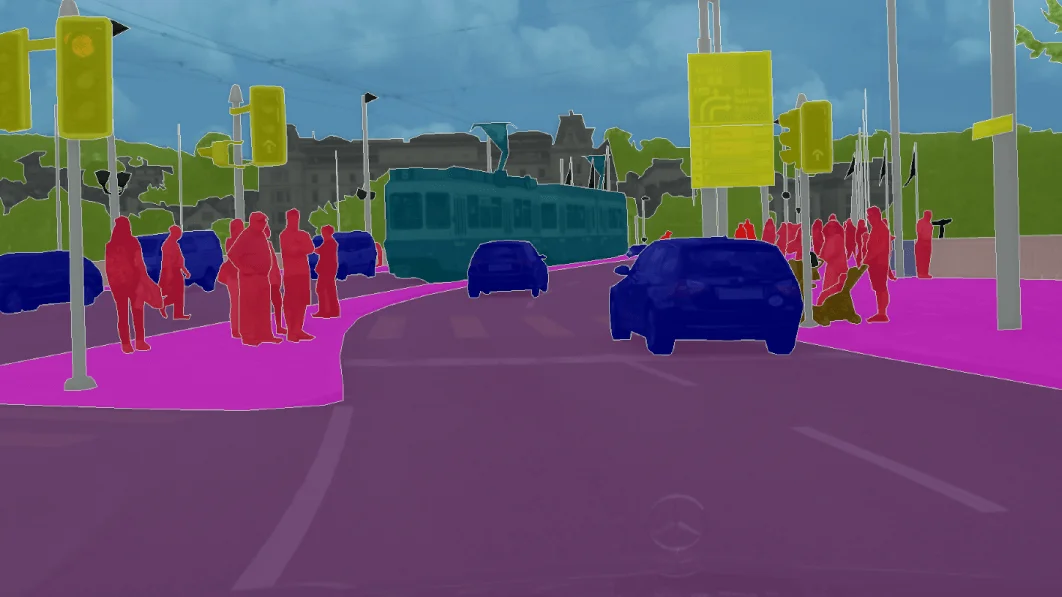
After applying convolutional neural networks (CNN) heavily to classification problems now it's time to explore more about the potential of CNN. Apart from classification, CNN is used today for more advanced problems like image segmentation, object detection, etc. Image segmentation is a process in computer vision where the image is segmented into different segments representing each different class in the image.
Segmentation helps to identify where objects of different classes are present in an image. UNet is a convolutional neural network architecture that expanded with few changes in the CNN architecture. It was invented to deal with biomedical images where the target is not only to classify whether there is an infection or not but also to identify the area of infection.
This article will demonstrate how we can build an image segmentation model using U-Net that will predict the mask of an object present in an image. The model will localize the object in the image using this method. We will be using Google Colab for the implementation whereas you can work on whatever IDE you like.
What you will see in the article?
- What is UNet Architecture?
- Downloading the data set of cats and dogs over which we will build image segmentation model
- How to build the UNet model?
- How to make predictions using the UNet model
1. What is U-Net Architecture

The UNet architecture was introduced for BioMedical Image segmentation by Olag Ronneberger et al. The introduced architecture had two main parts that were encoder and decoder. The encoder is all about the covenant layers followed by pooling operation. It is used to extract the factors in the image. The second part decoder uses transposed convolution to permit localization. It is again an F.C connected layers network. You can read the original published paper U-Net: Convolutional Networks for Biomedical Image Segmentation. Also, read more about UNet architecture that is published with the name as Understanding Semantic Segmentation with UNet.
2. How to download the data set?
The name of the data set is oxford iiit pet dataset which was published on Kaggle. If this does not work for you then you can download it directly from this link. The data set is about a different breed of dogs and cats. With each pet name, there are two types of images that would see when you will obtain the data which is one jpg file and another png file. The jpg files contain the image of the respective pet whereas the png file contains the mask image of the pet. You need to closely observe this to identify the mask.
3. How to Build UNet Model for Image Segmentation
After downloading the data set we have saved the images folder to the drive so that we can read them if you want to read that folder locally. First, we need to import the libraries that we require.
import cv2
import matplotlib.pyplot as plt
import os
from PIL import Image
import numpy as np
import pandas as pd
Once we are done importing the libraries we initialize the directory where the images are stored. After that, we store the list directory in a variable and check what all is present in the list. Use the below code to obtain that and once you print the list you will see something similar to the content shown in the image.
os.chdir('/content/drive/My Drive/Images')
lst   = os.listdir('/content/drive/My Drive/Images')
print(lst)

After this, we have created two lists one for storing masks and the other for storing the image. (mask & img). After storing the image and mask we have picked only 1000 images with their corresponding masks. Use the code shown below to do the same.
mask = []
img = []
for filename in lst:
   if filename.endswith('.jpg'):
   img.append(filename)
   if filename.endswith('.png'):
   mask.append(filename)

img.sort()
mask.sort()
img = img[:1000]
masks = mask[:1000]
After sorting has been done we are reading the image and label mask in X and y respectively. We have captured the index of the image file and stored the directory of that index image. After that, we open that image and resize it also then we convert that image into a grayscale image and store its index. We then store the mask of the image corresponding to the index we stored the grayscale image. After that, we give the directory of the mask and read the mask. Finally, we have pre-processed the mask image by resizing it and normalizing the pixel value then stored it at the pre-processed mask image at the output array at the same index position. X[n] stores the image and y[n] stores the corresponding mask.
3.1 Preprocessing of the image and mask
y = np.zeros((1000, 28,28), dtype=np.float32)
X = np.zeros((1000,224, 224, 1), dtype=np.float32)

for file in img:
index = img.index(i)
dir_img = os.path.join('/content/drive/My Drive/Images', i)
img = Image.open(dir1)
img = img.resize((224, 224))
img = np.reshape(img.convert('L'), (224,224,1))
X[n] = img
          mask = masks[index]
dir_mask = os.path.join('/content/drive/My Drive/Images, mask)
mask_img = cv2.imread(dir_mask)
mask_img = (mask!=2)*1.0
    mask_img = cv2.resize(mask, (28, 28))
     mask_img = 1.0*(mask[:,:,0]>0.2)
     y[n] = mask

If you will plot the pre-processed image and mask you will see something similar to the image shown above. The above image shows the pre-processed image as well as its mask. Now we install the pre-trained model for segmentation and load all the useful libraries from that segmentation model as shown in the code below. We will have to add a few convolution libraries as well to add our own custom layers.
!pip install git+https://github.com/qubvel/segmentation_models
from segmentation_models import Unet
from segmentation_models.backbones import get_preprocessing
rom segmentation_models.losses import bce_jaccard_loss
from segmentation_models.metrics import iou_score
from sklearn.model_selection import train_test_split
import tensorflow as tf
from keras.optimizers import Adam
from tensorflow.keras.losses import binary_crossentropy
from keras.models import model_from_json

from keras.layers import Input, Conv2D, Reshape
from keras.models import Model
We then divide the data into training and testing X, y respectively. After dividing we have imported ResNet as a backbone network and loaded the weights. After this, we pre-process the input and output accordingly.
X_train, X_test, y_train, y_test = train_test_split(X, y, test_size=0.2)
BACKBONE = 'resnet34'
preprocess_input = get_preprocessing(BACKBONE)
X_train = preprocess_input(X_train)
X_test = preprocess_input(X_test)
3.2 Building The UNet Model
We have then imported the U-net model being ResNet as a backbone network and loaded weights of image net. We have then defined the input shape that is expected by the base model and the custom layer that takes that base mode input whose output is then passed to the UNet model. The output of UNet model is then passed to other defined ConvNet layers having activation as ReLU. The final output is then reshaped to 28X28. At last, we have defined the model that takes input (inp) and gives us the output (x_out) using the base_model.
from keras.layers import Reshape
N = x_train.shape[-1]

base_model = Unet(backbone_name='resnet34', encoder_weights='imagenet')

input_base_model = Input(shape=(224, 224, N))

l1 = Conv2D(3, (1, 1))(inp)

out = base_model(l1)

x1 = Conv2D(10, kernel_size =3,strides=2,padding = "same", activation="relu")(out)
x1 =layers.BatchNormalization()

x2= Conv2D(10, kernel_size=3,strides=2,padding = "same", activation="relu")(x1)
x2 =layers.BatchNormalization()

x3 = Conv2D(10, kernel_size=3,strides=2,padding = "same", activation="relu")(x2)
x3 =layers.BatchNormalization()

x4 = Conv2D(1, kernel_size=2,strides=2,padding = "same", activation="relu")(x3)

x_out = Reshape((28,28))(x4)

model = Model(input_base_model, x_out, name=base_model.name)
We have then defined the function for metric, loss and optimizer that we will be using. Dice coefficient as the metric, loss function as binray_cross_entropy and sgd as an optimizer. After defining everything we have compiled the model and fitted the training and validation data to the model. The code illustration for the same is given below.
def dice_coefficient(y_true, y_pred):
    numerator = 2 * tf.reduce_sum(y_true * y_pred)
    denominator = tf.reduce_sum(y_true + y_pred)

return numerator / (denominator + tf.keras.backend.epsilon())

def loss(y_true, y_pred):
    return binary_crossentropy(y_true, y_pred) - tf.log(dice_coefficient(y_true, y_pred) + tf.keras.backend.epsilon())

model.compile(optimizer='sgd', loss=loss, metrics=[dice_coefficient])

model.fit(X_train,y_train,batch_size=32,epochs=30,validation_data=(X_test, y_test))

Once the model is trained we can then evaluate its performance over the testing set using the code shown below which will give us the least loss and highest accuracy. After evaluation, we have saved the trained model weights by serializing it.
model.evaluate(x_test, y_test)
from keras.models import model_from_json
model_json = model.to_json()

with open("model.json", "w") as json_file:
    json_file.write(model_json)
model.save_weights("model.h5")
print("Saved model to disk")

4. Prediction by the UNet model
After saving the model we made predictions on X_train and X_test using the trained model and stored it. After making predictions we then have defined a function to visualize the prediction made by the model. The function expects input array and output array and the predictions. We have defined k to be none so to randomly pick the images from the training data and for the same index of the picked training image we have taken the mask. We have then defined the figure size and plotted all three that are image, mask, and predicted mask.
training_pred = model.predict(X_train)
testing_pred = model.predict(X_test)

def prediction(X, y, pred, k=None):
    if k  == ‘None’:
        k = np.random.randint(0, len(X))

    has_mask = y[k].max() > 0

    figure, j = plt.subplots(1, 3, figsize=(20, 20))
    j[0].imshow(X[k, ..., 0])
    if has_mask:
        j[0].contour(y[i].squeeze())
    k[1].imshow(y[i].squeeze())
    k[2].imshow(pred[i].squeeze())
    if has_mask:
        k[2].contour(preds[i].squeeze())
We now plot the images to see the model results. Use the below code to do so
prediction(X_train, y_train, training_prediction)

The above images show the randomly picked images, corresponding ground truth of the mask and predicted mask by the trained UNet model.
Conclusion
Image segmentation is a very useful task in computer vision that can be applied to a variety of use-cases whether in medical or in driverless cars to capture different segments or different classes in real-time. I hope you have got a fair and understanding of image segmentation using the UNet model. Now you can try implementing image segmentation on different problems using -Net or by exploring other models that are useful in image segmentation. You can also check this Kaggle problem “Carvana Image Masking Problem”. Also, read the applications of segmentation.

Your reaction