

Analyzing the review of customers is becoming more interesting day by day. This is because every customer-oriented company wants to know the feedback of its customers towards its product in order to customer satisfaction. The developments in the field of natural language processing are helping in analyzing the customer’s reviews that are available in the textual format.
In this article, we will analyze the reviews of customers about a restaurant and will predict based on these reviews whether the customer has liked the product of the restaurant or not. That means whether it is a positive review or negative review, based on the available text review. The prediction will be carried out by classification models and will find out which classification model is best in this task of prediction.
The Dataset
In this experiment, a restaurant’s reviews dataset is used that is publically available on Kaggle. The motivation behind using this dataset is that most of the restaurants request its customers for review. Based on these reviews, the restaurant will be able to make improvements in order to further customer satisfaction. This dataset comes in a TSV (Tab Separated Values) file and comprises 1,000 reviews of customers along with a binary feature indicating whether a customer has liked the product of the restaurant or not.
Analyzing Reviews using Natural Language Processing
First, we need to import the required libraries. The below code snippet will import those libraries.
#Importing required Libraries
import pandas as pd
import numpy as np
import matplotlib.pyplot as plt
import re
import nltk
from nltk.corpus import stopwords
from nltk.stem.porter import PorterStemmer
from sklearn.feature_extraction.text import CountVectorizer
from sklearn.model_selection import train_test_split
from sklearn.naive_bayes import GaussianNB
from sklearn.metrics import confusion_matrix
from sklearn.ensemble import RandomForestClassifier
from sklearn.svm import SVC
The dataset that is downloaded from the Kaggle will be read here. As we are reading a TSV file, we need to give the separating parameter that is delimiter here. For TSV files, the tab space is the delimiter so ‘\t’ is used here. To ignore the quotes present in the text, we are including the quoting parameter here.
# Reading the dataset
dataset = pd.read_csv('Restaurant_Reviews_New.tsv', delimiter = '\t', quoting = 3)
Now, once we read the dataset, we need to preprocess the data. It is expected that you are aware of the basics of natural language processing. Here we need text data only into consideration so a regular expression is used for taking alphabetical values only. Then we convert all the text into lower case. After that, it is split into words and converted to its original form by stemming. Finally, all the stopwords are removed from the text and every word is added to the corpus.
# Preprocessing
nltk.download('stopwords')
corpus = []
for i in range(0, 1000):
    review = re.sub('[^a-zA-Z]', ' ', dataset['Review'][i])
    review = review.lower()
    review = review.split()
    ps = PorterStemmer()
    review = [ps.stem(word) for word in review if not word in set(stopwords.words('english'))]
    review = ' '.join(review)
    corpus.append(review)
Once the corpus of words is ready, we create a bag of words model, that is actually a sparse matrix where we are using a maximum of 1500 features. From this sparse matrix, we have created the input and output features. The output feature in this data set is the binary response to whether the customer has liked the product of the restaurant or not. After that, we have defined the training and test sets.
# Creating the Bag of Words model
cv = CountVectorizer(max_features = 1500)
X = cv.fit_transform(corpus).toarray()
y = dataset.iloc[:, 1].values

# Splitting the dataset into the Training set and Test set
X_train, X_test, y_train, y_test = train_test_split(X, y, test_size = 0.20, random_state = 0)
Classification of Reviews
Once we are ready with the training and test data, we will define three classification models through which we will predict whether the custom has liked the product or not, based on the reviews. We are going to define three classification models here - the Naive Bayes Model, the Random Forest Model, and the Support Vector Model.
#Clasiification
# Fitting Naive Bayes
NB_classifier = GaussianNB()
NB_classifier.fit(X_train, y_train)
y_pred_NB = NB_classifier.predict(X_test)

# Random Forest
rf_classifier = RandomForestClassifier(n_estimators = 10, criterion = 'entropy', random_state = 0)
rf_classifier.fit(X_train, y_train)
y_pred_rf = rf_classifier.predict(X_test)

#Support Vector
SVC_classifier = SVC(kernel = 'rbf')
SVC_classifier.fit(X_train, y_train)
y_pred_SVC = SVC_classifier.predict(X_test)
Now once we have defined and trained the three models and made predictions using all of these, we need to see their classification accuracies. This we are going to check through the confusion matrix and CAP (Cumulative Accuracy Profile) Curve Analysis.
#Confusion Matrices cm_NB = confusion_matrix(y_test, y_pred_NB) cm_RandFor = confusion_matrix(y_test, y_pred_rf) cm_SVC = confusion_matrix(y_test, y_pred_SVC)#CAP Analysis total = len(y_test) one_count = np.sum(y_test) zero_count = total - one_count lm_NB = [y for _, y in sorted(zip(y_pred_NB, y_test), reverse = True)] lm_SVC = [y for _, y in sorted(zip(y_pred_SVC, y_test), reverse = True)] lm_RandFor = [y for _, y in sorted(zip(y_pred_rf, y_test), reverse = True)] x = np.arange(0, total + 1) y_NB = np.append([0], np.cumsum(lm_NB)) y_SVC = np.append([0], np.cumsum(lm_SVC)) y_RandFor = np.append([0], np.cumsum(lm_RandFor)) plt.figure(figsize = (10, 10)) plt.title('CAP Curve Analysis') plt.plot([0, total], [0, one_count], c = 'k', linestyle = '--', label = 'Random Model') plt.plot([0, one_count, total], [0, one_count, one_count], c = 'grey', linewidth = 2, label = 'Perfect Model') plt.plot(x, y_SVC, c = 'y', label = 'SVC', linewidth = 2) plt.plot(x, y_NB, c = 'b', label = 'Naive Bayes', linewidth = 2) plt.plot(x, y_RandFor, c = 'r', label = 'Rand Forest', linewidth = 2) plt.legend()
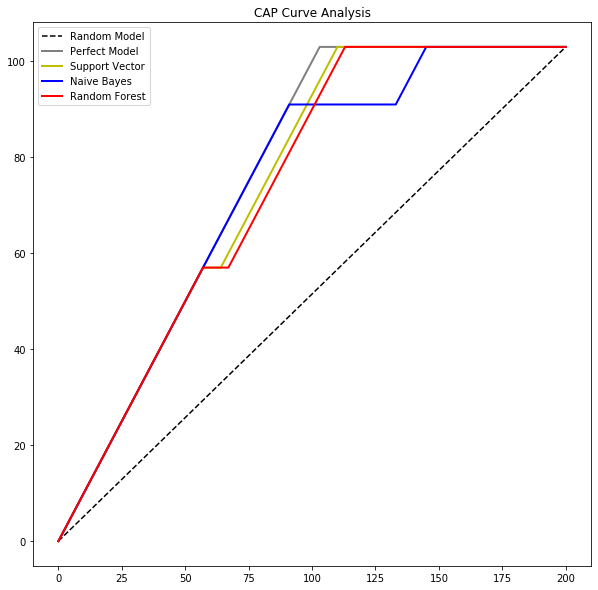
By analyzing the confusion matrices and CAP curves of each of the three classifiers, it is clear that the support vector classifier is best among all three. In the task of predicting whether the customer likes the product or not, based on reviews, the support vector classifier has outperformed the other two classifiers.
- From Humanoid Robots to Telecom Trials, 12 Major Announcements at NVIDIA GTC Berlin 2026
- Anyone Can Make a Robot Move, Few Can Make It Stop
- After ISRO’s PSLV Failure, TakeMe2Space Looks to SpaceX for Reliable Launch
- Why AI Agents are the Next Frontier in Quantum Security
- Physical AI Squeezes Labour Market, And Low-Skilled Immigrant Jobs May Be First to Fall
- Rocket Math Isn’t Mathing: Why India’s Space Launches are Expensive