

5 min
 We have all been in situations where we went to a doctor when we’re feeling unwell and after finding out the consultation fee, we think that it would have been much better to just have waited out the illness. MachineHack’s latest hackathon now gives you a chance to model and predict doctor’s fee. You can use this article to submit your first solution and then go on to create awesome and better models.
1) Open your favourite browser and go to https://www.machinehack.com/course/predict-a-doctors-consultation-fees-hackathon/
2) Click the login button on the top right corner. If you are a new user click on sign up and register on MachineHack with your email, otherwise enter your email and password and click “log in”.
We have all been in situations where we went to a doctor when we’re feeling unwell and after finding out the consultation fee, we think that it would have been much better to just have waited out the illness. MachineHack’s latest hackathon now gives you a chance to model and predict doctor’s fee. You can use this article to submit your first solution and then go on to create awesome and better models.
1) Open your favourite browser and go to https://www.machinehack.com/course/predict-a-doctors-consultation-fees-hackathon/
2) Click the login button on the top right corner. If you are a new user click on sign up and register on MachineHack with your email, otherwise enter your email and password and click “log in”.
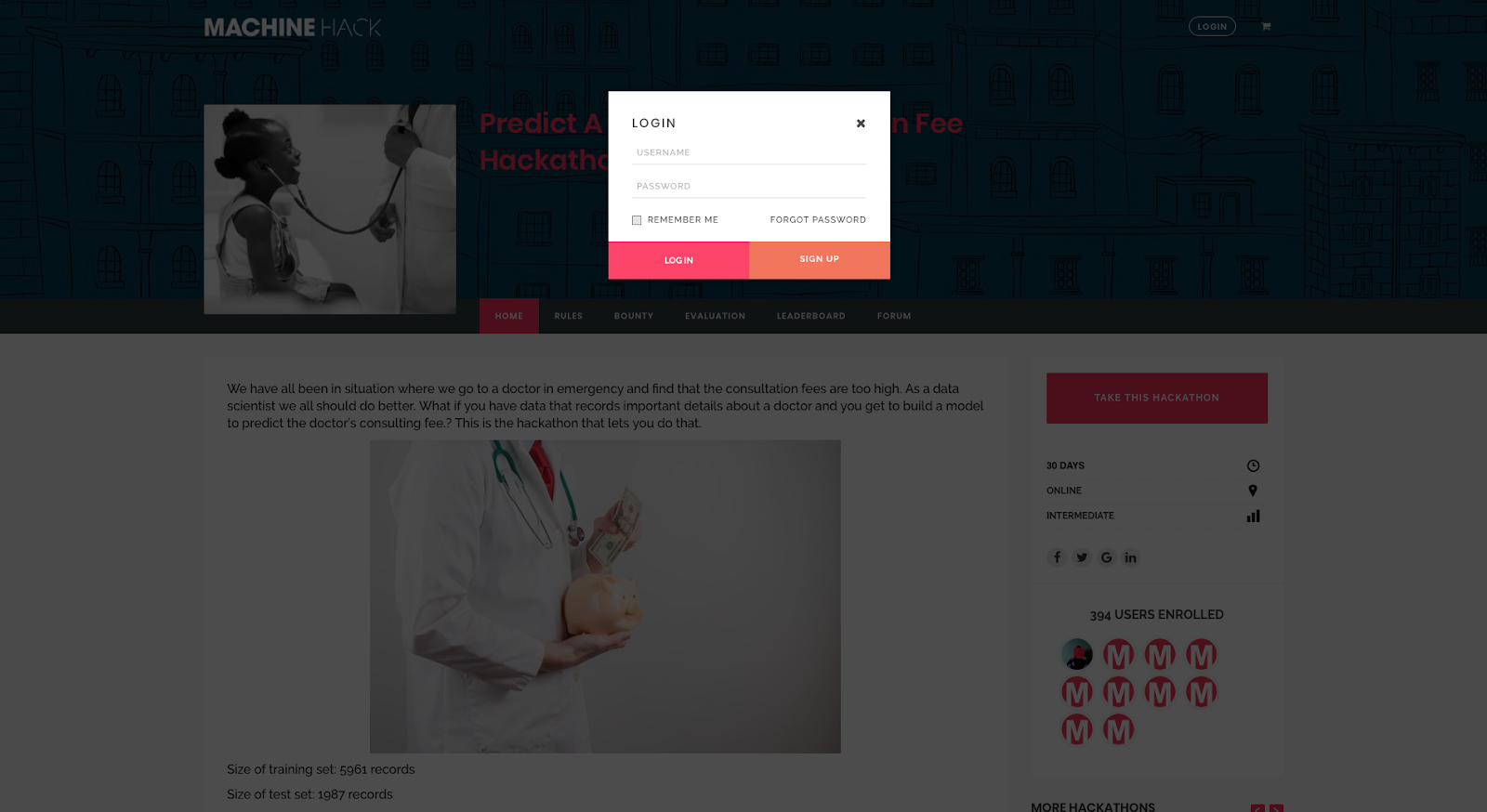 3) After logging in, click on “Hackathons” which will take you to the “All Hackathons” page. There, choose our latest hackathon “Predict A Doctor’s Consultation Fee Hackathon ”. Read through each of the highlighted sections of the Hackathon to understand the problem clearly.
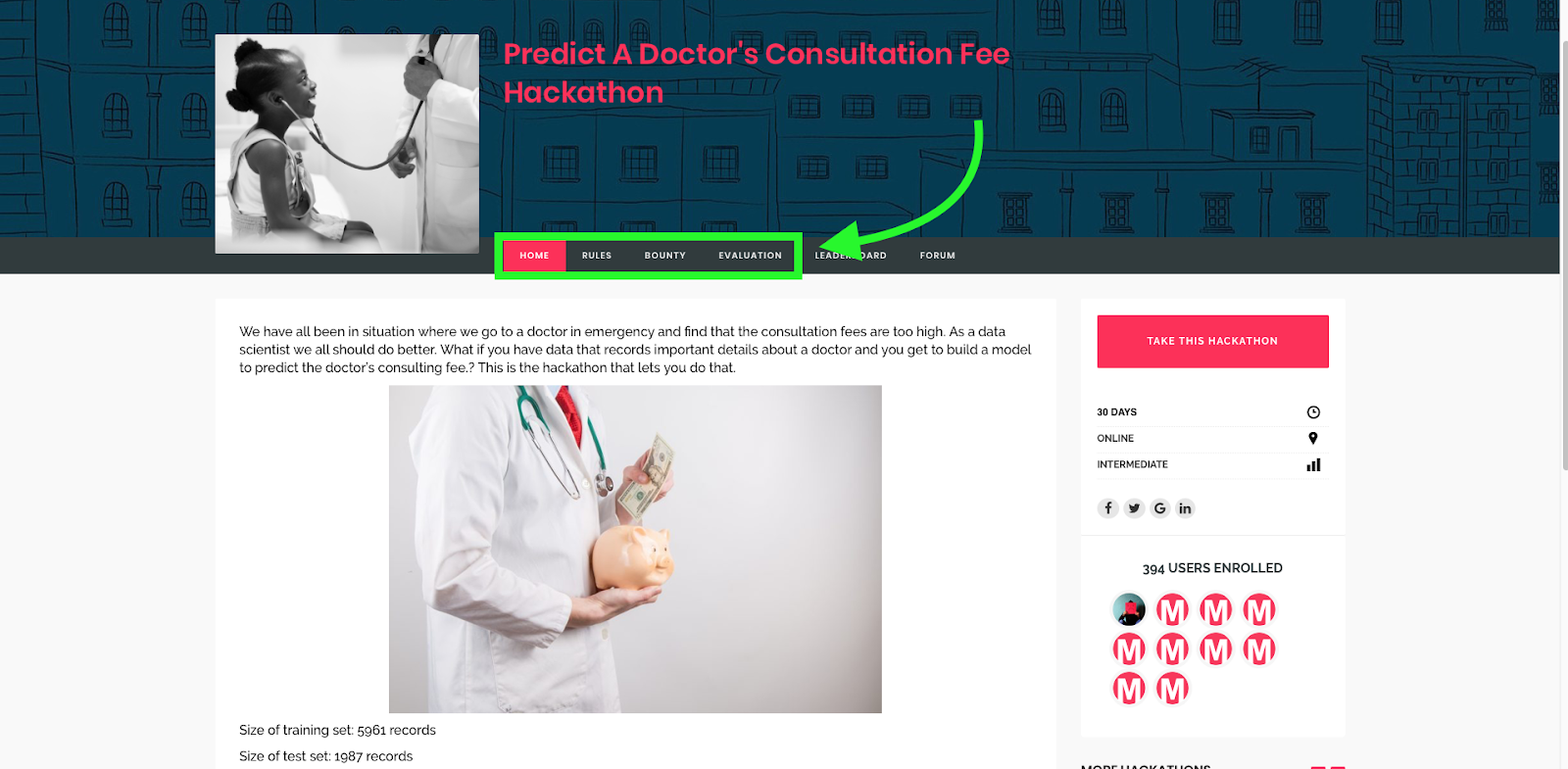 4) Click on “Start Hackathon” to enter the challenge, read through the rules and click on “Start Course” which will take you to the submission page
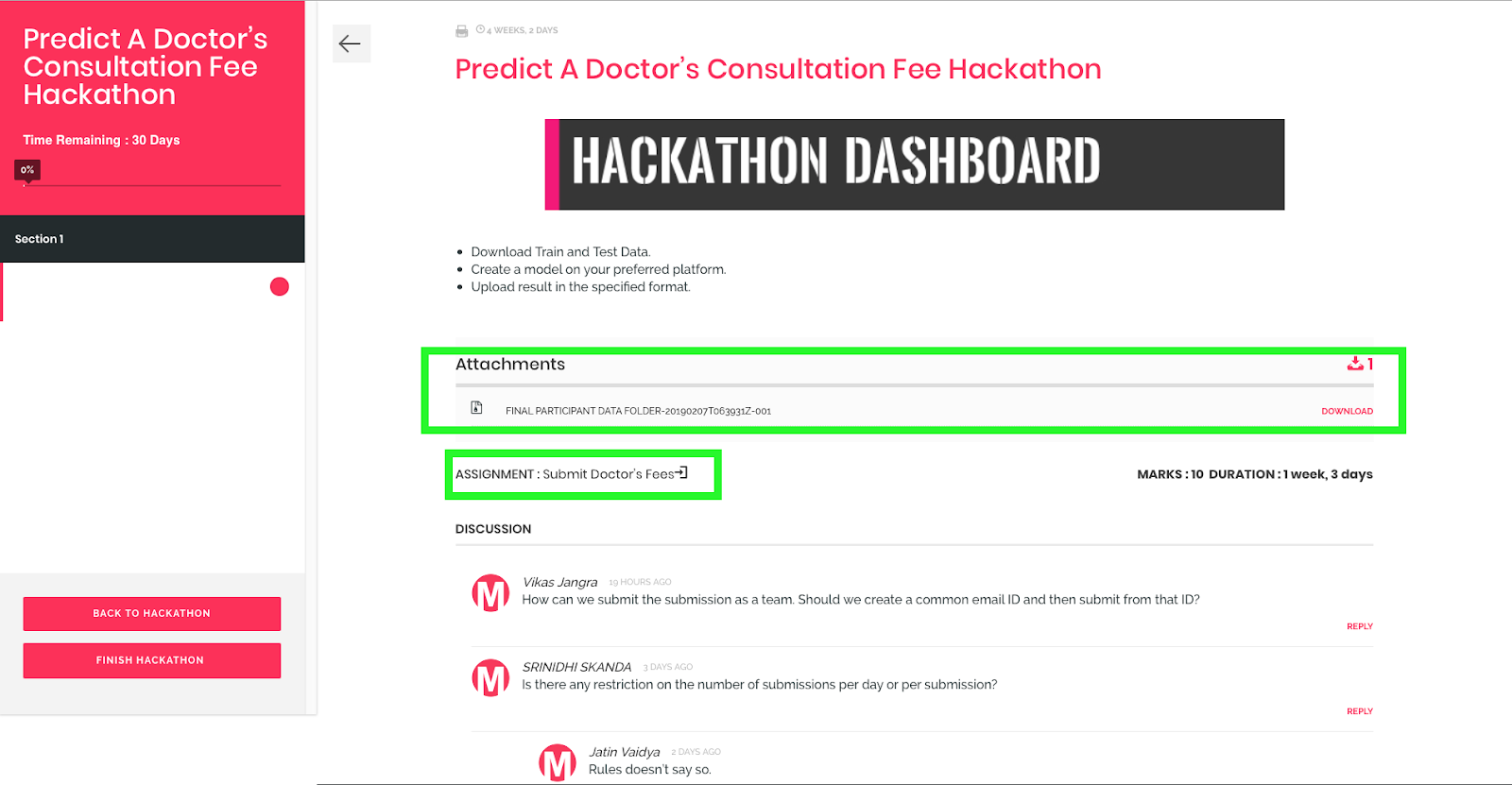
 5) Downloading the data and submitting your solution: In the submission page, the training set, test set and sample submission can be downloaded from the “Attachment” section and your submissions can be made by following the submit link in the “Assignment” section as highlighted below.
 Caution:
After you click on “Finish Hackathon” you cannot submit any more entries. Finish the hackathon only when you have no more submissions to make.
Caution:
After you click on “Finish Hackathon” you cannot submit any more entries. Finish the hackathon only when you have no more submissions to make.
Solving The Predict A Doctor’s Consultation Fee Hackathon
A. Understanding the problem
Predict A Doctor’s Consultation Fee Hackathon is about predicting the fee a doctor will charge for consultation based on the following features. Qualification: Qualification and degrees held by the doctor Experience: Experience of the doctor in years Rating: Rating given by patients Profile: Type of the doctor Miscellaeous_Info: Extra information about the doctor Place: Area and the city where the doctor is located. Since we are going to predict whole numbers, the problem is a regression problem.B. Data Cleaning
Data Cleaning and pre-processing is an essential part of creating any machine learning model. The cleaner the data the better the prediction. The data provided is raw and may contain missing values or fields. Make sure to clean your data before you start building your models. Follow the link to get yourself started with Data Preprocessing in Python and R. C. Coding Your First Regression Problemimport pandas as pd
training_set = pd.read_excel("Final_Train.xlsx")
test_set = pd.read_excel("Final_Test.xlsx")
X_train = training_set.iloc[:,0:6].values
Y_train = training_set.iloc[:,-1].values
X_test = test_set.iloc[:,0:6].values
# Data Preprocessing
"""Follow the instructions at :
https://analyticsindiamag.com/data-pre-processing-in-python/ to perform Data-Preprocessing or Cleaning"""
# Using Decision Tree Regressor to Predict the Doctor Fees
#importing the library for Decision Tree Regressor
from sklearn.tree import DecisionTreeRegressor
#Initializing the Deision Tree Regressor
dtr = DecisionTreeRegressor()
# Fitting the Decision Tree Regressor with training Data
dtr.fit(X_train,Y_train)
# Predicting the values(Fees) for Test Data
Y_pred_dtr = scaler.inverse_transform(dtr.predict(X_test))
"""NOTE:scaler.inverse_transform is used to inverse the scaling"""
# Saving the Predicted values in to an Excel file
pd.DataFrame(Y_pred_dtr, columns = ['Fees']).to_excel("predictions_tree.xlsx", index = False)
D. Submitting your solution
Go to the submission page as shown in step 5 above and click on “Submit Doctor’s Fees” in the “Assignment” section. Select the file you want to upload, add a comment and click on “Submit Assignment”.E. Checking your Score
Check the hackathon’s leaderboard. The scores of your submission will be updated within five minutes after submission.
- The AI Slowdown Narrative Doesn’t Reflect Enterprise Reality
- India’s Enterprises are Scaling AI. Is the Infrastructure Ready?
- Industry Wants Faster Approvals and Cheaper Power in India’s Data Centre Policy
- Inside Jio Platforms: Its Tech Bets, Loss-Making Subsidiaries and Hidden Risks
- India’s GCCs to Add 1.4 Million Jobs, Drive 170 Million Sq. Ft. Office Demand by 2031
- AI Can Be Cyborg or Centaur. But Can Enterprises Monetise It?