

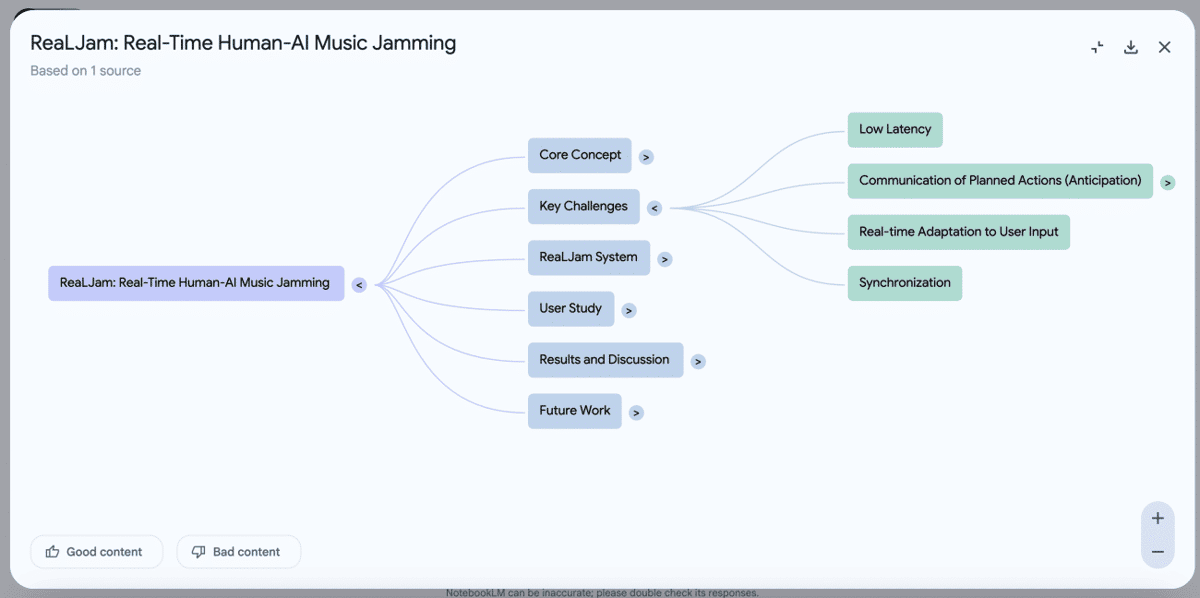
Tech giant Google rolled out NotebookLM’s new mind map feature on Wednesday, allowing users to see a visual summary from any source document. The topics and their related ideas are represented as a branching diagram.
Simon Tokumine, director of product management at Google Labs, took to X to make this announcement.
🛳️Rolling out interactive Mindmaps in NotebookLM!
— Simon (@tokumin) March 19, 2025
I'm so inspired by the Exploratorium here in SF - What if every notebook generated your own personal set of interactive understanding toys that help you learn through play? What if instead of text or images, Notebook could even… pic.twitter.com/fFJCGrv0kc
As per the official documentation, one can use the mind maps feature when trying to understand the big picture of the source material, explore unfamiliar information, connect the dots, and get a structure of the information.
To generate a mind map, one needs to open an existing notebook (or create a new one). Once the source is analysed, a “Mind Map” button will appear, generating a mind map note to see the visual summary. Furthermore, one can interact with the Mind Map by zooming in/out, scrolling, expanding/collapsing branches, and clicking on the nodes to ask questions in NotebookLM chat.
The Mind Map can also be downloaded and shared as an image file. The feature will be available globally in the next seven days and should be available in some countries presently. AIM was able to access the feature, and it worked as expected.
Besides this, the company also added a new feature to Gemini, Canvas, that provides an interactive space for refining documents and code. It also enabled support for Audio Overview in Gemini.
A user needs to select ‘Canvas’ in the prompt bar and start writing/editing documents, or code, with changes appearing in real-time. The feature also supports previews for HTML/React code.
To collaborate, one can export the output to Google Docs and share it with others.
Google has been announcing major updates across all its AI products, like Gemma 3, and new models tuned for robotics, and it appears to be getting more serious with AI updates.
- ReNew Pledges ₹80,000 Cr for Green Data Centre to Fuel India’s AI Push
- Mars Opens Hyderabad GCC With Genpact to Expand Digital, AI Capabilities
- Shield AI Opens Bengaluru Engineering Office to Build Defence Autonomy Software
- Adobe, Google Expand AI Partnership Across Creative and Productivity Tools
- Google Launches Gemini 4 Hydrogen for Faster Coding and AI Workflows
- Kalshi to Develop Trading Platform for Compute Futures: Report