
Transformers is all the attention, we need right now!
OpenAI has recently released its text-to-image generation model based on transformers architecture called DALL-E. The name of this model is inspired by surrealist Salvador Dali and the robot from Wall-E. DALL-E is a neural network that creates images from text( that can be expressed in natural language). This model holds 12 billion parameters of autoregressive transformers(from GPT3) trained on 250 million pairs of images and text that are collected through the internet. The DALL-E model gives high-quality images on MS-COCO dataset zero shot, when trained without labels. Due to the model's flexibility, DALL-E is able to integrate different things in a very reasonable way such as creating anthropomorphized versions of animals, rendering text, and performing some types of image-to-image translation.
The DALL-E framework is published under OpenAI by Aditya Ramesh, Mikhail Pavlov, Gabriel Goh, Scott Gray, Chelsea Voss, Alec Radford, Mark Chen, Ilya Sutskever.
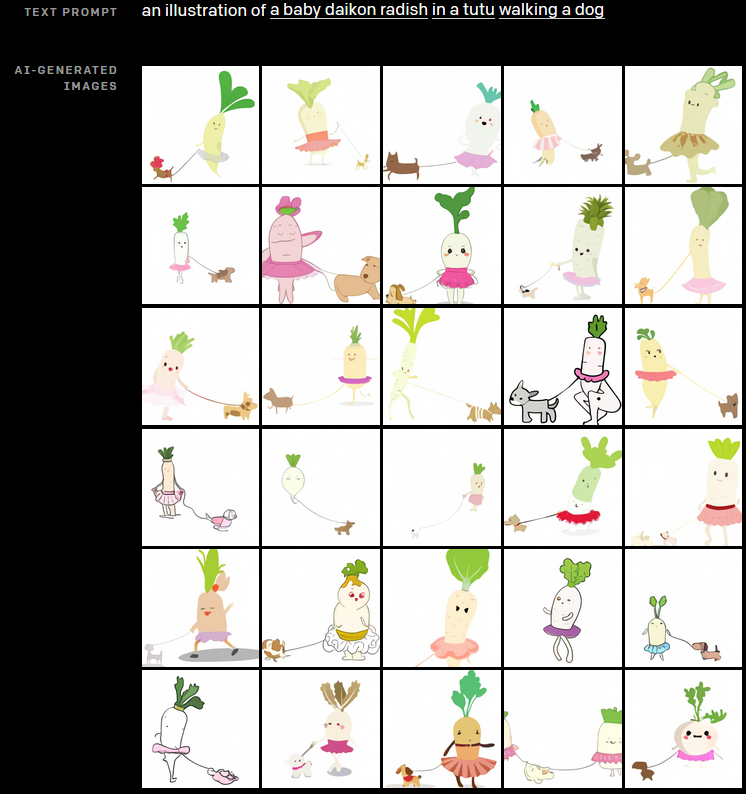
Here is an example of generating high-quality AI images generated from text.
Overview of DALL-E
The DALL-E is a transformer language model whose goal is to train an autoregressive transformer in order to model the text and image tokens as a single stream of data. The overall approach DALL-E can be shown as maximizing the evidence lower bound (ELB) on the joint likelihood of the model distribution over images. Using pixels as image tokens may require a high amount of memory to generate high-quality images but the use of likelihood objectives tends to capture the high-frequency structure that makes the objective more visible to us. The whole training procedure has divided into two stages:
Stage 1 : Train a discrete Variational Autoencoder(DVAE) to compress each 256 X 256 RGB image to 32 X 32 grid of image tokens, each element of which can assume 8192 possible values. This reduces the context size of the transformer by a factor of 192 without a large degradation in visual quality.

Stage 2 : Concatenate up to 256 BPE-encoded text tokens with the 32 × 32 = 1024 image tokens, and train an autoregressive transformer to model the joint distribution over the text and image tokens.
Note : The details of DVAE are given in the Appendix of Research Paper .
Apart from generating images from scratch, the above approach helps to reproduce a consistent image with the text that can extend to the bottom-right corner from any rectangular region of any image.
Application use of DALL-E
- Controlling attributes
- Drawing multiple objects
- Visualizing perspective and three-dimensionality
- Visualizing internal and external structure
- Inferring contextual details
- Applications of preceding capabilities
- Combining unrelated concepts
- Animal illustrations
- Zero-shot visual reasoning
- Geographic knowledge
- Temporal knowledge
Requirements & Installation
The package which we are going to install is the PyTorch implementation of discrete VAE used for DALL-E. You can install this package via pip.
!pip install DALL-E
Demo of Using Pretrained D-VAE for DALL-E
- Import all the required packages and modules.
 import io
 import os, sys
 import requests
 import PIL
 import torch
 import torchvision.transforms as T
 import torchvision.transforms.functional as TF
 from dall_e import map_pixels, unmap_pixels, load_model
 from IPython.display import display, display_markdown
- Make helper functions:
a) For dowloading the image
 target_image_size = 256
 def download_image(url):
     resp = requests.get(url)
     resp.raise_for_status()
     return PIL.Image.open(io.BytesIO(resp.content))
b) For preprocessing the downloaded image
 def preprocess(img):
     s = min(img.size)
     if s < target_image_size:
         raise ValueError(f'min dim for image {s} < {target_image_size}')
     r = target_image_size / s
     s = (round(r * img.size[1]), round(r * img.size[0]))
     img = TF.resize(img, s, interpolation=PIL.Image.LANCZOS)
     img = TF.center_crop(img, output_size=2 * [target_image_size])
     img = torch.unsqueeze(T.ToTensor()(img), 0)
     return map_pixels(img)
- Load the models for encoder and decoder.
 # This can be changed to a GPU, e.g. 'cuda:0'.
 dev = torch.device('cpu')
 # For faster load times, download these files locally and use the local paths instead.
 enc = load_model("https://cdn.openai.com/dall-e/encoder.pkl", dev)
 dec = load_model("https://cdn.openai.com/dall-e/decoder.pkl", dev)
- Download the image from the url and preprocess it.
 x = preprocess(download_image('https://assets.bwbx.io/images/users/iqjWHBFdfxIU/iKIWgaiJUtss/v2/1000x-1.jpg'))
 display_markdown('Original image:')
 display(T.ToPILImage(mode='RGB')(x[0]))
The input image is :

- Reconstruct the image.
 import torch.nn.functional as F
 z_logits = enc(x)
 z = torch.argmax(z_logits, axis=1)
 z = F.one_hot(z, num_classes=enc.vocab_size).permute(0, 3, 1, 2).float()
 x_stats = dec(z).float()
 x_rec = unmap_pixels(torch.sigmoid(x_stats[:, :3]))
 x_rec = T.ToPILImage(mode='RGB')(x_rec[0])
 display_markdown('Reconstructed image:')
 display(x_rec)
The output image after reconstruction will look like this:

EndNotes
In this post, we have given an overview of DALL-E, a very simple method for text-to-image generation based on an autoregressive transformer.
Note : All the images except for the output are taken from official sources.
Official Codes, Documentation & Tutorials are available at :

Your reaction
Discussion
What's your take on this story?
No comments yet — be the first to share your view.