
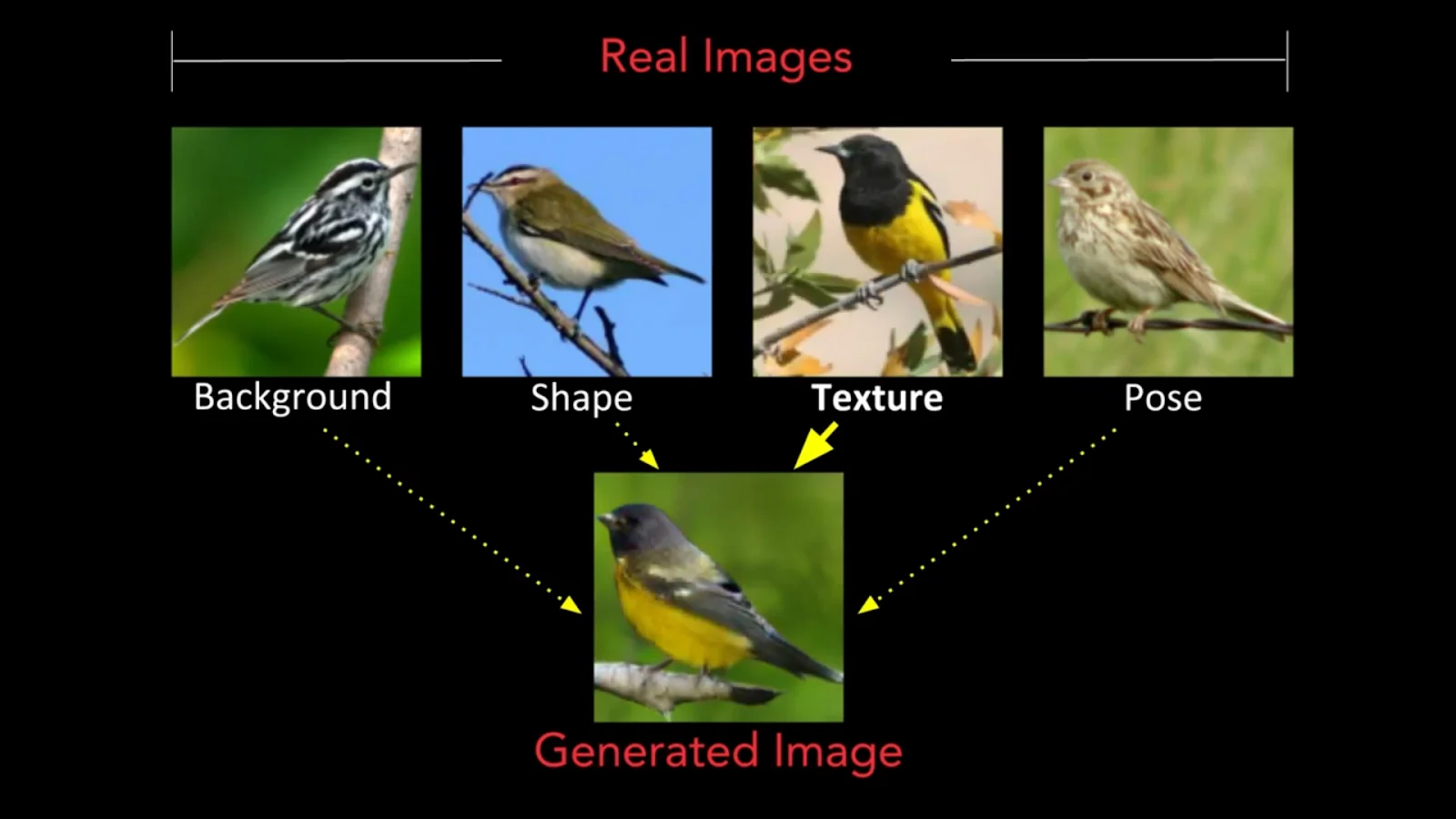
MixNMatch is a conditional generative model that disentangles and encodes background, object pose, shape, and texture from real images with minimal supervision. Simply put, it is a GAN that creates synthetic images by combining different aspects of multiple real reference images. While there has been great progress made in conditional image generation, MixNMatch is the first model to simultaneously disentangle background, object pose, object shape, and object texture with minimal supervision.
Architecture and Approach
For an unlabeled collection of images of a single object category, MixNMatch learns two tasks simultaneously:
- Encoding background, object pose, shape, and texture factors associated with images into a disentangled latent code space i.e., where a code uniquely controls each factor.
- Generating high-quality images matching the true data distribution Pdata(x) by combining latent factors from the disentangled code space.

The generator model used is based on FineGAN. FineGAN hierarchically generates images in three stages from an input of four randomly sampled latent codes (z, b, c, p):
- Background stage where the model only generates the background, conditioned on the latent one-hot background code b
- Parent stage where the model generates the object’s shape and pose, adapted on latent one-hot parent code p as well as continuous code z, and stitches it to the existing background image.
- Child stage where the model fills in the object’s texture, conditioned on latent one-hot child code c.

FineGAN automatically generates masks in the parent and child stages, without any supervision, to capture the appropriate shape and texture details. It uses object bounding boxes, acquired through an object detector to disentangle the background. For the remaining factors, FineGAN uses information theory and imposes constraints on the latent codes’ relationships. It is trained with three losses, one for each stage, using adversarial training to make the generated image look real and/or mutual information maximization between the latent code and images.

Here Lb, Lp, and Lc represent the losses in the background, parent, and child stages.
FineGAN is good at disentangling multiple factors to generate realistic images but it is conditioned on sampled latent code, not real images. To encode disentangled representations from real images, MixNMatch uses four encoders, each of which predicts the z, b, p, c codes from real images. These encoders also learn inverse mapping, i.e., projection from real images into the code space to help maintain the desired disentanglement properties.
Adversarial learning is performed on the paired image-code distribution produced by the encoder and the generator’s paired image-code distribution. The loss function used simultaneously enforces the generated images to look real and extracted real image-codes to capture the desired factors.

Here E is the encoder, G is the FineGAN generator, and y is a placeholder for the latent codes z, b, p, c. Pdata is the data (real image) distribution and Pcode is the latent code distribution.
Another drawback of FineGAN for this use-case is that it imposes strict code relationship constraints. Although these constraints are key to induce the desired disentanglement in an unsupervised way, but for arbitrary real images these strict relationships may not hold. For example, a car can have multiple different backgrounds in real images. This would make enforcing its extracted codes difficult. This strict code relationship constraint makes the discriminator’s task unnecessarily easy. It also confuses the background b and texture c encoders since the background and child latent codes will essentially become identical as they are always being asked to predict the same output as each other and won’t be able to distinguish between background and object texture.
To deal with this constraints issue, MixNMatch trains four separate discriminators, one for each code type. This way, discriminators can’t see the other codes and cannot discriminate based on their relationships. Also, it includes fake images generated with randomly sampled codes without the code constraints when training the encoders. Specifically, the encoders are trained to predict back the sampled codes that were used to generate the corresponding fake image.

Here CE() denotes cross-entropy loss, and y is a placeholder for the latent codes b, p, c. For z, the L1 loss is used. This loss function helps each encoder, particularly the b and c encoders, to learn the corresponding factor.
By combining the four latent code encoders and the FineGAN generator, we get MixNMatch’s code mode setting. Although this code mode can encode up to four images into b, z, p, c codes and generate realistic images with high accuracy, it cant provide exact pixel-level shape and pose alignment. This is mainly because the latent p code space’s capacity, which is responsible for capturing shape, is too small to model per-instance pixel-level details.

MixNMatch’s feature mode addresses this issue of pixel-level details. Instead of encoding reference images into a low-dimensional shape code, it directly learns a mapping from the image to a higher-dimensional feature space that preserves the reference image’s spatially-aligned shape and pose details. Generator Gp is used to adversarially train a new shape and pose feature extractor S, which takes as input a real image x and outputs feature S(x). Gp takes as input codes p and z to generate the parent stage image, capturing the object’s shape.

MixNMatch in Action
Requirements
- Python 3.7
- Pytorch 1.3.1
- Torchvision==0.4.2
- Easydict
- Matplotlib
- Scikit-learn
- TensorboardX
- Pillow
- NVIDIA GPU + CUDA CuDNN
Generating images from a pre-trained model
- Clone the repository
git clone https://github.com/Yuheng-Li/MixNMatch.git
- Download the pre-trained models and extract them in the models directory. Pretrained models for CUB, Dogs, and Cars are available at this link. Ensure that the Generator, Encoder, and Feature_extractor models in the models folder are named as G.pth, E.pth, and EX.pth
- Navigate into the code directory and run
eval.pyfile
python eval.py --z path_to_pose_source_images --b path_to_bg_source_images --p path_to_shape_source_images --c path_to_color_source_images --out path_to_ourput --mode code_or_feature --models path_to_pretrained_models
python eval.py --z pose/pose-3.png --b background/background-3.png --p shape/shape-2.png --c color/color-2.png --mode code --models ../models --out ./output-1.png

python eval.py --z pose/pose-2.png --b background/background-1.png --p shape/shape-4.png --c color/color-3.png --mode code --models ../models --out ./output-2.png

Training a model
You can download the formatted CUB data from this link. Or if you wish to train this on your own dataset, format it in a way similar to the CUB dataset provided.
In the config.py file:
- Specify the dataset location in DATA_DIR.
- Specify the number of super and fine-grained categories that you wish FineGAN to discover in SUPER_CATEGORIES and FINE_GRAINED_CATEGORIES.
Run the scripts for the two training stages:
- Run
python train_first_stage.py output_name - Run
python train_second_stage.py output_name path_to_pretrained_G path_to_pretrained_E
Note that for the second stage of training, output will be in output/output_name, path_to_pretrained_G will be output/output_name/Model/G_0.pth, path_to_pretrained_E will be output/output_name/Model/E_0.pth
Last Epoch (Endnote)
Although conditional image generation is quite an active research area, there isn’t really disentanglement for natural objects they are usually just used for faces. The proposed MixNMatch cannot only achieve state-of-the-art performance with little supervision, but can also be applied to any industry. This makes it a very powerful and flexible solution. The paper also proposes other interesting use-cases like sketch2image, cartoon2image, and image2gif.


Your reaction
Discussion
What's your take on this story?
No comments yet — be the first to share your view.