

5 min
All machine Learning beginners and enthusiasts need some hands-on experience with Python, especially with creating neural networks. This tutorial aims to equip anyone with zero experience in coding to understand and create an Artificial Neural network in Python, provided you have the basic understanding of how an ANN works.
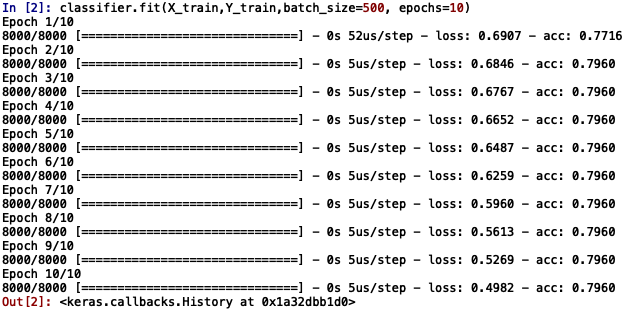 The values of loss and accuracy displayed along the right side denote the loss and accuracy attained during the training of the model at each epoch
Evaluating the performance on the test set
The values of loss and accuracy displayed along the right side denote the loss and accuracy attained during the training of the model at each epoch
Evaluating the performance on the test set
 Loss = 0.48 0r 48%
Accuracy = 0.7975 or 79%
It means that 79% of the predicted results match with the actual values in the test set.
The parameters can be tweaked to see its effects on the results and optimal values can be chosen.The Python code can be used to solve any problems such as regression or classification and just requires you to change some arguments.
Loss = 0.48 0r 48%
Accuracy = 0.7975 or 79%
It means that 79% of the predicted results match with the actual values in the test set.
The parameters can be tweaked to see its effects on the results and optimal values can be chosen.The Python code can be used to solve any problems such as regression or classification and just requires you to change some arguments.
Prerequisites
- Basic understanding of Artificial Neural Network
- Basic understanding of python language
Neural Network in Python
We will use the Keras API with Tensorflow or Theano backends for creating our neural network.Installing libraries
Theano
pip install --upgrade --no-deps git+git://github.com/Theano/Theano.git
Tensorflow
pip3 install --user --upgrade “tensorflow_url for specific to the environment”
Find the tensorflow_url here
Notes:
Requires a 64 bit Architecture
Keras
pip install --upgrade Keras
By default Keras uses Tensorflow backend. If you feel the need to use Theano backend instead, locate the file /home/user/.keras/keras.json (or %USERPROFILE%/.keras/keras.json in windows) and replace the line "backend": "tensorflow" with "backend": "theano"
If the file is not present, create the file in the same location and add the following lines :
{
"image_data_format": "channels_last",
"epsilon": 1e-07,
"floatx": "float32",
"backend": "theano"
}
Let's get coding :
Import the libraries
import keras
from keras.models import Sequential
from keras.layers import Dense
Initialising the Artificial Neural Network
model = Sequential()
The Sequential model is a linear stack of layers.
Creating the Input-layer and the first hidden layer
model.add(Dense(input_dim = 2, units = 10, activation='relu', kernel_initializer='uniform'))
This line adds the input layer and one hidden layer to our neural network. Lets break down the arguments one by one:
Dense(): lets us create a densely connected neural network
input_dim : shape or number of nodes in the input layer
units : the number of neurons or nodes in the current layer (hidden layer)
activation : the activation function applied to each node.”relu” stands for Rectified Linear Unit
kernel_initializer: initial random weights of the layer
The number of input layer depends on the problem you wish to solve using the network. For example, if the problem is to predict the salaries by considering a person's experience and age, ‘Salary’ being the dependent and ‘Experience’ and ‘Age’ being the independent variables, the model will have 2 input nodes and a single output node. Giving an optimal number of nodes in the hidden layers requires a deeper understanding. However, you can experiment with different numbers and see its effects on the result.
Creating a second hidden layer
model.add(Dense(units = 20, activation='relu', kernel_initializer='uniform'))
The line creates and adds another hidden layer to the model with 20 nodes and 'rectifier' activation function and uniform distribution of weights. More layers can be added depending on the problem and its complexity.
Creating the output layer
model.add(Dense(units = 1, activation='sigmoid', kernel_initializer='uniform'))
Units here is the number of nodes in the output layer. Here we have a single output layer.
Sigmoid or softmax are the commonly used activation functions for an output layer.
Compiling the ANN classifier
model.compile(optimizer='adam', loss='binary_crossentropy', metrics=['accuracy'])
- Optimizer: an optimizer function for the network, There are several types of optimizers and the choice depends on the nature of the problem
- Loss: used for calculating the losses and errors.There are several types and the choice depends on the nature of the problem.
- Metrics: the metric used to measure the accuracy of the model.Types of metrics.
Fitting the model with the training set
model.fit(X_train,Y_train,batch_size=500, epochs=10)
X_train: The training data consisting of only the independent factors
Y_train: The training data consisting of only the dependent factors
Batch_size: the weight is updated after training each batch of samples
epochs: one epoch stands for one complete training of the neural network with all samples.
You will see a similar output as follows:
The values of loss and accuracy displayed along the right side denote the loss and accuracy attained during the training of the model at each epoch
Evaluating the performance on the test set
model.evaluate(X_test,Y_test)
Output:
Loss = 0.48 0r 48%
Accuracy = 0.7975 or 79%
It means that 79% of the predicted results match with the actual values in the test set.
The parameters can be tweaked to see its effects on the results and optimal values can be chosen.The Python code can be used to solve any problems such as regression or classification and just requires you to change some arguments.- From Humanoid Robots to Telecom Trials, 12 Major Announcements at NVIDIA GTC Berlin 2026
- Anyone Can Make a Robot Move, Few Can Make It Stop
- After ISRO’s PSLV Failure, TakeMe2Space Looks to SpaceX for Reliable Launch
- Why AI Agents are the Next Frontier in Quantum Security
- Physical AI Squeezes Labour Market, And Low-Skilled Immigrant Jobs May Be First to Fall
- Rocket Math Isn’t Mathing: Why India’s Space Launches are Expensive