

Recommender systems are one of the major tools for attracting customers in different kinds of markets. A good recommendation increases the customer's engagement and hence impacts the business positively. When it comes to the development of recommender systems, we find it very complex. LensKit is a library or toolkit which can facilitate us with building a good recommender system in a very easy way. In this article, we will discuss the LensKit toolkit for building recommender systems. The major points to be discussed in this article are listed below.
Table of contents
- What is LensKit?
- Building a recommender system
- Loading dataset
- Importing the components
- Instantiating algorithms
- Functionalizing recommendations
- Fitting recommendation
- Evaluating recommendation
Let’s start with understanding what LensKit is.
What is LensKit?
LensKit is a library that includes a variety of tools for building and practising recommendation systems. It is the successor of the Java-based LensKit toolkit for python. Using this library of python, we can utilize to train, run, and evaluate the recommender algorithms. One of the most important things about building this library is to provide a flexible way for research in the field of recommendation systems.
LensKit has a variety of components and interfaces that can be utilized in designing and implementing a new algorithm. It has tools for scoring items that can be considered as a base tool for any recommendation system using which we can score the items or pick the top n recommender.
It also has facilities for predicting ratings. Predicting ratings can be considered as scores that depend on rating scales that we want to use. It is a representation of rating predictions to users. Using the Item Recommender interface of this tool we can provide our top recommendations. The below image can be considered as the workflow diagram of different components of this toolkit.

In the workflow diagram, we can see that the rating predictor and item recommender generate their respective result scores using the item scorer.
We can install this library in our environment using pip and the below lines of codes.
%pip install LensKit
Or we can install it directly using the git command as,
pip install git+https://github.com/LensKit/lkpy
After installing it we are ready to use it. Let's see how we can do this.
Building a recommender system
In this article, we are going to use the LensKit toolkit for nDCG evaluation. nDCG stands for normalized discounted cumulative gain that is a measure of ranking quality. Using this we can measure the effectiveness of the recommendation algorithm. This toolkit is compatible with Pandas data frame and still provides some of the datasets for practising recommendation systems using some of its modules. One condition that we are required to follow is that we need data with expected variable names. For example, expected rating data can contain the following columns:
- User
- Item
- rating
This data can also contain different columns.
In one of our articles, we saw the working of the surprise library. To check the compatibility of LensKit in this article, we will load the data using the surprise toolkit and other pieces of work will be performed using the LensKit toolkit.
Loading dataset
Let’s load a dataset
import surprise
import pandas as pd
data = surprise.Dataset.load_builtin('ml-100k')
ddir = surprise.get_dataset_dir()
r_cols = ['user', 'item', 'rating', 'timestamp']
ratings = pd.read_csv(f'{ddir}/ml-100k/ml-100k/u.data', sep='\t', names=r_cols,
                      encoding='latin-1')
Output:

Here we can see the format of our data that is similar to the expected rating dataset format where we can see the user, item, rating, and timestamp columns. Let's proceed to the further steps.
Importing the components
from LensKit import batch, topn, util, topn
from LensKit import crossfold as xf
from LensKit.algorithms import Recommender, als, item_knn as knn
%matplotlib inline
Instantiating algorithms
algo_ii = knn.ItemItem(20)
algo_als = als.BiasedMF(50)
Functionalizing recommendations
After defining the algorithms we are ready to generate recommendations and measure them. Using this toolkit we can also evaluate the recommendation at the time of generation to save the memory. Here we will first generate the recommender and then evaluate it.
Using the below function we can generate recommendations in batch settings, which means this function will allow us to generate recommendations using one algorithm and some part of training and test data.
def eval(aname, algo, train, test):
    fittable = util.clone(algo)
    fittable = Recommender.adapt(fittable)
    fittable.fit(train)
    users = test.user.unique()
    recs = batch.recommend(fittable, users, 100)
    recs['Algorithm'] = aname
    return recs
Fitting recommendation
After defining this function we can perform the generation of recommendations by looping the data and algorithm.
all_recs = []
test_data = []
for train, test in xf.partition_users(ratings[['user', 'item', 'rating']], 5, xf.SampleFrac(0.2)):
    test_data.append(test)
    all_recs.append(eval('ItemItem', algo_ii, train, test))
    all_recs.append(eval('ALS', algo_als, train, test))
Output:

This output is similar to traditional processes of generating recommendation systems which have some warnings about runtime problems because of large matrices.
Evaluating recommendation
Now we are ready to see results. Before showing the results we can concatenate results into one data frame.
all_recs = pd.concat(all_recs, ignore_index=True)
all_recs.head()
Output:
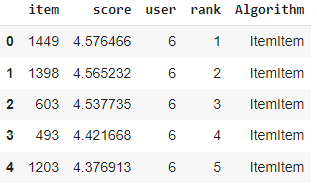
In the output, we can see the scores of our items with their ranks and the algorithm that is used to generate the result.
For better analysis, we can also concatenate all the test data into one data frame.
test_data = pd.concat(test_data, ignore_index=True)
test_data.head()
Output:

Now, this toolkit provides a module for analyzing the generated recommendations named as RecListAnalysis. Using this module we can line up our tests and recommendations properly. Let's see how we can use it for evaluating the nDCG.
rla = topn.RecListAnalysis()
rla.add_metric(topn.ndcg)
results = rla.compute(all_recs, test_data)
results.head()
Output:

Here in the output, we can see that we have values for nDCG in data frame format and that can be evaluated using different methods. Let’s see which algorithm has the most nDCG values.
results.groupby('Algorithm').ndcg.mean()
Output:
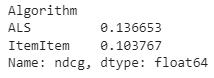
Let's visualize our evaluation
results.groupby('Algorithm').ndcg.mean().plot.bar()
Output:

Here we have our results. We can see that the alternative least square is having larger nDCG values.
Final words
In this article, we have discussed some of the important details about the LensKit toolkit that is designed to make and explore recommendation systems. Along with this, we have implemented one process where we used two algorithms to compare the nDCG values on the MovieLen rating dataset.
References

Your reaction
Discussion
What's your take on this story?
No comments yet — be the first to share your view.