

Medical Imaging has been used in several applications in the healthcare industry. Deep Learning solutions have exceeded many healthcare tasks in detecting and diagnosing abnormalities in medical data. In January 2020, we noticed Google’s DeepMind AI outperformed radiologists in detecting breast cancer, according to Nature’s publication.
Data management is one of the most critical steps in deep learning solutions. The size of healthcare data is reaching 2314 Exabytes of new data by 2020. According to IBM, We are almost generating 2.5 quintillion bytes of data daily, including large healthcare and financial information.
Introduction
MONAI is a PyTorch based framework, community-driven, and has been accepted in many healthcare imaging solutions. It is integrated with training and modelling workflows in a native PyTorch Standard. MONAI provides deep learning solution in medical image training and analysis at several places
A typical end-to-end workflow of MONAI in the medical deep learning area

Source: https://docs.monai.io/en/latest/_images/end_to_end.png
MONAI Dataset Managers
CacheDataset is a multi-thread dataset manager to accelerate the transformation during the training by storing intermediate outputs before the randomised transforms stage in the transformation loop. It provides up to 10x training speed.
Code: https://docs.monai.io/en/latest/_modules/monai/data/dataset.html#CacheDataset
Documentation: https://docs.monai.io/en/latest/data.html#monai.data.CacheDataset
Similar to CacheDataset, PersistentDataset stores the intermediate cache values which are persisted in the disk for the rapid retrieval between the runs, especially in case of hyperparameter tuning or when the dataset size is much bigger than the available memory.
Code: https://docs.monai.io/en/latest/_modules/monai/data/dataset.html#PersistentDataset
Documentation: https://docs.monai.io/en/latest/data.html#persistentdataset
Just like in PyTorch SmartCache, SmartCacheDataset in MONAI replaces the same number of items once the previous epoch gets completed during the training process.
Let’s say we have 5 images:[image1, image2, image3, image4, image5] and cache_numr = 4, replace_rate = 0.25
cache_num: number of items needs to be cached. Default is sys.maxsize. It will take the minimum of (cache_num, data_length x cache_rate, data_length).
During training, image will be replaced for every epoch as below:
 epoch 1: [image1, image2, image3, image4]
 epoch 2: [image2, image3, image4, image5]
 epoch 3: [image3, image4, image5, image1]
 epoch 3: [image4, image5, image1, image2]
 epoch N: [image[N % 5] ...]
Code: https://docs.monai.io/en/latest/data.html#smartcachedataset
Documentation: https://docs.monai.io/en/latest/_modules/monai/data/dataset.html#SmartCacheDataset
ZipDataset combines multiple PyTorch datasets and converts them into a tuple. It allows performing complex training transformation in different data sources.
Documentation: https://docs.monai.io/en/latest/data.html#zipdataset
Code: https://docs.monai.io/en/latest/_modules/monai/data/dataset.html#ZipDataset
You can test the above different dataset managers here.
We are going to learn how to load a public dataset in MONAI. MedNISTDataset, DecathlonDataset etc. can be loaded directly using MONAI APIs.
from monai.apps import DecathlonDataset, MedNISTDataset

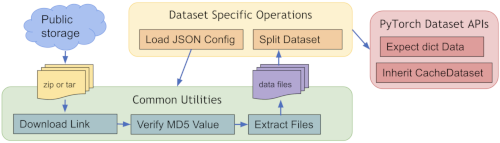
We can refer to the MedNISTDataset or DecathlonDataset to easily create a new Dataset for other public data. MONAI provides
Mainly include the below steps:
- MONAI provides a caching mechanism called CacheDataset to accelerate the training process.
- Need to check if the datasets provide a public access key to share and use it
- Using monai.apps.download_and_extract to download and extract the dataset
- Need to define and split the dataset into training, validation, and test sets
- It is important to create the data list with dict items:
[
{'image': image1_path, 'label': label1_path},
{'image': image2_path, 'label': label2_path},
{'image': image3_path, 'label': label3_path},
... ...
]
Installing MONAI Packages in python
pip install monai[all]
Below example is taken from MONAI tutorial from GitHub.
Import Python and MONAI APIs
 import os
 import sys
 import tempfile
 import matplotlib.pyplot as plt
 from monai.apps import download_and_extract
 from monai.config import print_config
 from monai.data import CacheDataset
 from monai.transforms import (
     Compose,
     LoadImaged,
     Randomizable,
     ToTensord,
 )
 print_config()
#Defining public dataset and the required transformation
For this example, we are going to use IXIdataset.
Download size 4.5 GB Approx.
 class IXIDataset(Randomizable, CacheDataset):
     resource = "http://biomedic.doc.ic.ac.uk/brain-development/downloads/IXI/IXI-T1.tar"
     md5 = "34901a0593b41dd19c1a1f746eac2d58"
     def __init__(
         self,
         root_dir,
         section,
         transform,
         download=False,
         seed=0,
         val_frac=0.2,
         test_frac=0.2,
         cache_num=sys.maxsize,
         cache_rate=1.0,
         num_workers=0,
     ):
         if not os.path.isdir(root_dir):
             raise ValueError("Root directory root_dir must be a directory.")
         self.section = section
         self.val_frac = val_frac
         self.test_frac = test_frac
         self.set_random_state(seed=seed)
         dataset_dir = os.path.join(root_dir, "ixi")
         tarfile_name = f"{dataset_dir}.tar"
         if download:
             download_and_extract(self.resource, tarfile_name, dataset_dir, self.md5)
# loading sample 10 images
         self.datalist = [
             {"image": os.path.join(dataset_dir, "IXI314-IOP-0889-T1.nii.gz"), "label": 0},
             {"image": os.path.join(dataset_dir, "IXI249-Guys-1072-T1.nii.gz"), "label": 0},
             {"image": os.path.join(dataset_dir, "IXI609-HH-2600-T1.nii.gz"), "label": 0},
             {"image": os.path.join(dataset_dir, "IXI173-HH-1590-T1.nii.gz"), "label": 1},
             {"image": os.path.join(dataset_dir, "IXI020-Guys-0700-T1.nii.gz"), "label": 0},
             {"image": os.path.join(dataset_dir, "IXI342-Guys-0909-T1.nii.gz"), "label": 0},
             {"image": os.path.join(dataset_dir, "IXI134-Guys-0780-T1.nii.gz"), "label": 0},
             {"image": os.path.join(dataset_dir, "IXI577-HH-2661-T1.nii.gz"), "label": 1},
             {"image": os.path.join(dataset_dir, "IXI066-Guys-0731-T1.nii.gz"), "label": 1},
             {"image": os.path.join(dataset_dir, "IXI130-HH-1528-T1.nii.gz"), "label": 0},
         ]
         data = self._generate_data_list()
         super().__init__(
             data, transform, cache_num=cache_num, cache_rate=cache_rate, num_workers=num_workers,
         )
     def randomize(self, data=None):
         self.rann = self.R.random()
     def _generate_data_list(self):
         data = list()
         for d in self.datalist:
             self.randomize()
             if self.section == "training":
                 if self.rann < self.val_frac + self.test_frac:
                     continue
             elif self.section == "validation":
                 if self.rann >= self.val_frac:
                     continue
             elif self.section == "test":
                 if self.rann < self.val_frac or self.rann >= self.val_frac + self.test_frac:
                     continue
             else:
                 raise ValueError(
                     f"Unsupported section: {self.section}, "
                     "available options are ['training', 'validation', 'test']."
                 )
             data.append(d)
         return data
#Selecting a few images to visualise
 train_ds = IXIDataset(
    root_dir=root_dir,
    section="training",
    transform=Compose([LoadImaged("image"), ToTensord("image")]),
    download=True,
 )
 plt.figure("check", (18, 6))
 for i in range(3):
    plt.subplot(1, 3, i + 1)
    plt.imshow(train_ds[i]["image"][:, :, 80].detach().cpu(), cmap="gray")
 plt.show()

Please check the full code here
Conclusion
In this article, we have learned about different datasets managed from MONAI and also how they are unique from each other. We have also learned and implemented a public medical imaging dataset using MONAI. Check the full tutorial on MONAI here.


Your reaction
Discussion
What's your take on this story?
No comments yet — be the first to share your view.