
With the release of the new version of Pytorch 1.12, Pytorch has come up with a new DataFrame library for data visualization or preprocessing named Torcharrow. Torcharrow is a Pytorch library for data processing and visualization with support for processing tabular data and is more suitable for deep learning data. Torcharrow has come up with the ability of faster processing of data by lighter usage of the processing unit. In this article let us get a brief overview of the latest preprocessing library of Pytorch 1.12 named Torcharrow.
Table of Contents
- An overview of Torcharrow
- Benefits of Torcharrow
- Data processing using Torcharrow
- Summary
An overview of Torcharrow
Pytorch, an open-sourced machine learning and deep learning framework based on the torch library is used in various applications like computer vision and Natural Language processing. PyTorch came up with the release of a new version Pytorch 1.12 on June 28, 2022. With the release of the new version, Pytorch has created a new API for a faster and more efficient data processing library named Torcharrow which is still in the beta stage with more features to be added. Torcharrow is the data processing library that aims to handle and process data with minimal requirement of resources and less weight enforced on the central processing unit.
Are you looking for a complete repository of Python libraries used in data science, check out here.
Torcharrow follows the same hierarchy and operating characteristics as the Pandas library with a similar ability for data processing. Torcharrow in the beta stage provides data processing with various aspects such as data addition, data manipulation, statistical analysis of data along with querying data with respect to SQL queries. Once the stable version is released hopefully, all the necessary processing steps would be supported by Torcharrow.
Benefits of Torcharrow
The Torcharrow library of data processing comes with various advantages in efficient data handling and processing. They are:
- Torcharrow supports various dimensions of data right from single columnar data to multi-columnar data like dataframe.
- Torcharrow supports various types of data like numbers, strings, and lists.
- Torcharrow aims to support complex torch data with minimum resources and run flawlessly with devices utilizing only the CPU.
- Easy integration and logging with respect to Pytorch DataLoader and Datapipe.
A complete overview of data processing using Torcharrow
Let us first install the Torcharrow library in the working environment.
!pip install --user torcharrow
import torcharrow as ta
import torcharrow.dtypes as dt
import torcharrow.expression as exp

import warnings
warnings.filterwarnings('ignore')
Now the torcharrow library is installed and loaded in the working environment. Let us start exploring the Single dimensional data supported by Torcharrow.
1-Dimensional data processing using Torcharrow
Similar to the pandas Series, Torcharrow supports single-dimensional data processing by using the Column function. So let us see how to process data using the Column function of Torcharrow.
Creating a column
col1=ta.Column([1,2,3,4,5,None])
col1

The Column function of Torcharrow has to be created using the Torcharrow instance and the Torcharrow column considers the value as integer values which reduces the memory occupancy and the Torcharrow Column function has the ability to retrieve the count of null values in the output along with the length of the Column and the datatype of that Column.
Common column operations
In the beta release of Torcharrow, there are two operations being supported by the Column functions and they are as shown below.
Computing the length
The length of the Column can be computed using the “len” function which provides information on the number of rows in the data frame.
col2=ta.Column([1.1,2.2,3.3,4.4,5.5,None])
len(col2) ## To retrieve the length of the particular

So here there are 6 rows in the Column datatype of Torcharrow.
Computing the count of null values
The number of null values in the data frame can be computed using the null_count function of the Torcharrow library as shown below.
col2=ta.Column([1.1,2.2,3.3,4.4,5.5,None])
col2.null_count  ## To obtain the count of null values in the column

Here “None” in the Column datatype is considered to be the null value.
Creating a Torcharrow column with variable string length
Torcharrow supports variable length strings that can be passed onto the Column data type.
str_col1=ta.Column([['Torcharrow','Column'],['Torcharrow','is','still','in','beta-stage']])
str_col1

The strings passed to the Column data type, by default are considered as List data types. The type of the variable length string created can also be retrieved using the type function.
type(str_col1)

Appending a single value to the Column dataframe
New value addition can be done using the append function of the Column dataframe of Torcharrow wherein both single values and multiple values can be appended at the same time.
str_col1=ta.Column([['Torcharrow','Column'],['Torcharrow','is','still','in','beta-stage']])
So for the above-created Column datatype let us first see how to append a single value.
str_col1=str_col1.append([['Torcharrow','is','faster','and','efficient']])
str_col1

Appending multiple values to the Column Dataframe
In a similar manner, multiple values can be appended using various list instances in the single append function as shown below.
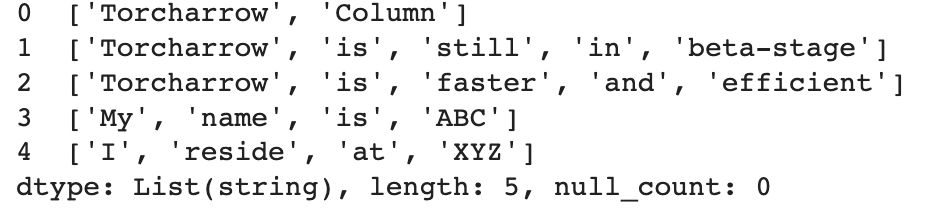
str_col1=str_col1.append([['My','name','is','ABC'],['I','reside','at','XYZ']])
str_col1
Working with Torcharrow Dataframe
Torcharrow data frames are similar to pandas dataframe but as Torcharrow is still in the beta stage and the Torcharrow dataframe still does not have the ability to read data of different formats like CSV, text, and HTML files. So let us see what all processing can be done using the beta stage of the torcharrow dataframe.
Creating a Torcharrow dataframe
A Torcharrow dataframe can be created using the inbuilt function of Torcharrow as shown below.
df = ta.DataFrame({"Col1": list(range(10,10+10)), "Col2": list(reversed(range(20,20+10))), "Col3": list(range(30,30+10))})
df

Retrieving the columns of Torcharrow dataframe
The columns of the Torcharrow dataframe can be retrieved using the columns function.
df.columns

Data Retrieval from the dataframe
The Torcharrow dataframe facilitates the head and tail function wherein the first and last few entries of the dataframe can be retrieved accordingly.
df.head(3) ## Retrieving the first 3 entries of the torcharrow dataframe

df.tail(3) ## Retrieving the last 3 entries of the torcharrow dataframe

So using the head and tail function the first and last few entries of the dataframe can be retrieved.
Adding a new column to the Torcharrow dataframe
Similar to the Pandas module a new column can be added to the Torcharrow dataframe where in the new column name to be added will be specified along with the values to be added.
df['Col4']=ta.Column(list(range(41,41+10)))
df

So here we can see that a new column is being added to the original dataframe
Adding rows to the Torcharrow dataframe
Rows can be added to the Torcharrow dataframe using the append function as shown below.
df=df.append([(10,100,101,102),(11,110,111,112)])
df

Manipulating values of Dataframe
The values of the dataframe can be manipulated by using any of the mathematical operators or any functions. Let us see how to manipulate the value of the dataframe using addition operation.
df['Col1']=df['Col1']+50
df
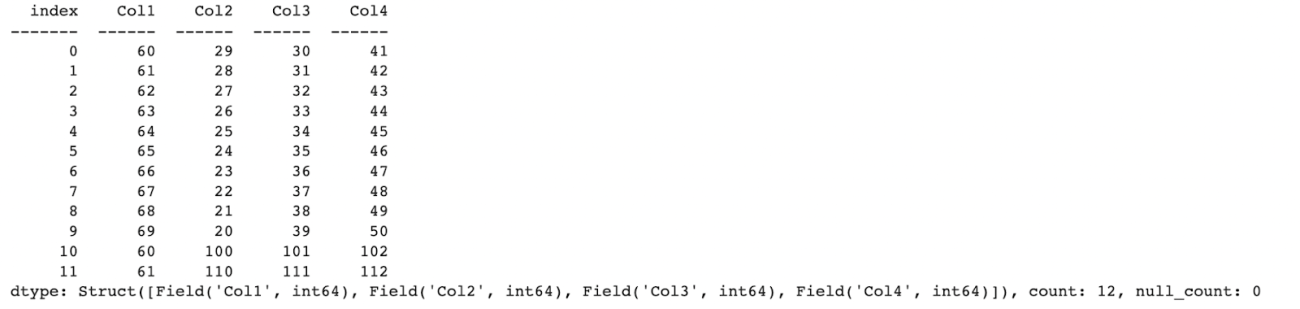
Here we can see that each value of Column1 50 is being added.
Selection operations
Torcharrow supports both string-based and integer-based selections along with slicing. Let us see how Torcharrow can be used for different selection operations.
String based selection
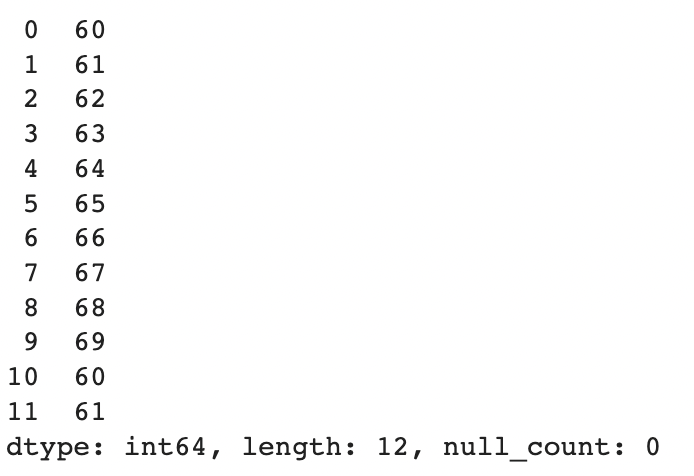
The column name required has to be mentioned in square brackets for string-based selection.
df['Col1']
Slicing: String-based selection
In a similar way through slicing required columns can be retrieved.
df['Col1':'Col3']

Integer based selection
For integer-based selection, the rows required for retrieval have to be specified.
df[1]

Slicing: Integer-based selection
The required rows can be specified in the square brackets for retrieval where in the last value will be exclusive.
df[1:5]

Condition-based selection
For condition-based selection, the required column to check along with the condition to validate has to be specified which will return a boolean output.
df['Col1']>65 ## returns a boolean output
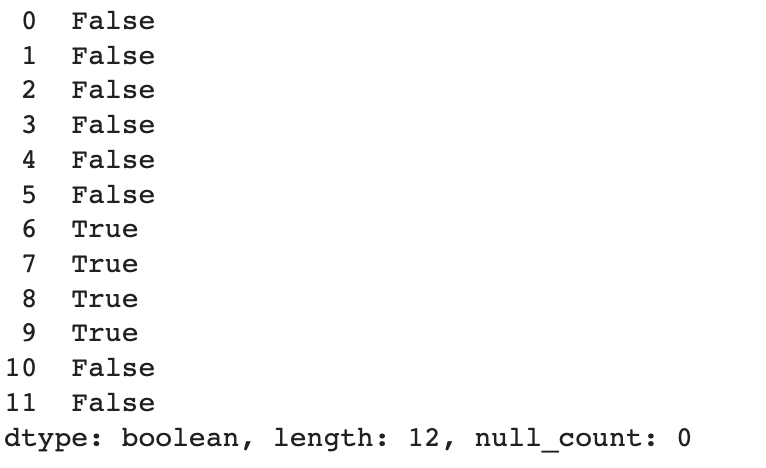
If the values for the condition have to be retrieved the dataframe object has to be used along with the condition.
df[df['Col1']>65] ## Dataframe values for the specified condition is retrieved

Handling missing values
Using the Torcharrow data frame the missing values can be imputed with the required value or the missing value can be dropped.
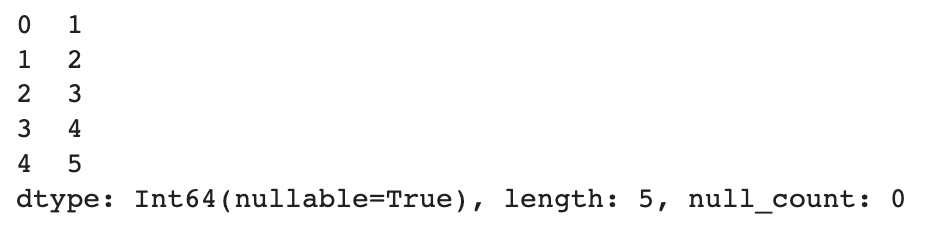
Let us see how to impute any missing value with the required value.
s=ta.Column([1,2,3,None,5])
s=s.fill_null(4)
s
In a similar manner, the entire row with the missing value can be removed.
s.drop_null()

Case conversion operations
The entire string can be converted to uppercase using the upper function.
str_col=ta.Column(['Welcome to Torcharrow','Today is a beautiful day'])
str_col.str.upper()

The same string can also be converted to lowercase using the lower function.
str_col.str.lower()

Replacing characters
The string characters can be replaced in the Torcharrow library using the replace function.
str_col.str.replace('W','A')

Splitting characters
Huge string characters can be split into smaller string characters using the split function.
split_str=str_col.str.split(sep=' ')
split_str

Using one of the inbuilt functions
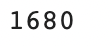
Let us use the reduce inbuilt function that is being supported by Torcharrow to reduce the sequence of numbers to a single value.
import operator
ta.Column([5,6,7,8]).reduce(operator.mul)
Querying Torcharrow dataframe similar to SQL Query
Let us create a Torcharrow dataframe and query the dataframe using the where clause.
sel_df = ta.DataFrame({'A': ['a', 'b', 'a', 'b'],'B': [1, 2, 3, 4],'C': [10,11,12,13]})
sel_df.where(sel_df['C']>11)

Summary
Torcharrow is one of the beta stage libraries of the Pytorch 1.12 version where some required processing such as data retrieval, data addition, and data manipulation is provided with respect to Python based approach. Basic SQL querying is also provided in the beta stage. Torcharrow is designed to be more memory efficient and is focused to process huge data in the central processing unit. So a stable release of the library is expected to support data reading of various formats, data addition, and manipulation in different ways, and also support various SQL clauses.

Your reaction
Discussion
What's your take on this story?
No comments yet — be the first to share your view.