
In machine learning, data mining is one of the major sections that cover the extraction of the data from the different platforms. OCR (Optical Character Recognition) is part of the data mining process that mainly deals with typed, handwritten, or printed documents. These documents hold the data mainly in the form of images. Extracting such data requires some optimised models which can detect and recognize the texts. Getting information from complex structured documents becomes difficult and hence they require some effective methodologies for information extraction. In this article, we will discuss docTR, a deep learning-based tool for localizing and detecting the text in documents. The major points to be discussed in the article are listed below.
Table of contents
- The Optical Character Recognition (OCR)
- Types of OCR
- Applications of OCR
- Information extracted using docTR
- What is docTR?
- Importing document
- Importing models
- Model fitting
- Text extraction
Let's start with understanding OCR.
The Optical Character Recognition (OCR)
OCR is a short form of Optical character recognition or optical character reader. By the full form, we can understand it is something that can read content present in the image. Every image in the world contains any kind of object in it and some of them have characters that can be read by humans easily, programming a machine to read them can be called OCR. Programmatically we can say that it is the process of converting images of typed, handwritten, or printed text into machine-encoded text.
We mainly find the usage of this type of program in extracting data from printed paper data, the example of printed paper can be passports, invoices, statements, business cards, etc. OCR can also be considered the base programming for various projects like text mining, text-to-speech, cognitive computing, etc. while OCR is a program that is related to the field of computer vision in machine learning.
Talking about history, it all started with training models with images of all kinds of characters that need to be detected from documents. Nowadays we can find that there are models which are capable of detecting and recognizing characters with a high degree of accuracy for any kind of font and from any kind of document. Also, various models are capable of generating documents similar to the original and we can edit the generated document.
Are you looking for a complete repository of Python libraries used in data science, check out here.
Types of OCR
There are various types of OCR. Some of the basic types of OCR are as follows:
- Optical character recognition(OCR): Targets only a text at a time from the documents.
- Optical word recognition(OWR): Targets one word at a time from the documents.
- Intelligent character recognition(ICR): It is an update of standard OCR that can be capable of targeting one character at a time that is in the form of handwriting or cursive.
- Intelligent word recognition(IWR): It is an update of standard OWR that can be capable of targeting one word at a time that is in the form of handwriting or cursive.
We can also categorize OCRs by their type of work environment in the following way:
- Offline OCR: This kind of OCR works in offline mode where we normally use offline documents for the recognition of characters or words.
- Online OCR: This kind of OCR is generally enabled in cloud storage and they are capable of recognising characters from the documents that are present in the cloud.
- Dynamic OCR: This kind of OCR is capable of recognising characters from dynamic documents. Here the dynamic documents are those that keep characters and words in motion.
Applications of OCR
Before going deep into OCR implementation we are required to know the places where we may be required to use OCR. Some examples of such use cases are as follows:
- Data entry.
- Number plate recognition.
- Traffic sign and vehicle recognition.
- Information extractor from important documents such as passports, Aadhar cards, etc.
- Scanned data editor.
- Electronic books from printed books.
- Assistive technology for blind and visually impaired users.
Information extracted using docTR
After finding some use cases of OCR we are required to have some knowledge about the implementation of the OCR. in some of our articles, we can find various ways to implement OCR and in this article, we are going to discuss another way that can be used for implementing OCR in our projects. docTR is a library that helps us in performing OCR. It’s a deep learning-based tool where end-to-end OCR is achieved using a two-stage approach: text detection (localizing words), and then text recognition (identifying all characters in the word). Let's have a general introduction to this library.
What is docTR?
docTR is a library that provides an open-source implementation of OCR and one thing that is amazing about the library is it is built using both TensorFlow and PyTorch. Using this library we can easily extract information from the documents. This library has 2 text detection models, and 2 text recognition models, and it supports more than 10 freely available datasets.
Some main features of this library are it is user-friendly to the users of TensorFlow and PyTorch, it is robust, lightweight, and gives the state of the art performance in the field of OCR with minimal dependencies. We can install its TensorFlow version using the following lines of codes.
!pip install python-doctr[torch]
Before installation, we are required to have PyTorch and TensorFlow installed in our environment. After installation, we are ready to use this library.
Using this library we can extract information from the document in just 5 steps. Let's start with our first step of importing a document.
Importing document
from doctr.io import DocumentFile
doc = DocumentFile.from_images("/content/D Mart Grocery product price list-1.jpg")
print(f"Number of pages: {len(doc)}")
Output:

Here in the above codes, we can see that this library provides a feature that can be used in reading images, and here is the output we can see there is only one image. Let's visualise this image.
import matplotlib.pyplot as plt
plt_1 = plt.figure(figsize=(16, 16))
plt.imshow(doc[0])
plt.show()
Output:
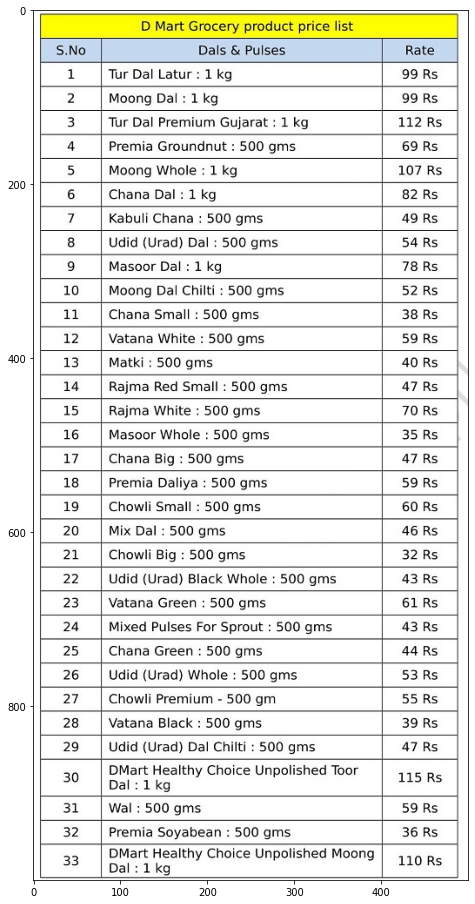
Here we can see that the image has a price list of some of the grocery items.
Importing models
In this section, we will look at how we can instantiate a pre-trained model from docTR to extract information from the document.
from doctr.models import ocr_predictor
ocr = ocr_predictor(pretrained=True)
Output:

Here we can see that we have instantiated two models in one instance. Now we can see the structure of this model using the following lines of codes.
ocr
Output:
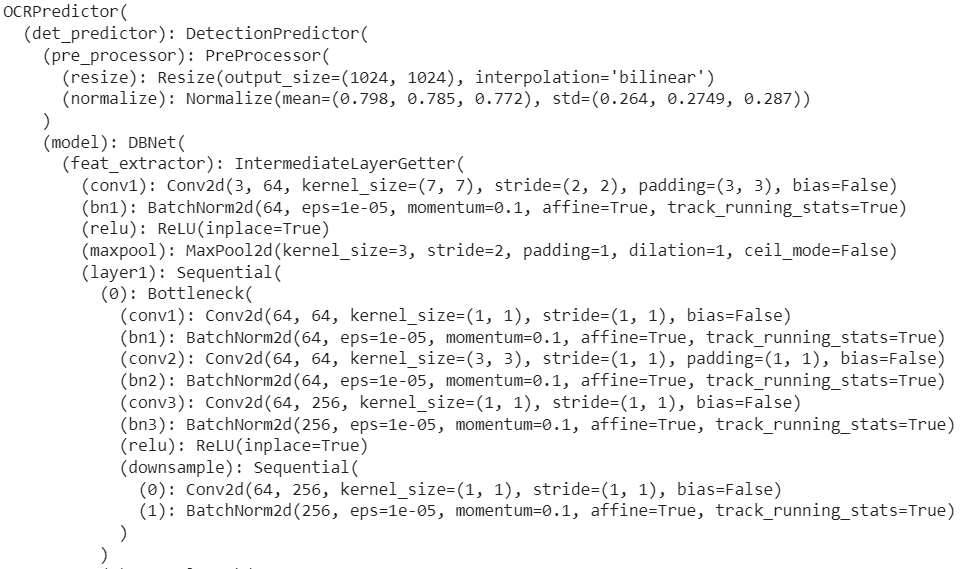
In the output, we can see some of the layers of these two models.
Model fitting
Let's fit the model on the imported image.
result = ocr(doc)
We can check the performance of the model using the following codes.
result.show(doc)
Output:
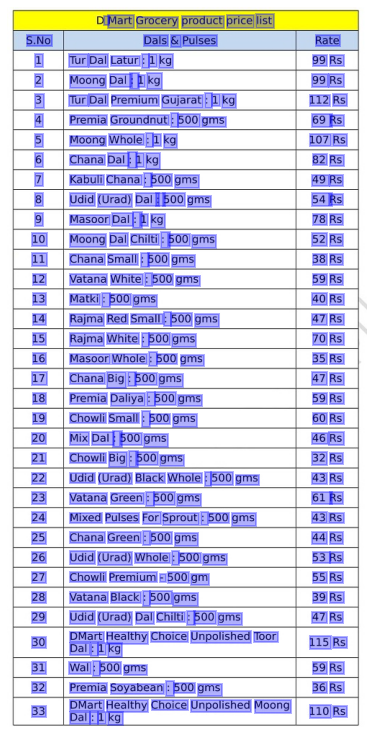
Here we can see that the model has covered almost all the text from the image.
Text extraction
In this section, we are going to recreate the entire image using the model.
synthetic_pages = result.synthesize()
plt_1 = plt.figure(figsize=(16, 16))
plt.imshow(synthetic_pages[0])
plt.show()
Output:
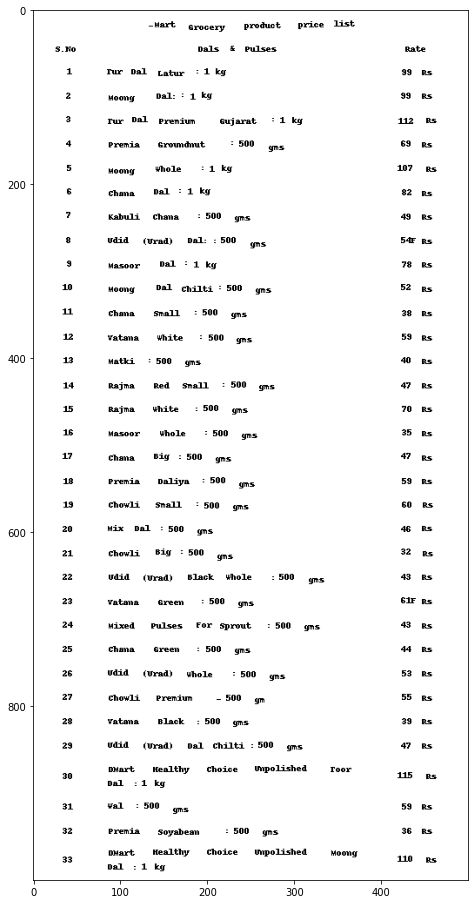
Here is the image that represents all the text extracted from the original image. Let's check what are the words that our model has extracted.
text = result.render()
text
Output:

Here we can see all the extracted texts from the original image.
Final words
In this article, we have discussed the optical character recognition(OCR) that is used to extract information from printed documents and we have discussed the types and use cases of OCR. Along with this, we have seen how we can implement OCR using the docTR library.

Your reaction
Discussion
What's your take on this story?
No comments yet — be the first to share your view.