

Sonnet is an open-source Deepmind library for constructing neural networks on Tensorflow 2.0. Sonnet has many resemblances to several of these current neural network libraries, but it also has unique features tailored to the research needs. In this article, we will discuss the uniqueness that Sonnet offers then Keras or sklearn and try to learn about Sonnet with a small implementation. Following are the topics to be covered.
Table of contents
- About Sonnet
- What does sonnet offer?
- Implementing MLP offered by Sonnet
Let’s understand the Sonnet library offered by DeepMind.
About Sonnet
DeepMind's Sonnet is a Tensorflow-based platform for building neural networks. For the building of neural networks based on a TensorFlow computation graph, the framework provides a higher degree of abstraction.
The Sonnet is a programming approach for creating neural networks using TensorFlow at a high level. More precisely, Sonnet allows you to create Python objects that represent neural network components, which can then be integrated into a TensorFlow graph.
Sonnet's basic notion is modules. Sonnet's Modules contain neural network elements like models that may be integrated numerous times into a data flow graph. That procedure abstracts low-level TensorFlow features like session creation and variable sharing. Modules may be coupled in any way, and Sonnet allows developers to create their own Modules using a simple programming approach.
Sonnet's higher-level programming structures, module-based setup, and connection isolation are undeniable benefits. However, I believe that some of the most significant advantages of the new Deep Learning architecture are buried under the surface.
Are you looking for a complete repository of Python libraries used in data science, check out here.
What does sonnet offer?
- Multi-Neural Network Applications: Using TensorFlow to implement multi-neural network solutions like multi-layer neural networks or adversarial neural networks is a nightmare. Individual neural networks may be implemented using Sonnet's Module programming approach, which can then be merged to create higher-level networks.
- Training neural networks: Sonnet makes neural network training easier by concentrating on specific modules.
- Testing: Sonnet's higher-level programming style makes automated neural network testing using common frameworks easier.
- Extensibility: Developers may simply extend Sonnet by creating new modules. They may even direct how the TensorFlow graph for that module is constructed.
- Composability: Consider having access to a vast ecosystem of pre-built and trained neural network modules that can be dynamically combined to form higher-level networks. Sonnet is unquestionably a step in the right direction.
Implementing MLP offered by Sonnet
MLP stands for Multi-layer Perceptron Classifier, which is linked to a Neural Network by its name. It uses the underlying Neural Network. In this article let’s build an MLP classifier by using the Sonnet module.
Install Sonnet library
!pip install dm-sonnet tqdm
Import necessary libraries.
import sonnet as snt
import tensorflow as tf
import tensorflow_datasets as tfdf
import matplotlib.pyplot as plt
from tqdm import tqdm
For this article, we will be using the famous MNIST dataset of handwritten digits with a set of 60,000 samples for training and a test set of 10,000 examples. In a fixed-size picture, the digits have been size-normalized and centred.
batch_size = 200

def process_batch(images, labels):
  images = tf.squeeze(images, axis=[-1])
  images = tf.cast(images, dtype=tf.float32)
  images = ((images / 255.) - .5) * 2.
  return images, labels

def mnist(split):
  dataset = tfdf.load("mnist", split=split, as_supervised=True)
  dataset = dataset.map(process_batch)
  dataset = dataset.batch(batch_size)
  dataset = dataset.prefetch(tf.data.experimental.AUTOTUNE)
  dataset = dataset.cache()
  return dataset

train = mnist("train").shuffle(10)
test = mnist("test")
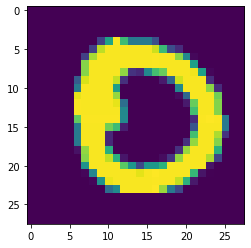
Let’s have a view of the test dataset.
images, _ = next(iter(test))
plt.imshow(images[1])
Build an MLP classifier
class sample_MLP(snt.Module):

  def __init__(self):
    super(sample_MLP, self).__init__()
    self.flatten = snt.Flatten()
    self.hidden1 = snt.Linear(1024, name="hidden1")
    self.hidden2 = snt.Linear(1024, name="hidden2")
    self.logits = snt.Linear(10, name="logits")

  def __call__(self, images):
    output = self.flatten(images)
    output = tf.nn.relu(self.hidden1(output))
    output = tf.nn.relu(self.hidden2(output))
    output = self.logits(output)
    return output
Here using a Sonnet linear module which is built on the top of TensorFlow module which is a lightweight container for variables. The linear module created in the ‘_int_’ function could be easily called by using the ‘_call_’ to apply the operations on the dataset.
Defining a base model and implement the data
mlp_testin = sample_MLP()

images, labels = next(iter(test))
logits = mlp_testin(images)

prediction = tf.argmax(logits[0]).numpy()
observed = labels[0].numpy()
print("Predicted value: {} actual value: {}".format(prediction, observed))
plt.imshow(images[0])
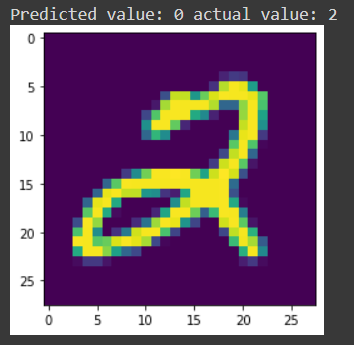
As it could be observed that the base model is not performing well on the data since the actual value is 2 and the prediction value is 0. So there is a need to tune the model.
Tuning the model
num_images = 60000
num_epochs = 10

tune_er = snt.optimizers.SGD(learning_rate=0.1)

def step(images, labels):
  """Performs one optimizer step on a single mini-batch."""
  with tf.GradientTape() as tape:
    logits = mlp_testin(images)
    loss = tf.nn.sparse_softmax_cross_entropy_with_logits(logits=logits,
                                                          labels=labels)
    loss = tf.reduce_mean(loss)

  params = mlp_testin.trainable_variables
  grads = tape.gradient(loss, params)
  tune_er.apply(grads, params)
  return loss

for images, labels in progress_bar(train.repeat(num_epochs)):
  loss = step(images, labels)

print("\n\nFinal loss: {}".format(loss.numpy()))

Evaluating the model performance.
total = 0
positive_pred = 0
for images, labels in test:
  predictions = tf.argmax(mlp_testin(images), axis=1)
  positive_pred += tf.math.count_nonzero(tf.equal(predictions, labels))
  total += images.shape[0]

print("Got %d/%d (%.02f%%) correct predictions" % (positive_pred, total, positive_pred / total * 100.))

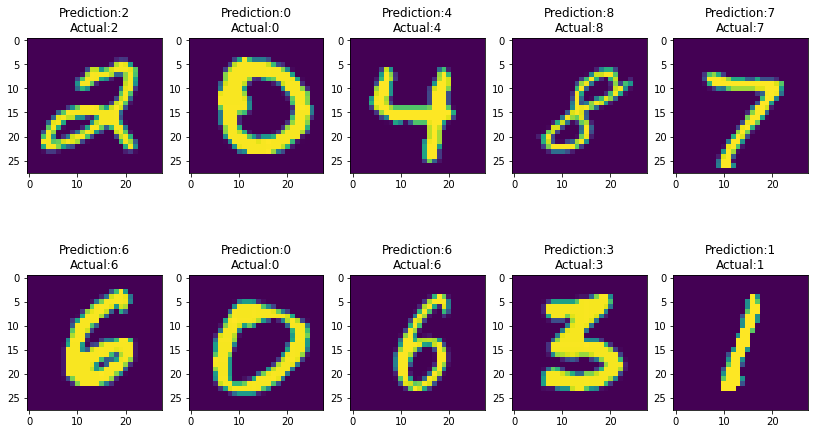
Visualize the correct and wrong predictions.
for images, labels in test:
    predictions = tf.argmax(mlp_testin(images), axis=1)
    eq = tf.equal(predictions, labels)
    for i, x in enumerate(eq):
      if x.numpy() == correct:
        label = labels[i]
        prediction = predictions[i]
        image = images[i]
        ax[n].imshow(image)
        ax[n].set_title("Prediction:{}\nActual:{}".format(prediction, label))
        n += 1
        if n == (rows * cols):
          break
if n == (rows * cols):
      break
test_samples(correct=True, rows=2, cols=5)
test_samples(correct=False, rows=2, cols=5)

Conclusion
Sonnet offers a straightforward yet powerful programming approach based on a single notion module. Modules can include references to parameters, other modules, and procedures that process user input. With this hands-on article, we have understood the uniqueness that Sonnet offers and the implementation of Sonnet to build an MLP model.

Your reaction
Discussion
What's your take on this story?
No comments yet — be the first to share your view.