

BigQuery ML allows the user to use regular SQL queries to develop and execute machine learning models in BigQuery. It democratises machine learning by enabling SQL practitioners to create models using their existing SQL tools and abilities. BigQuery ML accelerates development by removing the need to relocate data. Although it began with linear regression, it has now expanded to include more powerful models such as Deep Neural Networks and AutoML Tables by linking BigQuery ML to TensorFlow and Vertex AI as its backend. This article is focused on building a machine learning model with BigQuery ML. Following are the topics to be covered.
Table of contents
- Getting started with Big Query ML
- Authenticating and Project setup
- Data extraction
- Analysis of the data
- Training and Evaluating the model
Machine learning on massive datasets necessitates substantial programming and understanding of ML frameworks, which not everyone possesses. BigQuery ML enables analysts to apply machine learning using their existing SQL tools and abilities. Let’s have a look at the supported ML models.
Getting started with Big Query ML
The user needs to create an account on the google cloud platform. One can skip the credit card information if one just wants to use the Big Query ML for trial. Basically depending on the needs of the individual user.
Once registered on GCP, search for Big Query and create a project. One can create a dataset and add data to it from the GCP or from the notebook, which will be demonstrated later in this article. The screen would look something like the image shown below.
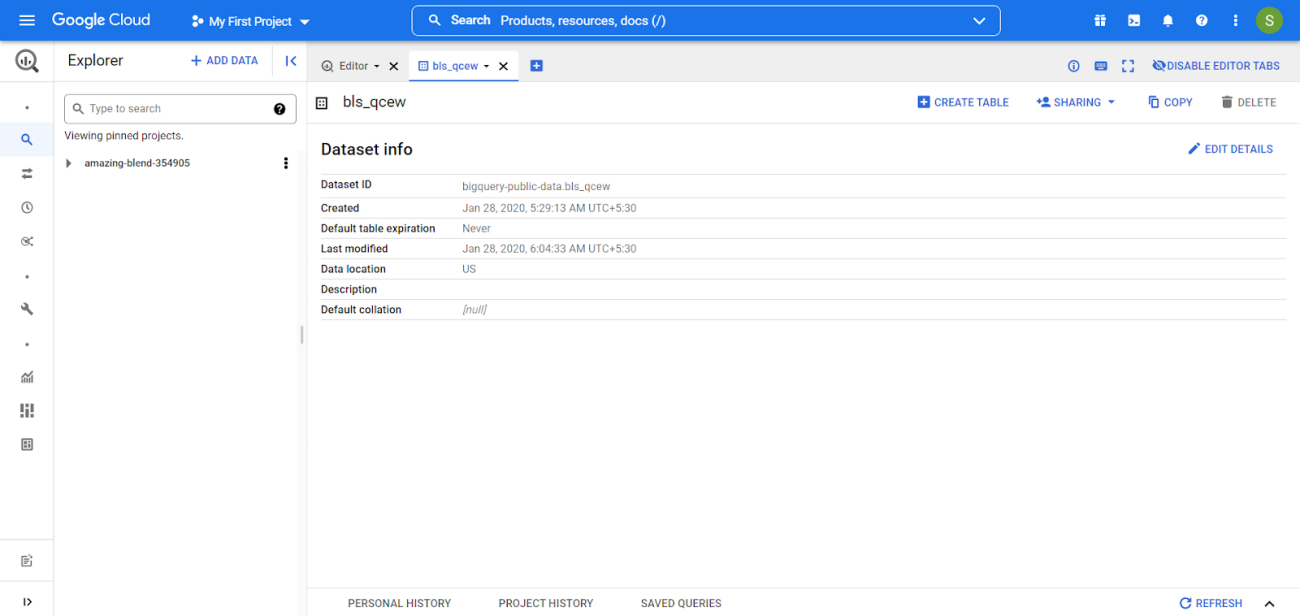
This article uses a colab notebook so the process would differ for different AI platform notebooks.
Are you looking for a complete repository of Python libraries used in data science, check out here.
Authenticating and Project setup
The GCP account needs to be authenticated for usage and make sure to use the same account id (Gmail id) for both GCP and colab. Since using the colab notebook I need to use the below code.
from google.cloud import bigquery
from google.colab import auth
auth.authenticate_user()
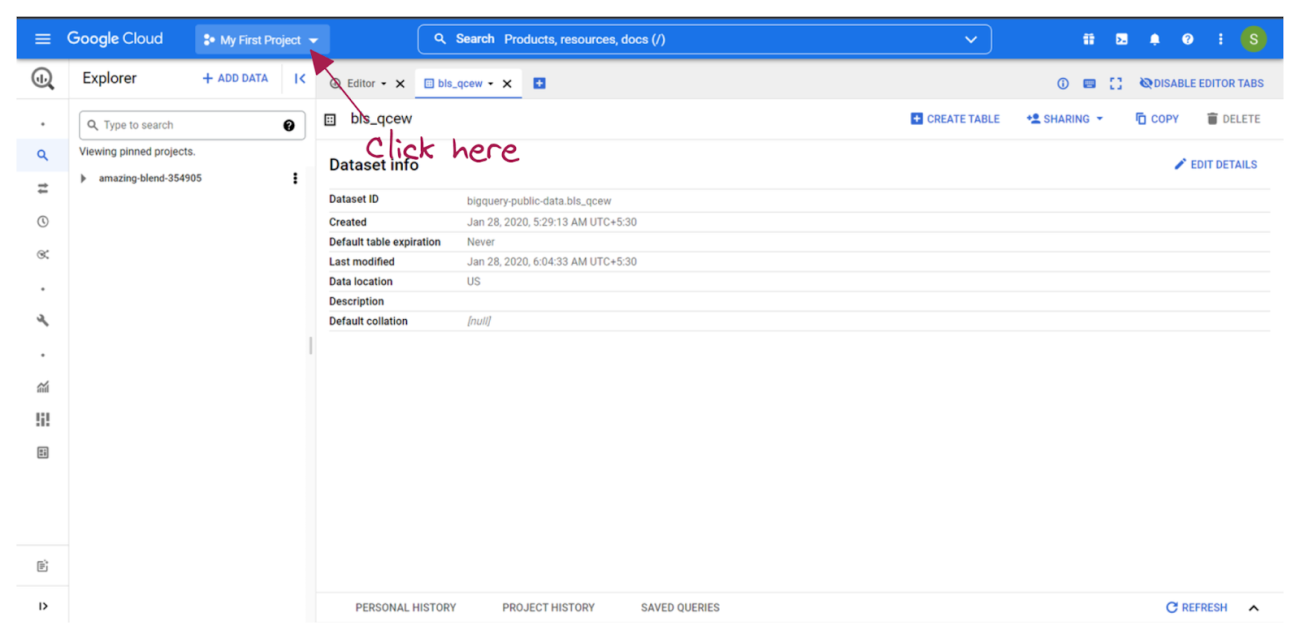
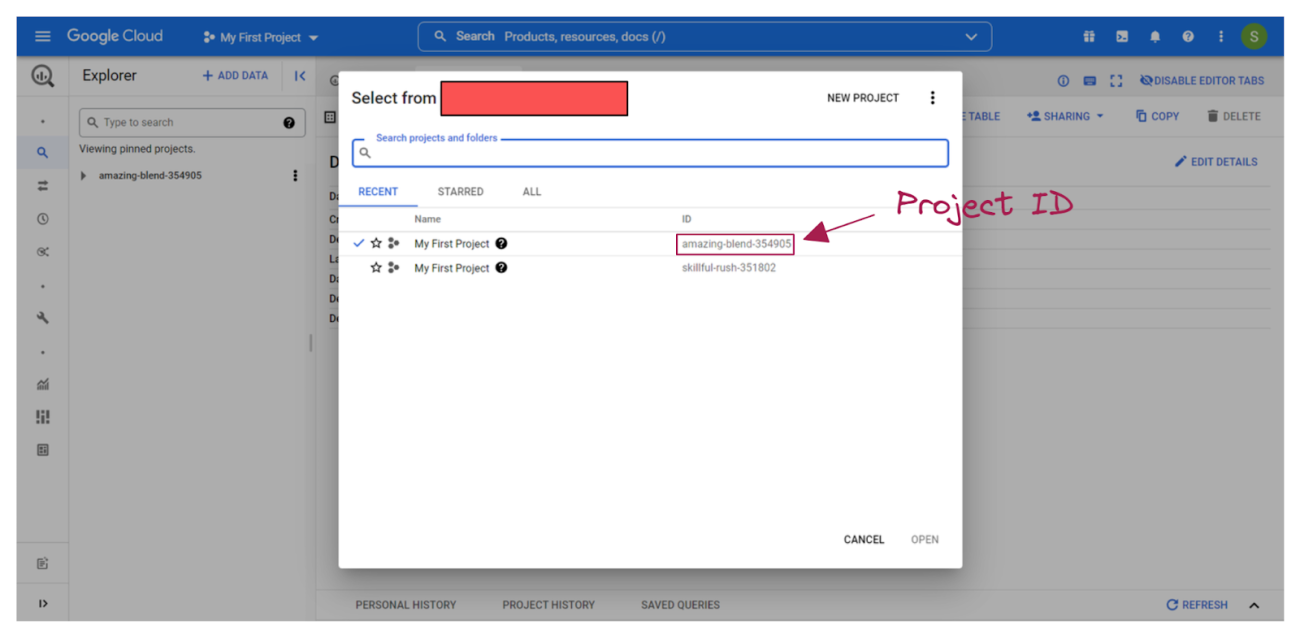
Once authenticated then it's time for setting up the project variables like project id, dataset name and model name. The model name could be defined as any preferred name in any particular format. The project id can be found under the project detail section on the GCP. Below is the way to access the project id.
project_id = 'amazing-blend-354905'
dataset_name = "experimental_data"
model_name = "sm_experimental_model"
eval_name = model_name + "_eval"
client = bigquery.Client(project=project_id)
dataset = client.create_dataset(dataset_name)
Data extraction
The extracts will be divided into 80,10,10 for training, validation, and testing in this article.
In BigQuery, we need a repeatable sample of the data for machine learning. Change the '8' in the query above to '= 8' to receive validation data, and '= 9' to get testing data. As a result, 10% of samples are validated and 10% are tested.
Need to write the SQL query inside triple inverted commas and then pass the query to the client query for processing. The Big Query will process the query and return the output which is needed to be stored in a variable and it could be converted into a pandas dataframe using ‘to_dataframe’.
The whole dataset
query = """
SELECT
    age,
    workclass,
    functional_weight,
    education,
    education_num,
    marital_status,
    occupation,
    relationship,
    race,
    sex,
    capital_gain,
    capital_loss,
    hours_per_week,
    native_country,
    income_bracket
FROM
  `bigquery-public-data.ml_datasets.census_adult_income`
"""
dataset = client.query(query).to_dataframe()
Training set
query = """
SELECT
    age,
    workclass,
    functional_weight,
    education,
    education_num,
    marital_status,
    occupation,
    relationship,
    race,
    sex,
    capital_gain,
    capital_loss,
    hours_per_week,
    native_country,
    income_bracket
FROM
  `bigquery-public-data.ml_datasets.census_adult_income`
WHERE
  MOD(ABS(FARM_FINGERPRINT(CAST(functional_weight AS STRING))), 10) < 8
"""
train_dataset = client.query(query).to_dataframe()
Testing set
query = """
SELECT
    age,
    workclass,
    functional_weight,
    education,
    education_num,
    marital_status,
    occupation,
    relationship,
    race,
    sex,
    capital_gain,
    capital_loss,
    hours_per_week,
    native_country,
    income_bracket
FROM
  `bigquery-public-data.ml_datasets.census_adult_income`
WHERE
  MOD(ABS(FARM_FINGERPRINT(CAST(functional_weight AS STRING))), 10) = 9
"""
test_dataset = client.query(query).to_dataframe()
Validation set
query = """
SELECT
    age,
    workclass,
    functional_weight,
    education,
    education_num,
    marital_status,
    occupation,
    relationship,
    race,
    sex,
    capital_gain,
    capital_loss,
    hours_per_week,
    native_country,
    income_bracket
FROM
  `bigquery-public-data.ml_datasets.census_adult_income`
WHERE
  MOD(ABS(FARM_FINGERPRINT(CAST(functional_weight AS STRING))), 10) = 8
"""
eval_dataset = client.query(query).to_dataframe()
Checking the length of all the dataset
len(dataset), len(train_dataset), len(eval_dataset), len(test_dataset)

Analysis of the data
Let’s check missing values in the dataset.
query = """
SELECT
  COUNTIF(workclass IS NULL
    OR LTRIM(workclass) LIKE '?') AS workclass,
  ROUND(COUNTIF(workclass IS NULL
    OR LTRIM(workclass) LIKE '?') / COUNT(workclass) * 100)
    AS workclass_percentage,
  COUNTIF(occupation IS NULL
    OR LTRIM(occupation) LIKE '?') AS occupation,
  ROUND(COUNTIF(occupation IS NULL
    OR LTRIM(occupation) LIKE '?') / COUNT(occupation) * 100)
    AS occupation_percentage,
  COUNTIF(native_country IS NULL
    OR LTRIM(native_country) LIKE '?') AS native_country,
  ROUND(COUNTIF(native_country IS NULL
    OR LTRIM(native_country) LIKE '?') / COUNT(native_country) * 100)
    AS native_country_percentage
FROM
  `bigquery-public-data.ml_datasets.census_adult_income`
"""
client.query(query).to_dataframe()

Analyzing the number of citizens working in sectors like private, government, self-employed, etc.
query = """
SELECT
  workclass,
  COUNT(workclass) AS total_workclass
FROM
  `bigquery-public-data.ml_datasets.census_adult_income`
GROUP BY workclass
ORDER BY total_workclass DESC
"""
client.query(query).to_dataframe()
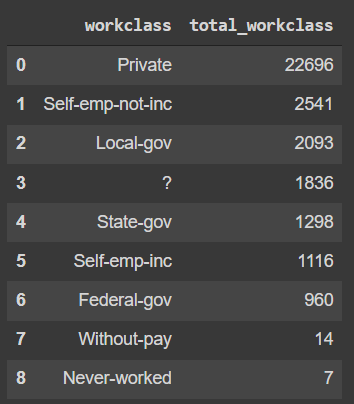
Similarly, anything could be extracted and stored from the dataset. The stored data could be handled similarly to the pandas dataframe that is normally read using the pandas read function. For more analysis refer to the colab notebook in the references.
Training and Evaluating the model
The Public Dataset will be used to train the model. The "create mode" clause is used to build and train the "experimental data.sm experimental model" model. The "create or replace model" command generates and trains a model while also replacing an existing model with the same name in the supplied dataset.
Training
CREATE OR REPLACE MODEL `experimental_data.sm_experimental_model`
  OPTIONS (
      model_type='logistic_reg',
      auto_class_weights=true,
      data_split_method='no_split',
      input_label_cols=['income_bracket'],
      max_iterations=15)
The preceding sentence implies that you are developing a logistic regression model. This option generates either logistic regression or a multiclass logistic regression model. The label column in logistic regression models must only have two different values. When creating a multiclass logistic regression model, use training data with more than two unique labels.
- model_type: need to specify the model like in this article using logistic regression.
- auto_class_weights: The training data used to build a multiclass logistic regression model is unweighted by default. If the labels in the training data are skewed, the model may learn to overestimate the most common class of labels, which may be undesirable. Class weights can be employed in logistic and multiclass logistic regressions to balance the class labels. If true, the weights for each class are determined in inverse proportion to their frequency.
- data_split_method: The procedure for dividing input data into training and assessment sets. The model is trained using training data. The early halting of evaluation data is utilised to avoid overfitting. The default setting is auto split. Since already split the data before, I set it to “no split”.
- input_label_cols: The name(s) of the label column(s) in the training data. Although input label cols allow an array of strings, the linear reg and logistic reg models only support one array member. If input label cols are not supplied, the training data column labelled "label" is utilised. The query fails if neither exists.
- max_iterations: The maximum number of training steps.
When using a "create model" statement, the model must be 90 MB or less in size else the query will fail. In general, a total feature cardinality (model dimension) of 5-10 million is supported if all categorical variables are short strings. Dimensionality is determined by the string variables' cardinality and length. The data should not contain any null or nan values; otherwise, the query will fail. BigQuery ML standardized and centres all numeric columns at zero before forwarding them into training. BQML will convert categorical characteristics to numerical features. The final code will look something like this.
training_model_query = """
CREATE OR REPLACE MODEL `experimental_data.sm_experimental_model`
  OPTIONS (
      model_type='logistic_reg',
      auto_class_weights=true,
      data_split_method='no_split',
      input_label_cols=['income_bracket'],
      max_iterations=15) AS
  SELECT
      age,
      CASE
        WHEN workclass IS NULL THEN 'Private'
        WHEN LTRIM(workclass) LIKE '?' THEN 'Private'
        ELSE workclass
      END AS workclass,
      CASE
        WHEN native_country IS NULL THEN 'United States'
        WHEN LTRIM(native_country) LIKE '?' THEN 'United States'
        ELSE native_country
      END AS native_country,
      CASE
        WHEN LTRIM(marital_status) IN
          (
           'Never-married',
           'Divorced',
           'Separated',
           'Widowed'
          ) THEN 'Single'
        WHEN LTRIM(marital_status) IN
          (
           'Married-civ-spouse',
           'Married-spouse-absent',
           'Married-AF-spouse'
          ) THEN 'Married'
        ELSE NULL
      END AS marital_status,
      education_num,
      occupation,
      race,
      hours_per_week,
      income_bracket
    FROM
      `bigquery-public-data.ml_datasets.census_adult_income`
    WHERE
      MOD(ABS(FARM_FINGERPRINT(CAST(functional_weight AS STRING))), 10) < 8
      AND (occupation IS NOT NULL OR LTRIM(occupation) NOT LIKE '?%')
    GROUP BY  1, 2, 3, 4, 5, 6, 7, 8, 9
"""
client.query(training_model_query)
Evaluating
Let’s evaluate the model using the “ML.EVALUATE” clause.
evaluating_model_query = """
SELECT
  precision,
  recall,
  accuracy,
  f1_score,
  log_loss,
  roc_auc
FROM ML.EVALUATE (MODEL `experimental_data.sm_experimental_model`,
  (
    SELECT
      age,
      CASE
        WHEN workclass IS NULL THEN 'Private'
        WHEN LTRIM(workclass) LIKE '?' THEN 'Private'
        ELSE workclass
      END AS workclass,
      CASE
        WHEN native_country IS NULL THEN 'United States'
        WHEN LTRIM(native_country) LIKE '?' THEN 'United States'
        ELSE native_country
      END AS native_country,
      CASE
        WHEN LTRIM(marital_status) IN
          (
            'Never-married',
            'Divorced',
            'Separated',
            'Widowed'
            ) THEN 'Single'
        WHEN LTRIM(marital_status) IN
          (
            'Married-civ-spouse',
            'Married-spouse-absent',
            'Married-AF-spouse'
            ) THEN 'Married'
        ELSE NULL
      END AS marital_status,
      education_num,
      occupation,
      race,
      hours_per_week,
      income_bracket
    FROM
      `bigquery-public-data.ml_datasets.census_adult_income`
    WHERE
      MOD(ABS(FARM_FINGERPRINT(CAST(functional_weight AS STRING))), 10) = 8
      AND (occupation IS NOT NULL OR LTRIM(occupation) NOT LIKE '?%')
    GROUP BY 1, 2, 3, 4, 5, 6, 7, 8, 9
    ))
"""
evaluation_job = client.query(evaluating_model_query).to_dataframe()

The AUC score is good, almost 0.87. The recall is also fine. We can commit that the model is doing a pretty good job to classify.
Prediction
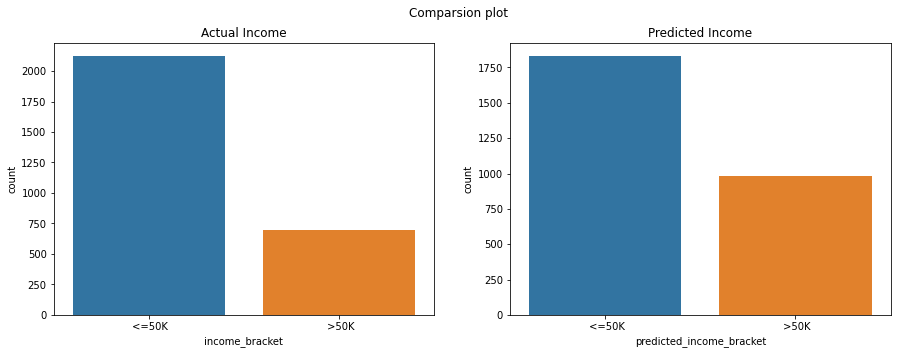
Now that the model is trained and evaluated, it is time to predict some income range. Since the goal of the model was to predict the income range which is either less than or equal to 50k or more than 50k. Let’s predict and compare the actual income bucket.
query_prediction = """
SELECT
  income_bracket,
  predicted_income_bracket,
  predicted_income_bracket_probs
FROM
  ML.PREDICT(MODEL `experimental_data.sm_experimental_model`,
  (
    SELECT
      age,
      CASE
        WHEN workclass IS NULL THEN 'Private'
        WHEN LTRIM(workclass) LIKE '?' THEN 'Private'
        ELSE workclass
      END AS workclass,
      CASE
        WHEN native_country IS NULL THEN 'United States'
        WHEN LTRIM(native_country) LIKE '?' THEN 'United States'
        ELSE native_country
      END AS native_country,
      CASE
        WHEN LTRIM(marital_status) IN
        (
            'Never-married',
            'Divorced',
            'Separated',
            'Widowed'
            ) THEN 'Single'
        WHEN LTRIM(marital_status) IN
          (
            'Married-civ-spouse',
            'Married-spouse-absent',
            'Married-AF-spouse'
            ) THEN 'Married'
        ELSE NULL
      END AS marital_status,
      education_num,
      occupation,
      race,
      hours_per_week,
      income_bracket
    FROM
       `bigquery-public-data.ml_datasets.census_adult_income`
    WHERE
      MOD(ABS(FARM_FINGERPRINT(CAST(functional_weight AS STRING))), 10) = 9
      AND occupation IS NOT NULL AND LTRIM(occupation) NOT LIKE '?%'
      GROUP BY  1, 2, 3, 4, 5, 6, 7, 8, 9
    ))
"""
predictions = client.query(query_prediction).to_dataframe()
Let’s compare the prediction to the actual.
fig, axes = plt.subplots(1, 2, figsize=(15, 5), sharex=True)
fig.suptitle('Comparsion plot')

sns.countplot(ax=axes[0], data=predictions, x='income_bracket')
axes[0].set_title('Actual Income')

sns.countplot(ax=axes[1], data=predictions, x='predicted_income_bracket')
axes[1].set_title('Predicted Income')

plt.show()
Conclusions
BigQuery ML democratises the use of machine learning by allowing data analysts, the major consumers of data warehouses, to construct and execute models using conventional business intelligence tools and spreadsheets. It is not necessary to write an ML solution in Python or Java. BigQuery uses SQL to train and access models. With this article, we have understood that one can use SQL to make predictive models without much knowledge of machine learning.

Your reaction
Discussion
What's your take on this story?
No comments yet — be the first to share your view.