
Developing a high-performing and accurate model blessing to a data scientist but maintaining the privacy of the data while training is one of the tasks which every data scientist and modeler needs to take care of. Many times it happens that after the training model explodes sensitive data to the user and this increases the insecurity of the data. Tensorflow privacy is a package that helps maintain the privacy of data while training the model. After this article, we can be using TensorFlow Privacy to train machine learning models with privacy for training data. The major points to be discussed in the article are listed below.
Table of content
- What is TensorFlow privacy?
- How does TensorFlow privacy measures privacy?
- Implementing Tensorflow privacy
- Importing data
- Preprocessing data
- Verifying data
- Defining parameters
- Building the model
- Model training
- Measuring privacy
Let’s start by introducing the TensorFlow privacy
What is TensorFlow privacy?
Tensorflow privacy is an open-source python package that is mainly developed for providing privacy while training machine learning or deep learning models. This package not only intends to provide privacy but also makes it easy for developers to implement it in their model training programs so that they can achieve state-of-the-art results with privacy guarantees.
In the recent scenario, we can see that machine learning programs are enhancing technologies and user experience while incorporating sensitive data such as personal information, photos, videos, and audio. To maintain privacy with such data parameters used with models should provide general information about the model, not the data. Tensorflow privacy comes to help us in this scenario. When the training data is sensitive the TensorFlow privacy provides features that use techniques based on the theory of differential privacy.
This package ensures that a trained model on sensitive data will not recognize or remember any of the sensitive information contained by any of the samples under the whole training data. One thing which is most impressive about this package is it is open-source which means it can be used freely in the development of models without any restrictions while other packages are payable and require a lot of effort.
Without so much expertise in privacy and the underlying mathematics, we can use this package and this package is developed so that an expert in the mechanism of TensorFlow can use this package. The workflow of this library is simple and we don't need to change our model architectures, training procedures, or processes. By just changing codes( that are simple) and tuning the privacy parameters we can imply this package in our models. Let's take a look at how this package measures privacy.
Are you looking for a complete repository of Python libraries used in data science, check out here.
How does TensorFlow privacy measure privacy?
As discussed above, this package provides facilities and techniques for providing privacy in machine learning model development using the theory of differential privacy. This theory aims to provide learning that does not include information about an individual sample while training on useful information about the whole data. This can be achieved using two values as follows:
- Epsilon: This value is a measure of the probability that shows how many changes are in output when a single training sample is excluded. A small value of epsilon represents the higher value of privacy. It should be less than one. It should be less than 10.
- Delta: This value is also a kind of probability measure that represents the change in model behaviour. We can set these values and need to set less than 1e-7 or so without compromising utility. It is suggested to set not less than the inverse of the size of training data.
Let's implement an example where we will use the TensorFlow privacy to train machine learning models with privacy for training data. Before implementing it we are required to install this package in the environment that can be done using the following codes.
!pip install tensorflow-privacy
After installation, we are ready for implementation.
Implementing Tensorflow privacy
In this article, we are going to use a convolutional neural network to classify the cifar100 dataset. More details about the data can be found here, Let's start by loading the data.
Importing data
import tensorflow as tf
import numpy as np
from tf.keras import datasets, layers, models

data = datasets.cifar100
(train_images, train_labels), (test_images, test_labels) = data.load_data()
Output:

Here we have imported the data. Let's preprocess the data
Data preprocessing
Normalizing pixel values between 0 and 1 as,
train_images = np.array(train_images, dtype=np.float32) / 255
test_images = np.array(test_images, dtype=np.float32) / 255
Reshaping the images data.
train_images.shape, test_images.shape
Output:

train_images = train_images.reshape(50000, 32, 32, 3)
test_images = test_images.reshape(10000, 32, 32, 3)
Converting the labels given on the data.
train_labels
Output:
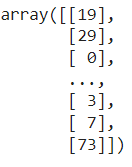
Here we can see that we have 100 classes. In this article, we are going to see the nature of the work of the TensorFlow privacy package so we are going to perform binary classification. For this, we can just change labels using the following codes.
train_labels = np.array(train_labels, dtype=np.int32)
test_labels = np.array(test_labels, dtype=np.int32)

train_labels = tf.keras.utils.to_categorical(train_labels, num_classes=100)
test_labels = tf.keras.utils.to_categorical(test_labels, num_classes=100)
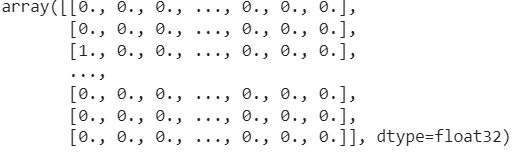
Let's check how many labels are there.
train_labels
Output:
Verifying the data
Let's verify the data by visualizing it.
import matplotlib.pyplot as plt
plt.figure(figsize=(10,10))
for i in range(25):
    plt.subplot(5,5,i+1)
    plt.xticks([])
    plt.yticks([])
    plt.grid(False)
    plt.imshow(train_images[i])
plt.show()
Output:
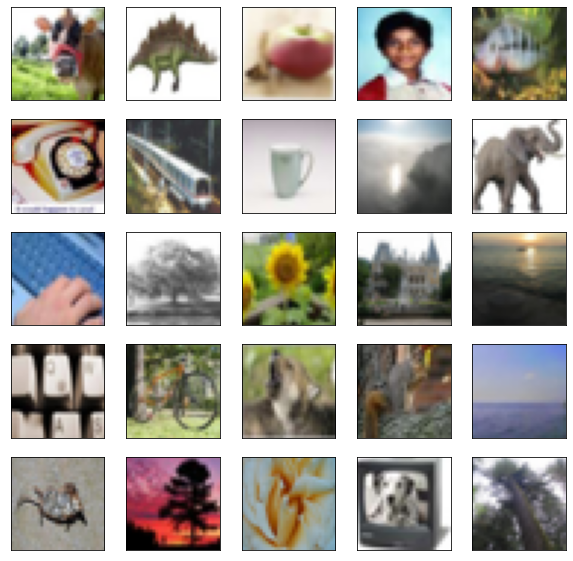
Here we can see our data.
Defining parameters
epochs = 3
batch_size = 250
The above-defined parameters are parameters for model training. Let's define the parameters which we are going to use in checking training privacy.
l2_norm_clip = 1.5
noise_multiplier = 1.3
num_microbatches = 25
learning_rate = 0.25
Here we have defined four parameters.
l2_norm_clip: This parameter is the maximum euclidean norm. This is for each gradient of the model parameters.
noise_multiplier: This parameter is will apply the noise to gradients during training
num_microbatches: This parameter is a kind of sub batch of the batches that we have defined. This should be multiple of the main batch sizes.
learning_rate: This parameter helps in defining the effect of each update.
Building the model
model = models.Sequential()
model.add(layers.Conv2D(32, (3, 3), activation='relu', input_shape=(32, 32, 3)))
model.add(layers.MaxPooling2D((2, 2)))
model.add(layers.Conv2D(64, (3, 3), activation='relu'))
model.add(layers.MaxPooling2D((2, 2)))
model.add(layers.Conv2D(64, (3, 3), activation='relu'))
model.add(layers.Flatten())
model.add(layers.Dense(64, activation='relu'))
model.add(layers.Dense(100))
Let's visualize the model.
dot_img_file = '/tmp/model_1.png'
tf.keras.utils.plot_model(model, to_file=dot_img_file, show_shapes=True)
Output:

Here we can see the structure of our model.
Defining optimizer and loss function
This step is our main step where we will define instances of the TensorFlow privacy package. Here we will use the differential privacy defined stochastic gradient descent optimizer that will capture the privacy measure while we will train our model.
import tensorflow_privacy

from tensorflow_privacy.privacy.analysis import compute_dp_sgd_privacy

optimizer = tensorflow_privacy.DPKerasSGDOptimizer(
    l2_norm_clip=l2_norm_clip,
    noise_multiplier=noise_multiplier,
    num_microbatches=num_microbatches,
    learning_rate=learning_rate)

loss = tf.keras.losses.CategoricalCrossentropy(
    from_logits=True, reduction=tf.losses.Reduction.NONE)
Here we have defined the optimizer and loss function using the TensorFlow privacy package.
Model training
Now we can normally train our model using the following lines of codes.
model.compile(optimizer=optimizer, loss=loss, metrics=['accuracy'])

model.fit(train_images, train_labels,
          epochs=epochs,
          validation_data=(test_images, test_labels),
          batch_size=batch_size)
Output:

Here we can see that our model is trained. Although the accuracy of the model is very low we are here to measure privacy while training the model so this model can work for us.
Measuring privacy
In the above section of the article, we have discussed how this package measures privacy. Talking of the tools provided by the package is compute_dp_sgd_privacy. This tool will help us in calculating epsilon while a value of delta is given by us. Using the below codes we can calculate the epsilon value.
compute_dp_sgd_privacy.compute_dp_sgd_privacy(n=train_images.shape[0],
                                              batch_size=batch_size,
                                              noise_multiplier=noise_multiplier,
                                              epochs=epochs,
                                              delta=1e-5)
Output:

In the above, we can see that the value of epsilon is 17 at a given delta of 1e-5.
Final words
In this article, we have discussed the TensorFlow privacy that helps us in measuring the privacy of data while training our model. Along with this, we have discussed what measures this package reports us and how we can implement a model while measuring the privacy level.

Your reaction
Discussion
What's your take on this story?
No comments yet — be the first to share your view.